
The always-on display is a study in small numbers with long hours. On an OLED phone AOD typically draws somewhere around 0.5–1.5% per hour depending on brightness, coverage and refresh implementation — trivial at noon, and the single largest overnight consumer for many users by 3 a.m. The impulse to disable always on display dark room macrodroid-style is sound: a clock glowing in an empty, dark room serves nobody. This guide compares the three ways to do it and prices each one’s own battery cost, because the sensor method spends power to save power and deserves scrutiny.
Method One: The Schedule (Recommended Default)
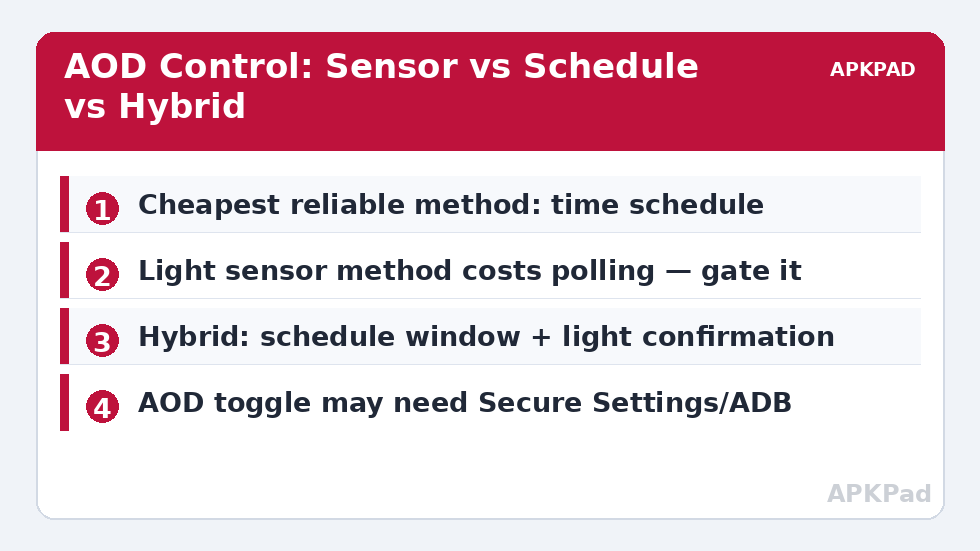
Trigger: Time (your sleep time). Action: AOD Off. Second macro: Time (wake time) or Alarm trigger → AOD On. Cost of running: zero — time triggers are events. Weakness: it knows the clock, not the room; a Sunday lie-in keeps AOD off until the wake macro’s hour, and an early night leaves it glowing until the scheduled time. For most people the schedule’s predictability beats the sensor’s cleverness, exactly as our polling analysis in reducing sensor polling predicts. Refine it with a charging constraint if the phone spends nights on a charger where you actually like the clock: AOD stays on while charging, off while not — many users find this single rule is the whole answer.
Method Two: The Light Sensor (Handle With Care)
| Approach | Running Cost | Accuracy to “dark room” | Notes |
|---|---|---|---|
| Time schedule | None | Indirect (assumes routine) | Default choice; refine with charging constraint |
| Continuous light sensor | Real — sensor polling day and night | Direct | Can spend a meaningful share of what AOD saves; worst option energetically |
| Hybrid: schedule window + light check on screen events | Negligible | Good | Sensor sampled only when the phone is already awake |
The trap in the sensor approach: to detect darkness continuously, something must keep sampling light — the very pattern that makes sensor triggers expensive. AOD’s saving is itself small, so the polling can plausibly eat half the benefit. If darkness-awareness matters (shift workers, irregular schedules), use the hybrid: within a broad night window, when a screen event occurs, sample the light sensor once; if dark, disable AOD until morning. You sample dozens of times a night instead of thousands, and the phone still adapts to the room it is actually in.
How to read this: the estimate adds a small always-on idle cost for MacroDroid itself (about 0.4% of battery per day) to a per-class daily cost for each trigger type you use, scaled slightly by how many macros you run. These are planning estimates from that transparent model — not measurements from your phone. Use them to compare setups before you build, then confirm against the real numbers under Android Settings → Battery.
Permissions and OEM Variations
AOD is an OEM feature, not a stock Android one, and MacroDroid’s ability to toggle it varies: some builds expose it through the “Always On Display” action or a system setting reachable with WRITE_SECURE_SETTINGS via ADB; others resist entirely, in which case the macro can only open the AOD settings page as a reminder. Samsung, OnePlus, Xiaomi and Pixel each implement AOD differently — including their own built-in schedules (check first! Several OEM AOD settings already offer “show as scheduled”, which makes this entire macro unnecessary on those phones). Built-in beats bolted-on, as with hotspot auto-off and much of the battery hacks philosophy.
What You Actually Save
Honest arithmetic: if AOD costs 1% per hour and your macro disables it for 8 dark hours, you save roughly 8% of overnight charge minus the macro’s own cost — hundreds of times more than the schedule macro costs, and meaningfully less if the sensor method spends its polling tax. On a charger overnight, you save nothing you can spend (the battery refills anyway) — the benefit there is reduced time at 100% and less heat, a battery-health argument rather than a capacity one, related to our 80% charge alert reasoning. Judge AOD control as an overnight-idle improvement, not a daytime one.
Beyond the Clock: What Else the Night Window Can Govern
Once a reliable “the house is asleep” signal exists — the schedule, or the hybrid’s dark-plus-night condition — it becomes infrastructure, and other small mercies can hang from it. The same window that retires the AOD can lower notification volume to a floor (not silent, for the genuinely urgent), switch the phone’s theme or wallpaper to its darkest variant, and arm the night radio posture you chose from the half-measure ladder. Resist scope creep, though: each addition is a new way for the night mode to be wrong in a new direction, and the AOD rule’s great virtue is its narrowness. Add one companion behaviour at a time, live with it a week, and keep a single “night mode off” widget on the home screen for the nights that break the pattern — guests, deadlines, a sick child. Automation that can be overridden in one tap gets overridden gracefully; automation that cannot gets uninstalled at 2 a.m.
AOD Variants: Peek, Tap-to-Show and the Middle States
Many OEMs now offer middle states between always-on and off: tap-to-show for ten seconds, raise-to-show, or AOD only while charging. These built-in postures capture much of this article’s benefit with no macro at all, and they interact with the schedule idea cleanly — tap-to-show by day (information on demand, near-zero cost), full off by night (the dark-room rule), is a combination several manufacturers have effectively standardised. If your phone offers it, adopt it and let MacroDroid’s contribution be only the clock-based switch between postures your settings screen cannot schedule. Where no middle state exists, the macro pair stands as written. Either way the principle is identical to the one governing hotspot auto-off and much of this category: the best automation is the least automation that produces the behaviour — preferably the manufacturer’s own switch, on a schedule you control.
Burn-In, Briefly and Without Panic
Readers researching AOD eventually meet the burn-in question, so it deserves a paragraph of proportion. OLED pixels age with use, and static elements displayed for years can leave ghosts; AOD mitigates this by shifting its elements periodically (every serious implementation does), and the realistic risk over a phone’s service life is small — visible mainly to those who keep devices many years at high AOD brightness. The night-off habit in this article incidentally halves AOD’s total lit hours, which halves whatever ageing it contributes, but that is a side-effect, not the argument: the argument is overnight energy and a dark bedroom. If burn-in anxiety is your primary driver, the direct levers are AOD brightness (some OEMs expose it) and the middle postures — tap-to-show — rather than schedules. Keep the concern in its place: a footnote in a decision about sleep and standby drain, not a reason to fear a feature designed by people who understood the panel better than the forums do.
Whichever method you choose, verify it the way this category verifies everything: three nights of overnight figures before, three nights after, medians compared. AOD savings are large enough to measure cleanly and small enough to be swamped by one bad-signal night — which is exactly why the median, and not the best night, gets the vote.
Frequently Asked Questions
How much battery does AOD really use?
On OLED phones, commonly 0.5–1.5% per hour, varying with brightness, how much of the screen is lit, and whether the panel drops to a low refresh rate. Over an 8-hour night that is 4–12% — small hourly, significant nightly.
My phone’s AOD settings already have a schedule. Use it or MacroDroid?
Use the built-in schedule. It does the same job with privileged access and zero extra machinery. MacroDroid earns its place when you need conditions the OEM schedule lacks — charging state, location, or sensor confirmation.
The light-sensor macro made my battery worse. Why?
Continuous light polling wakes the system repeatedly to evaluate the condition, day and night. If the sensor checks cost more than the AOD saves in your usage, net negative. Switch to the schedule or hybrid method.
Can I keep AOD on while charging but off on battery?
Yes — and it is often the best single rule. Power Connected → AOD On; Power Disconnected (with a night-window constraint so daytime unplugging does not kill it) → AOD Off.
Does disabling AOD affect notifications?
No. Notifications still arrive and alert as configured; you simply lose the persistent glanceable clock/icons while the screen is “off”. Notification LEDs or wake-on-notification settings, if your phone offers them, are separate choices.


