Some of the heaviest work your phone does is also the least urgent: backing up a day of photos, downloading updates for forty apps, analysing a music library, fetching tomorrow’s podcasts. Run at noon on battery, those jobs compete with your life; run at midnight on the charger, they cost you nothing you will ever notice. Building routines to defer heavy tasks until charging macrodroid owners can rely on is mostly an exercise in classification — deciding, once, what may wait and what must never wait — and then letting a power-connected trigger open the gates at the right moment.
How to defer heavy tasks until charging macrodroid gates should open
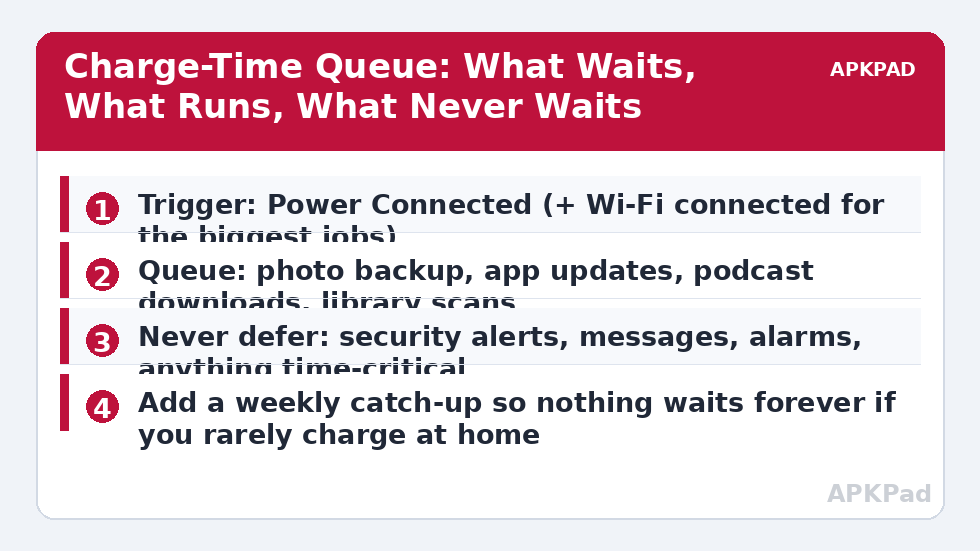
The core insight is that charging time is your phone’s free-energy window, and most people have hours of it daily. The deferral system has three moving parts: restraint during the day (heavy features held in their cheapest state), a gate that opens on charging (ideally with Wi-Fi), and a catch-up guarantee so nothing waits forever. It builds directly on patterns elsewhere in this category: the charging rule inside smart sync routines already treats plugged-in time as catch-up time for accounts, and pausing photo sync on mobile data uses the charger as the preferred moment for the heaviest uploads. This article generalises those two into one queue for the whole phone.
Honesty about the prize: as a typical estimate, deferring bulk work can save a few percent of daytime battery on a phone with large backups or download habits, and much less on a light phone — it varies by device and by how much heavy work you actually generate. The less measurable prize is predictability: the 15:00 slump caused by a noon backup storm simply stops happening.
How to read this: the estimate adds a small always-on idle cost for MacroDroid itself (about 0.4% of battery per day) to a per-class daily cost for each trigger type you use, scaled slightly by how many macros you run. These are planning estimates from that transparent model — not measurements from your phone. Use them to compare setups before you build, then confirm against the real numbers under Android Settings → Battery.
Step by step: build the charge-time gate
- List your heavy tasks from a week of battery settings: the apps with large background use are your queue candidates. Write the list down; memory edits it.
- In each candidate app, set its own options first — backup while charging, updates on Wi-Fi, downloads unmetered only — wherever the app offers them.
- Create Charging Gates Open in MacroDroid: trigger Power Connected. Actions: auto sync on, and set a variable charging_window = on that your other macros can respect.
- Create the daytime counterpart: trigger Power Disconnected, with a wait of a few minutes in case of a brief unplug. Actions: return sync to your normal daytime pattern and clear the variable.
- Add the Wi-Fi refinement as a constraint on the heaviest tier: the variable for bulk downloads is only fully open when charging and on Wi-Fi.
- Add the weekly catch-up: one fixed evening window where the gates open on Wi-Fi regardless of charging, so a week of travel and short charges cannot starve backups entirely.
| Task | Daytime | Charging | Charging + Wi-Fi |
|---|---|---|---|
| Photo and file backup | Held | Allowed | Preferred window |
| App update downloads | Held | Allowed | Preferred window |
| Podcast / offline video downloads | Held | Allowed if storage work is light | Yes |
| Messages, mail alerts, alarms | Always on | Always on | Always on — never deferred |
Notice the design restraint: the macros mostly move sync and state, and let each app’s own scheduler do the actual work inside the open gate. Fighting an app’s scheduler with repeated force-actions is how deferral systems become drain themselves — the exact failure the log audit guide teaches you to spot. Keep the gate simple enough to explain in one sentence, and it will still be working next year. The complete pattern, with its companion routines, is indexed in the battery hacks collection on APKPad.
Heat: the one real cost of charge-time work
Charging warms a phone; heavy CPU and modem work warms it more; together they can push battery temperature into the range where aging accelerates. This does not invalidate the system — it disciplines it. Run charge-time bulk work with the phone on a hard surface, out of direct sun, and ideally out of a thick case for the biggest sessions. If your phone regularly becomes uncomfortably warm during these windows, split the queue: backups on charge, but library analysis and other CPU-heavy jobs in the weekly Wi-Fi window on battery at a cool time of day instead. The staged responses in our thermal protection material exist for the same reason: temperature is a budget too, and a deferral system that cooks the battery to save it has missed the point.
Permissions and limits
Power Connected is one of Android’s cleanest event triggers and needs no special permission. The limits are about reach: MacroDroid cannot rewrite another app’s internal scheduler, cannot make a system update install at a chosen hour on most builds, and cannot guarantee a held task exists inside an app that does its work through push-driven servers. Sync toggles, where your design uses them, may need the Helper app or an ADB secure-settings grant on some devices. OEM battery managers are the other limit — if the phone kills the target app entirely at night, its backup cannot run in your open gate, so whitelist the few heavy apps whose night work you actually want.
Troubleshooting: the queue that never drains
Backups are days behind despite nightly charging. Check the gate conditions in order: is the phone actually on Wi-Fi at night, is the backup app whitelisted from optimisation, and did its own charging-only setting get reset by an update? Daytime drain did not improve. One heavy app is probably ignoring the system entirely — find it in battery settings rather than adding more gates for the well-behaved majority. The catch-up window fires during dinner and slows the phone. Move it later, gate it on the screen being off, or accept a smaller truth: a weekly window you tolerate beats a perfect one you disable.
A sample day with the gates working
Picture the system on an ordinary Tuesday. At 08:30 you take a dozen photos on a site visit; the backup holds its peace. At lunch an app store wants to download six updates; the daytime gate stays shut, and nothing competes with the map you are actually using. At 18:00 a podcast app queues three episodes for tomorrow’s commute — queued, not downloaded. At 22:40 you plug in on the nightstand, on home Wi-Fi, and the gates open in order: photos first, updates behind them, podcasts last, all inside the free-energy window. By morning everything is current, and at no point in the day did the battery pay for work that could have waited. The contrast case is the same Tuesday without gates — three invisible background sessions, each small, together explaining why the phone felt tired by 17:00. Nothing in the gated day required willpower, because the decision was made once, structurally, in the spirit of the idle drain routine that anchors this category: charge-time is work time for the phone, and daytime is yours.
Start smaller than the full system if it feels like a lot: pick the single heaviest app from your battery screen — for most people it is the photo backup or the app store — and defer only that one for the first week. Watch whether the daytime slump moves. One visible win teaches you your own phone’s pattern better than a grand design, and the remaining queue can be added app by app, a few minutes at a time, until the whole heavy tier works the night shift. Keep the never-defer list written down as you grow the system; it is the part that protects the design from your own future enthusiasm.
Frequently Asked Questions
Which tasks are safe to defer until charging?
Backups, app and system update downloads, podcast and video downloads for later, photo library analysis, and large cloud syncs. Anything whose value does not depend on the hour it happens is a candidate.
What should never be deferred?
Messages, calls, alarms, security and banking alerts, and any work with a deadline — a boarding pass download before a flight, for example. Deferral is for bulk, not for communication or safety.
I charge in short bursts. Will anything ever finish?
Large jobs resume where they left off in most apps, so bursts still make progress. If your pattern is all short charges, add the weekly catch-up window on Wi-Fi so the queue fully clears at least once a week.
Does charging-time work heat the phone?
It can: charging itself generates heat, and adding heavy work adds more. Keep the phone out of a case or off soft bedding during big charge-time jobs, and stop if the phone becomes uncomfortably warm.
Can MacroDroid force an app to do its backup only when charging?
Usually not directly — most apps keep their own scheduling. MacroDroid supervises: it can gate sync, data and Wi-Fi states around charging, remind you, and open the right settings. Where an app offers a charging-only option, that setting is the mechanism and the macro is the supervisor.