An always-listening assistant is a small, permanent wager: a microphone pipeline stays ready all day and all night so that, a few times a day, you can speak without touching the phone. Setting sensible voice assistant battery rules macrodroid time windows simply asks whether the wager should run at 3 a.m. in an empty kitchen. This guide is deliberately honest about scale — on modern hardware the direct saving is usually small, as a typical estimate often hard to separate from normal standby variation by device — because the real wins are fewer false wakes, a quieter night state, and rules that match how you actually use your voice.
Designing voice assistant battery rules macrodroid users will actually keep
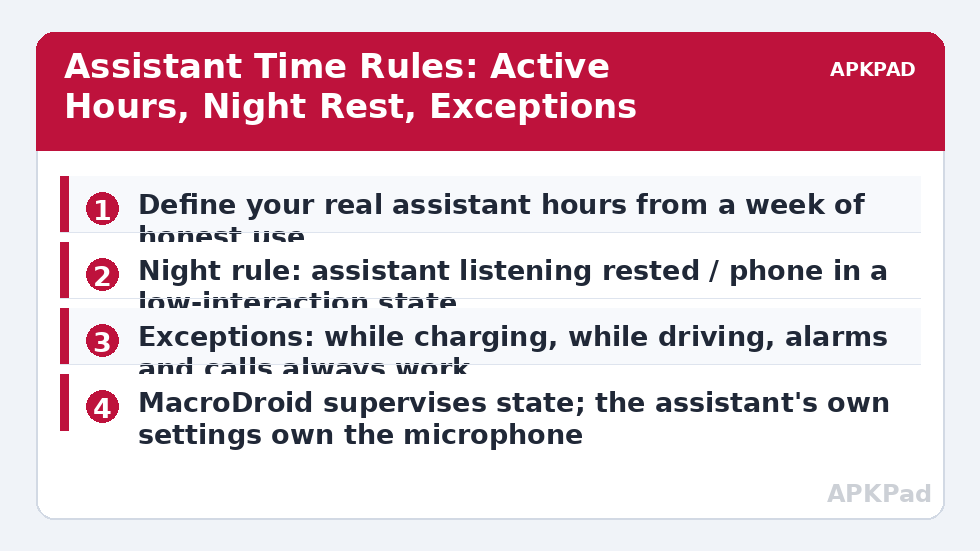
Begin with a week of honesty. When do you genuinely speak to the assistant? For most people the pattern clusters: mornings, cooking with messy hands, driving, and smart-home moments in the evening. Almost nobody’s cluster includes 01:00 to 05:00. Write your active window generously around the clusters — a rule that cuts listening ten minutes before your usual bedtime request will be disabled within a week, and a disabled rule saves nothing. The discipline is the same one behind nightly airplane mode: the schedule survives because it respects the life it wraps around, including a weekend variant if your nights shift on Fridays.
Next, understand what you can actually control. The wake-word switch normally belongs to the assistant app or the device’s assistant settings, and on many builds MacroDroid cannot flip it directly. What MacroDroid reliably owns is the surrounding state: time windows, Do Not Disturb, charging and driving exceptions, and opening the exact settings screen at the moment a manual toggle is needed. On builds where a secure-settings action does reach the assistant or hot-standby value, it will usually need WRITE_SECURE_SETTINGS granted via ADB — verify the single action on your phone before building a schedule on top of it.
How to read this: the estimate adds a small always-on idle cost for MacroDroid itself (about 0.4% of battery per day) to a per-class daily cost for each trigger type you use, scaled slightly by how many macros you run. These are planning estimates from that transparent model — not measurements from your phone. Use them to compare setups before you build, then confirm against the real numbers under Android Settings → Battery.
Step by step: the night-rest rule pair
- Note your assistant’s real hours for a few days, then choose a rest window with at least half an hour of margin at both ends.
- Create Assistant Night Rest with a time trigger at the window’s start. Constraint: not charging — a phone charging on the nightstand can afford to listen, and many people use exactly that moment for a last request.
- Actions: apply the assistant or hot-standby setting if your build supports it; otherwise open the assistant settings screen as a one-tap reminder for the first week, then rely on the assistant’s own scheduled or bedtime features if it offers them.
- Add the state actions that always belong to night: DND on for non-starred contacts, and any false-wake-prone smart displays in the bedroom set to their night mode by their own schedules.
- Create Assistant Morning Restore at the window’s end: reverse the setting, restore normal state, and clear any variable the night rule set.
- Add exceptions as constraints on the night rule: driving mode or car Bluetooth connected keeps listening active, whatever the clock says.
| Period | Listening | Why |
|---|---|---|
| Your active hours | On | The convenience you bought the feature for |
| Night, not charging, at home | Rested | No realistic use; false wakes are pure cost |
| Night, charging | Your choice — default on | Energy is free; the bedtime request stays possible |
| Driving, any hour | On | Hands-free is a safety feature, not a luxury |
If false wakes are your main problem rather than standby cost, the fix may be different in kind: retrain the voice model if your assistant offers it, move a phone that sits beside a television, or require a stricter wake setting. Time rules still help overnight, but a phone across the room from the TV helps all day. You will find this rule alongside the rest of the night-state family in the battery hacks collection on APKPad, and it pairs naturally with turning haptics off at low battery for a phone that is genuinely quiet when it should be.
What this cannot do — privacy and capability boundaries
Two clarifications protect you from disappointment. First, time rules are a battery and calmness tool, not a privacy guarantee: while listening is active in the day, the assistant works as designed, and while it is rested, other apps with microphone permission are a separate question governed by their own permissions. Manage microphone access per app in system settings if privacy is the concern. Second, resting the listener rests only the wake word. Alarms, timers already set, calls and notifications continue normally, because none of them depend on the always-listening pipeline. If a bedtime routine in your home is triggered by voice — lights via a spoken command at midnight, say — either move that command earlier, trigger it from the night rule itself, or exempt the window; do not discover the dependency in the dark.
Permissions and OEM differences
Time triggers and state actions need no special grant. The assistant setting itself is the variable part: Google Assistant, Samsung’s and other OEM assistants, and third-party options each keep their listening controls in different places, with different scheduled-quiet features built in. Where the assistant offers its own bedtime or downtime schedule, prefer it for the microphone itself and let MacroDroid coordinate the phone’s wider night state around it. That division — system owns its switch, macro owns the context — recurs throughout this site because it is the builds that survive OS updates.
Troubleshooting: the assistant that slept in
The restore did not happen and the assistant ignored me at breakfast. Check whether the morning macro ran at all; a phone in deep Doze or an app put to sleep by battery optimisation can miss a time trigger. Exclude MacroDroid from optimisation and add a second restore path on first unlock of the day. Listening turned off while I was driving at night. Your driving exception constraint did not match reality — test whether the car connection is Bluetooth media, a driving mode, or a cable, and use the signal your car actually produces. No battery difference after a month. That is a plausible, honest result on efficient modern hardware. Keep the rules for the quieter nights if you value them, or retire them without regret — an audit that retires a useless rule is a success, not a failure.
Households, children and guests: the social settings
Time rules live in a household, not in a vacuum. A phone that stops listening at 22:00 is a fine rule until a partner who shares the home office works late and uses voice control for lights and music — the window then belongs to the household’s latest user, not its earliest sleeper. Children complicate the picture differently: an assistant that answers at night can become a game, and resting the listener in a child’s room after bedtime is as much a sleep rule as a battery one. Guests need the least automation of all: a phone in a spare room that wakes to a television through the wall will settle itself once the visit ends, and building permanent rules around a temporary week is how systems accumulate barnacles. Review the windows whenever the household changes — a new job, a new baby, a new shift pattern — because the right hours are a description of a life, and lives revise themselves. The same household-first thinking shapes turning off always-on display in dark rooms, where a schedule only survives if it matches when the room is actually dark and actually empty.
Frequently Asked Questions
How much battery does always-listening actually use?
On modern phones the wake-word listener runs on a low-power processor and its direct cost is usually small — often difficult to separate from general standby drain. The honest case for time rules is modest savings plus fewer false wakes, not a dramatic percentage, and it varies by device.
Can MacroDroid switch my assistant’s wake-word detection off and on?
Sometimes indirectly, often not directly. The setting usually lives inside the assistant or device settings, sometimes behind secure settings. MacroDroid can reliably manage the surrounding state — DND, routines, reminders to toggle — and on some builds a system setting action works. Test your exact device before designing around it.
Will time rules break my morning alarm or routine?
Alarms are handled by the clock, not by the listening feature, and continue to work. A spoken morning routine that depends on you saying the wake word will not start while listening is rested — schedule it as a timed routine instead during those hours.
What about using the assistant while driving?
Keep driving as an explicit exception. If you use the assistant hands-free in the car, a driving-mode or car-Bluetooth constraint should keep listening active regardless of the clock, because reaching for the phone is the unsafe alternative.
Do false wake-ups matter for battery?
Each false wake can light the screen, listen, sometimes record a snippet and contact servers — individually trivial, collectively noticeable on a phone in a noisy home. If your assistant wakes often to television voices, that pattern is a stronger reason for time rules than standby cost alone.