
Lithium cells age fastest at the extremes — held at 100%, and dragged to zero. You cannot automate 80 battery charge limit alert behaviour into the charger itself with MacroDroid, but you can do the next best thing: make the phone impossible to ignore the moment it crosses 80%, so it spends minutes — not overnight hours — sitting full. Some phones (recent Pixels, Samsungs, iPhones) now offer a built-in 80% limit; if yours does, use that instead and skip this macro. This guide is for the majority of devices that still charge to 100% by default.
What the Evidence Actually Supports
Charge-limiting is not magic. The benefit is real but modest and long-term: keeping a battery mostly between roughly 20% and 80% can meaningfully slow capacity loss over hundreds of cycles compared with nightly 0–100% swings, mainly by reducing time at high voltage and heat. It will not double your battery’s lifespan, and it costs you the top fifth of your capacity every day. For a phone you keep three or more years, that trade is usually worth it. For a phone replaced yearly, it is mostly ritual. Be honest with yourself about which user you are before building alert fatigue into your mornings.
The Alert Macro
| Element | Configuration |
|---|---|
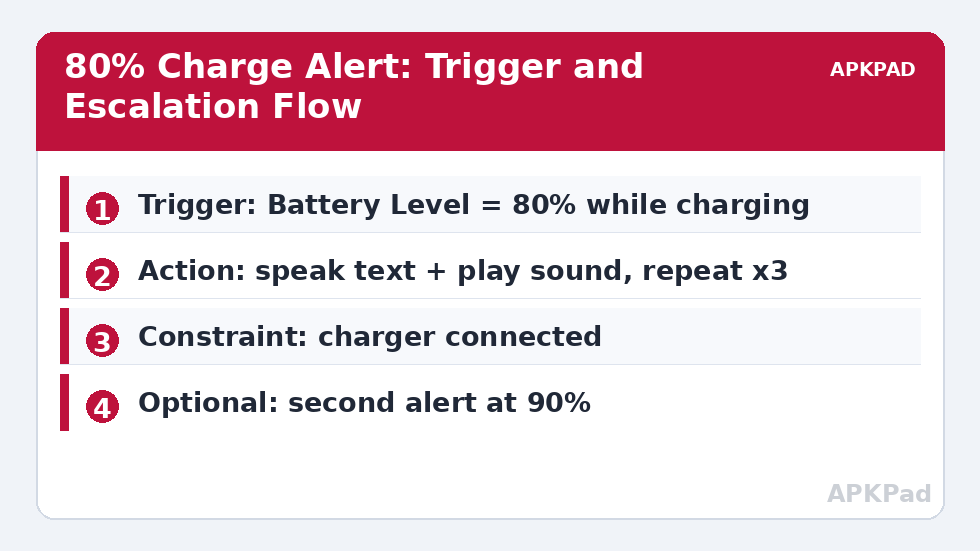
| Trigger | Battery Level reaches 80% (use the “increases to” style level trigger) |
| Actions | Speak Text “Battery eighty percent — unplug when ready” at media volume 80%; Play Sound (a distinct alarm tone); Wait 60 seconds; repeat speak + sound if still charging (loop maximum 3 times) |
| Constraints | Power connected (AC or USB); macro disabled between 23:00 and 06:30 if you charge overnight deliberately |
The repeat loop matters. A single beep at 14:20 while the phone charges in another room achieves nothing. Three escalating reminders over three minutes, then silence, is the balance between effectiveness and sanity. Use the loop counter rather than stacking waits — a macro still sitting in a Wait when you unplug can fire its remaining alerts pointlessly, which is why the “still charging” check sits inside the loop, not before it.
How to read this: the estimate adds a small always-on idle cost for MacroDroid itself (about 0.4% of battery per day) to a per-class daily cost for each trigger type you use, scaled slightly by how many macros you run. These are planning estimates from that transparent model — not measurements from your phone. Use them to compare setups before you build, then confirm against the real numbers under Android Settings → Battery.
Variations Worth Adding
The 90% backstop. Clone the macro with a 90% trigger and a more insistent tone. If the 80% alert is missed because the phone was in a bag, the 90% alert still rescues most of the benefit. The full-charge logger. A third macro that writes the time and date to a text file (or a MacroDroid variable) whenever the battery reaches 100% while charging gives you an honest record — after a month you will know whether the alerts changed your behaviour or just made noise. Desktop charging. If you work at a desk, a slower variant: alert at 80%, and if still charging at 85%, display a persistent notification you must dismiss. Different context, different escalation.
Interaction With Real Battery Features
Adaptive charging (which holds the phone near 80% overnight and finishes before your alarm) already solves the overnight problem elegantly on phones that have it — check before duplicating it with macros. If you use adaptive charging, restrict this alert macro to daytime top-ups with a time constraint. Also note the relationship with our battery temperature voice warnings: heat and high charge together are the real aging accelerant, so many users merge both into one “charging guardian” macro set. And if you are building a full routine, this alert belongs inside the broader system described in the battery hacks collection alongside the idle drain routine.
What This Cannot Do
MacroDroid cannot stop charging at 80% on an unrooted phone — it has no switch for the charging circuit. A handful of devices expose charge-limit toggles through manufacturer settings or, on rooted devices, through charging-control modules; that is a different tool for a different reader. An alert you act on achieves most of the same effect with none of the risk. Similarly, the alert cannot help a phone that charges unattended in another building — accept the limitation rather than escalating to ever-louder gimmicks.
The Psychology of an Alert You Will Actually Obey
Alert design is behaviour design. Three properties decide whether this macro survives its first month. Timing: the alert must arrive while action is still easy — at 80% you have a comfortable window; a first alert at 97% teaches helplessness, not habits. Tone: the sound should be distinguishable from every other notification on the phone, or your brain files it as background. Record a custom tone or use the most unusual built-in one; novelty is attention. Consequences: pair the alert with a small physical ritual — the phone moves from the charger to a specific spot, ideally a “charged shelf” near the door. Habits anchored to places outlast habits anchored to intentions, and within a few weeks most users report unplugging before the alert on many days: the macro trained the human, which was always the actual product.
Edge Cases: Cars, Desks and Shared Chargers
Charging in the car breaks the pattern happily: a 20-minute drive adds charge you want, and an 80% alert while navigating is a distraction you do not. Add a constraint — Bluetooth connected to the car, or a driving-mode variable — to suspend the alert on the road. Desk workers face the opposite shape: the phone sits plugged in for eight hours, so alerts at 80%, 90% and a rising-temperature check (the companion in our temperature warning guide) matter most there; some desk users instead use a smart plug on a timer as the enforcement arm, with the MacroDroid alert as the reminder to move the phone when the plug cuts power. Shared household chargers need the night-constraint most of all: your partner’s sleep is a design requirement, not an externality. Finally, travel: hotel charging overnight is precisely the unattended case alerts cannot fix — accept full charges on the road and let the home routine carry the long-term average.
Fast Charging Changes the Calculus Slightly
The 80% habit and fast charging pull in opposite directions: fast charging exists to minimise time plugged in, which is itself a form of time-at-high-charge reduction. If your pattern is “plug in at 30%, fast-charge to 85% while getting ready, leave”, your battery already spends little time full, and the alert’s marginal value is small — it is the overnight slow-charge and the all-day desk tether that accumulate damaging hours at 100%. Calibrate the system to your pattern: desk and overnight chargers get the full alert ladder; the hallway fast charger gets a single gentle stage or none. Wireless charging deserves a footnote of its own — it is slower and warmer, so a wireless pad used as an all-day desk rest is, thermally, the worst seat in the house for a phone to sit at 100%; if that is your setup, the 80% alert (paired with the temperature stages from the charging guardian set) is the highest-value macro in this article’s family.
Frequently Asked Questions
Is charging to 80% really better than 100%?
For long-term capacity retention, yes — time spent at full charge and high temperature accelerates chemical aging. The effect is gradual and cumulative, measured over months and years, not something you will feel in a week.
Can MacroDroid stop the charging itself at 80%?
No, not on a normal unrooted phone. It can only alert you (or control a smart plug in a home-automation setup). True charge cut-off requires a built-in OEM limit feature or root-level charging control.
My phone already has an 80% limit setting. Should I still use this?
No. The built-in limiter is strictly better because it holds the charge without your attention. This macro exists for devices that lack the feature.
The alert fires when the battery passes 80% while discharging. How do I stop that?
Add the “power connected” constraint, and use the level trigger in its charging/increase form where your MacroDroid version offers it. The constraint alone is sufficient: no charger, no alert.
Won’t the repeated alerts annoy everyone around me?
Cap the loop at three repetitions, choose a tone that is noticeable rather than obnoxious, and add a night-hours constraint if the phone charges beside a sleeping partner. An alert system you mute permanently saves nothing.


