Your bedtime macro dims the screen, sets Do Not Disturb, and speaks a confirmation — then does all three again four seconds later. To fix macros running twice macrodroid behaviour, resist the urge to rebuild the macro. A double run is almost never random: something is feeding the same actions into MacroDroid through two doors, and your job is to find which doors before you close one. This guide is about double-firing specifically — a macro that runs two or occasionally three times per event and then stops — which is a different fault from an endless loop.
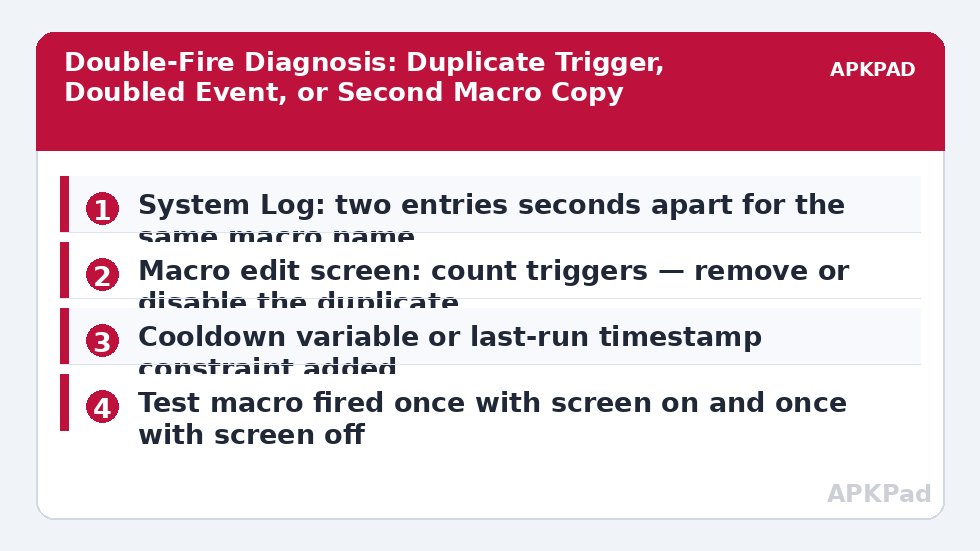
Start with evidence. Reproduce the event once, note the exact time, then open MacroDroid’s System Log and find the entries for that minute. Two runs will show as two separate start entries. Read the trigger named on each line carefully: if both runs name the same trigger, the event itself is likely being delivered twice; if they name different triggers, your macro simply has two triggers that both match; if the macro name appears with a second, similarly named macro in between, you may have two copies of the macro installed. Write down which pattern you see, because each one has a different fix below.
Why a Macro Fires Twice: Causes in Order
Work through these causes in the order listed. The first three account for the large majority of double runs, and all five can be confirmed from the edit screen and the System Log without changing a single setting.
- Two triggers that both match: a macro often grows a second trigger during editing — an old Geofence entry left beside a new Wi-Fi trigger, or both a Notification Received and an Application Launched trigger for the same app event.
- A doubled system event: some events genuinely arrive twice in different forms. Bluetooth devices commonly report a device connection and then an audio profile connection moments later; charger events can bounce as a cable settles.
- Two copies of the macro: an imported or duplicated macro with a near-identical name sits enabled beside the original, so one event starts both.
- The macro invokes itself or is invoked twice: an Invoke Macro action from another macro, plus the macro’s own trigger firing, produces a legitimate second run that looks like a fault.
- A flapping trigger condition: a value hovering at its threshold — battery at exactly the trigger percentage while charging, signal at the edge of a cell — fires, clears, and fires again within seconds.
Fix Macros Running Twice, Cause by Cause
Apply only the fix that matches the pattern you found in the log. Stacking every fix at once hides which one worked and leaves you with a macro full of guards it does not need.
Step 1: Remove the Duplicate Trigger
Open the macro and count its triggers, including any you added months ago and forgot. If two triggers can both match the same real-world event, decide which one is the real signal and delete or disable the other. Keep the more specific trigger: a Wi-Fi SSID match is a better arrival signal than a broad location event, and a named Bluetooth device is better than any Bluetooth connection.
- Open the macro in edit view and list every trigger at the top of the screen.
- Fire the real event once and note which triggers the System Log names across both runs.
- Disable the weaker trigger, retest, and only delete it once a day of normal use passes cleanly.
How to read this: the estimate adds a small always-on idle cost for MacroDroid itself (about 0.4% of battery per day) to a per-class daily cost for each trigger type you use, scaled slightly by how many macros you run. These are planning estimates from that transparent model — not measurements from your phone. Use them to compare setups before you build, then confirm against the real numbers under Android Settings → Battery.
Step 2: Collapse a Doubled Event Into One Run
When the log shows the same trigger twice a few seconds apart, the event itself is doubled and deleting triggers will not help. Add a cooldown instead: create a numeric variable for the last run time, set it as the macro’s first action, and add a constraint that the current time must be more than, say, ten seconds past that stored value. Genuine new events minutes later still run; the echo within seconds is absorbed. On phones where the same doubling appears across many macros after an update, also compare with the pattern in the macro loops and overheating guide — but note that a loop never stops on its own, while your double run does, and that difference is the whole diagnosis.
- Add a variable constraint comparing a stored last-run timestamp against the current time.
- Set that variable as the very first action so an echo run updates nothing else.
- Retest the event three times and confirm exactly one full run per event in the System Log.
Step 3: Hunt Down a Second Copy of the Macro
Sort MacroDroid’s macro list by name and look for twins: the original, a copy made before an edit, or an import that landed beside the existing set. Disable, do not immediately delete, the suspected copy and repeat the event. If the double run vanishes, the disabled copy was the second door. Category views hide duplicates well, so check the full list rather than a single category, and check any macro that uses Invoke Macro to call the one that doubles.
- Sort the full macro list alphabetically and look for duplicates or near-duplicates.
- Disable one copy and retest the triggering event.
- Delete the disabled copy only after the single-run behaviour survives a full day.
Verify the Fix: One Event, One Run, Three Ways
Fire the triggering event three separate times, minutes apart, with the screen on for one test and off for the others. After each, check the System Log: you want exactly one start entry per event, with the full action list completing once. If the macro sends a message or toggles a setting, confirm the outside world also shows one result — one SMS in the conversation, not two, and a setting that ends in the intended state rather than toggled twice back to where it started. That last check matters, because a toggle action run twice looks, from the home screen, exactly like a macro that never ran at all. If the doubling only appears when the phone has been idle for a long while, work through the delayed triggers in Doze guide as well, since deferred broadcasts flushed on wake can imitate a duplicate trigger.
The wider troubleshooting index on APKPad and the Fixes & Errors category collect the companion checks, and if your guard variable approach grows, the sibling guide on variables losing their values explains how to store the cooldown so it survives restarts.
When This Fix Won’t Work
Be honest about the edges. A cooldown constraint deliberately swallows events that arrive in quick succession, so a macro that must respond to two genuine events seconds apart — two different people ringing the doorbell, two distinct button presses — is the wrong place for a wide window; keep the window as short as the echo you measured, usually under ten seconds. Some OEM skins re-deliver certain broadcasts after the process is restarted by their battery manager, in which case the doubling returns whenever the app was killed first; that pattern points back to battery exemptions rather than macro design. And if the count keeps growing — three, five, twenty runs — you do not have a double-fire at all: treat it as a loop and follow the loop guide instead of widening the cooldown.
Frequently Asked Questions
Why does my macro run exactly twice, never three times?
Because there are usually exactly two paths into it: two triggers on the same macro, two copies of the macro, or one event the system reports in two forms, such as a Bluetooth connect followed immediately by a profile connect. Count the entries in the System Log and read their trigger lines — the pair of causes almost always identifies itself there.
Is a macro running twice the same problem as a macro loop?
No. A loop re-triggers itself endlessly and drains the battery, which is the overheating pattern. A double run fires a small fixed number of times and stops. The fixes differ too: loops need a re-entry guard on the macro’s own output, while double runs need the duplicate trigger, event, or macro copy removed at the source.
Will a Wait action at the start stop the second run?
Not by itself. The second invocation is a separate run, so a Wait inside the first run does not block it. Use a constraint instead: store a last-run timestamp or set a busy variable at the start and clear it at the end, with a constraint that blocks a new run while the first is still active or within a few seconds of it.
Why does the double run only happen with the screen off?
Some triggers are delivered once while the device is awake and again when a deferred broadcast is flushed as the phone wakes, and some OEM skins re-deliver events after Doze. Test the same trigger with the screen on and off and compare the System Log. If it only doubles when asleep, work through the battery and Doze checks as well as the duplicate-trigger checks.
I deleted a duplicate macro but it still runs twice. What is left?
Check whether the remaining macro has two triggers that both match the same event — for example an Application Launched trigger and a widget or intent route into the same actions — and whether another macro calls this one with Invoke Macro. The System Log shows which trigger started each run, so follow that label rather than the macro name alone.