
Overnight is the one period when your phone’s radios earn almost nothing: you are asleep, the phone is still, and every tower negotiation is pure waste. Learning to automate airplane mode schedule nightly with MacroDroid converts those hours into near-zero drain — phones commonly go from losing 5–10% overnight to losing 1–2%. But this is the one battery trick with a genuine safety dimension, so this guide spends as long on who should skip it as on how it works.
The Permission Reality First
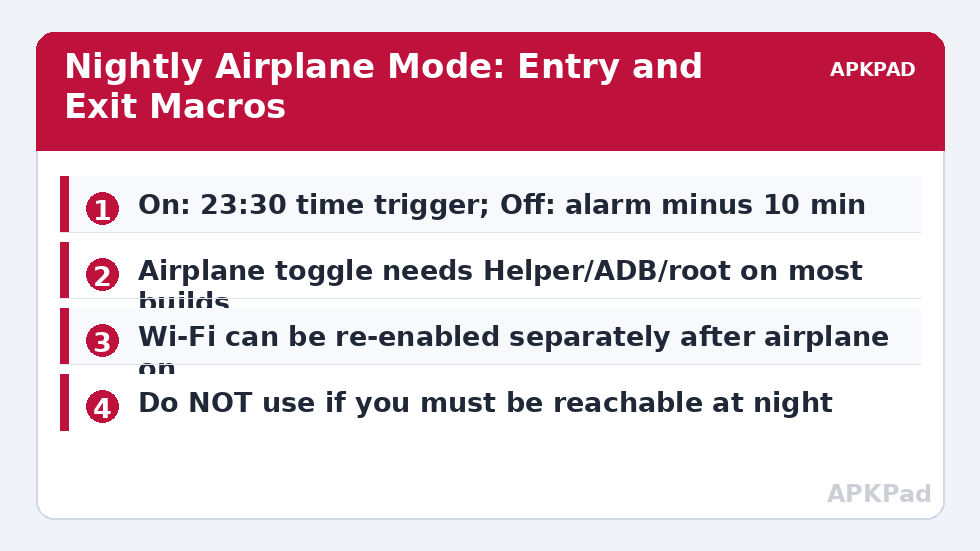
Toggling airplane mode is a protected action. On current Android versions MacroDroid needs one of: the MacroDroid Helper app (works on many builds), WRITE_SECURE_SETTINGS granted via ADB (works on most), or root (works on all). On some devices none of the non-root routes succeed and the action fails silently — you will know because the aeroplane icon never appears. Test the single action manually before building a schedule around it. Note also that a few OEMs reset ADB-granted permissions after major updates; if your schedule mysteriously stops working after a system update, re-grant rather than rebuilding. This pattern recurs across the battery hacks collection — radios are where Android’s security model pushes back hardest.
The Schedule Pair: Automate Airplane Mode Nightly
| Element | Night On | Morning Off |
|---|---|---|
| Trigger | Time: 23:30 (your actual sleep time, not a round number) | Time: 06:50, or “Alarm about to fire” style trigger where available |
| Actions | Airplane Mode ON → Wait 5 seconds → Wi-Fi ON (optional, see below) → optional voice note off | Airplane Mode OFF |
| Constraints | Only at home (Wi-Fi SSID or cell-tower condition) so travel nights behave normally; not while a call is active |
The optional Wi-Fi re-enable deserves explanation: airplane mode kills Wi-Fi too, but Android allows Wi-Fi to be switched back on independently afterwards. Doing so keeps Wi-Fi calling and smart-home control alive while the cellular modem — the expensive radio in weak-signal bedrooms — stays off. If your drain was mostly cellular (poor signal at home), this hybrid captures most of the saving with far less isolation. If your drain was everything, leave Wi-Fi off too.
How to read this: the estimate adds a small always-on idle cost for MacroDroid itself (about 0.4% of battery per day) to a per-class daily cost for each trigger type you use, scaled slightly by how many macros you run. These are planning estimates from that transparent model — not measurements from your phone. Use them to compare setups before you build, then confirm against the real numbers under Android Settings → Battery.
Who Must Not Use This
If anyone may need to reach you urgently at night — children, elderly parents, on-call work, a medical condition in the household — do not schedule full airplane mode. The hybrid above (cellular off is still unreachable, note) does not solve reachability either: with airplane mode on, ordinary calls cannot arrive, period, even with Wi-Fi on, unless your carrier supports Wi-Fi calling and it is enabled. A safer alternative for the must-be-reachable: the screen-off radio pattern with data only, which keeps the phone attached to the tower for calls while still cutting most idle cost. Emergencies are not the place to optimise percentages.
Expected Saving, Stated Plainly
The saving is bounded by your current overnight drain. In a strong-signal home losing 3% overnight, airplane mode saves perhaps 2% — trivial in absolute terms, though it also buys silence. In a weak-signal home losing 12% overnight (the modem hunting between towers), it can save 8–10%, which over a year is the equivalent of weeks of standby. Measure your overnight drain for two nights first (same charge level, phone untouched), then decide. Data first, macro second — the same discipline as our benchmark guide teaches for every battery claim.
Around the Edges: Alarms, Watches and Travel
The schedule interacts with three neighbours worth checking before your first automated night. Smartwatches: a watch paired to a phone in airplane mode keeps its own time and alarms but loses notifications and data; if you wear it to bed for sleep tracking, that is usually the intent — but confirm your watch’s fall detection or emergency features match your expectations while disconnected, per its own documentation. Other people’s schedules: if your household has a standing arrangement — a teenager who may call late, a partner on night shifts — encode it in the day-of-week constraint rather than remembering to disable the macro; arrangements encoded survive, arrangements remembered do not. Travel: the at-home constraint (SSID or cell cluster) is what stands between this macro and a phone going dark in a hotel in another timezone at 23:30 home time — MacroDroid’s clock is the phone’s clock, but your habits are not; the location constraint, not the time, is the safety-critical part of the design. Verify it on your first trip by checking the aeroplane icon before sleep.
The Half-Measure Ladder
Full airplane mode is the top of a ladder, and the rungs below it suit many more people. Rung one: the screen-off radio pattern overnight — data sleeps with the screen, calls still arrive. Rung two: mobile data off plus sync windows — the tower keeps you reachable, the chatter stops. Rung three: airplane mode with Wi-Fi restored — cellular silence, Wi-Fi calling and smart home alive. Rung four: full airplane. Each rung down costs less reachability and saves less battery; the right rung is the highest one whose loss you would not notice in a genuine emergency drill. Climb one rung per week, checking your morning battery figure against the overnight test, and stop when the marginal saving stops justifying the marginal silence.
What Happens to Alarms, Reminders and Morning Rituals
New adopters worry about the morning after: does the phone wake up ready? Walk the sequence once and the worry dissolves. The mode ends at the scheduled off-time — set it ten minutes before your alarm, not at it — and the radio stack re-registers within seconds to a minute. Notifications held overnight arrive in one batch during that window, mail syncs, the weather refreshes, and by the time the alarm speaks, the phone is simply a phone again. Two small print items: first, anything that generates its own over-the-air alert overnight (a second phone’s hotspot, a tablet) is unaffected, obviously, but a smartwatch in its own airplane posture follows its own schedule — align them deliberately or not at all. Second, if you use your phone as the alarm, keep the off-time honest on weekends too; a Saturday lie-in with the schedule ending at weekday time costs nothing but a silent phone for an extra hour in bed, which some users file under benefits.
If you take one design habit from this article, let it be the constraint that encodes context — home, weekday, not-in-a-call — rather than the toggle itself. Anyone can schedule a radio; the craft is in the conditions that keep the schedule true to a life that has travel, guests, deadlines and emergencies in it. Build those conditions first and the nightly silence will still be serving you, unedited, years from now.
Frequently Asked Questions
Can people still call me with airplane mode scheduled?
No — not on cellular. Calls, SMS and mobile data stop until the mode turns off. The only exception is Wi-Fi calling: if your carrier supports it, Wi-Fi is re-enabled after airplane mode, and that feature is on, calls can arrive over Wi-Fi.
Why does the airplane action fail on my phone?
It is a protected setting. MacroDroid needs the Helper app, WRITE_SECURE_SETTINGS via ADB, or root, and some OEM builds block all non-root routes. Verify by running the action alone and watching for the aeroplane icon.
Will my morning alarm still work?
Yes. Alarms are local to the device and unaffected by radios. Schedule the mode to end a few minutes before your alarm so notifications and news are waiting when you wake.
Does airplane mode at night harm the battery or phone?
No. It is the gentlest state the radio stack has. If anything, the reduced overnight drain means slightly shallower discharge cycles, which is marginally kinder to long-term battery health.
Can I make it weeknights only?
Yes — add a day-of-week constraint to both macros. Many users keep Friday and Saturday nights reachable for social reasons and automate Sunday to Thursday. The constraint is the difference between a system you keep and one you abandon.


