
An extreme battery saver mode trigger 15 percent design is emergency equipment, not a daily driver. Its job is narrow: stretch the last slice of battery until you reach a charger, while keeping the phone reachable for calls and messages. Android’s built-in Battery Saver already does a decent job of this, and if your phone offers an Ultra/Extreme saver (Pixels and several OEM skins do), prefer it. The MacroDroid version earns its place when you want a more aggressive or more specific profile — for example, one that protects a delivery app or a medical app while strangling everything else.
Design Principle: Cut in Order of Cost Per Compromise
Not all savings cost the same. Rank your actions by how much function they remove per percent saved. Display brightness and refresh rate cost nothing in function while the phone is in your pocket. Sync costs freshness, not reachability. Location costs navigation and any geofenced automations. Radios cost reachability itself — the one thing an emergency mode must preserve. So the macro fires in two stages: at 15%, the free cuts; at 10%, if you add the second trigger, the harder ones. Many users only need stage one, because the difference between 15% handled well and 15% ignored is often an extra hour or two of standby — enough to get home.
The Emergency Macro
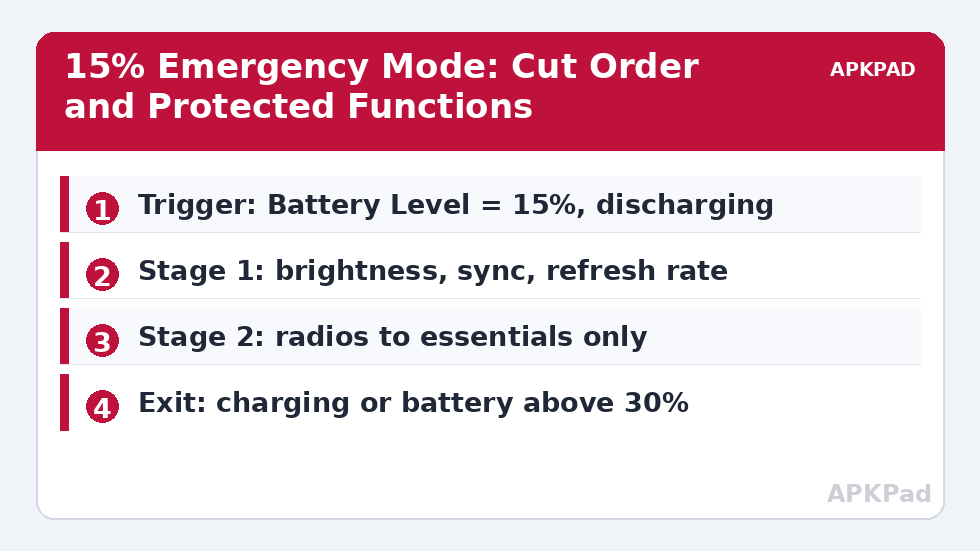
| Element | Stage 1 (15%) | Stage 2 (10%, optional) |
|---|---|---|
| Trigger | Battery Level = 15% | Battery Level = 10% |
| Actions | Enable system Battery Saver; brightness to 25%; auto-sync off; refresh rate to 60 Hz (where controllable); announce by voice “Battery saver on” | Mobile data off except when screen on; location mode to battery-saving; disable AOD; speak a second warning |
| Constraints | Not charging; not in a call | Not charging; not navigating |
Turning on the system’s own Battery Saver as the first action is deliberate: it applies dozens of internal restrictions (background network, animations, always-on listening) that MacroDroid cannot replicate one by one. Your macro then adds the device-specific extras the system saver misses. The voice announcement matters more than it looks — a phone that silently changes behaviour gets its saver disabled in frustration; a phone that explains itself gets kept.
How to read this: the estimate adds a small always-on idle cost for MacroDroid itself (about 0.4% of battery per day) to a per-class daily cost for each trigger type you use, scaled slightly by how many macros you run. These are planning estimates from that transparent model — not measurements from your phone. Use them to compare setups before you build, then confirm against the real numbers under Android Settings → Battery.
The Exit Macro Is Half the Design
Every emergency mode needs an equally deliberate exit, or you will find yourself at 60% charge wondering why sync is off. Build the restore macro with two triggers: Power Connected (any charger), and Battery Level rises above 30%. Actions: disable system Battery Saver, restore sync, restore brightness to auto, restore refresh rate, and post a notification “Emergency mode off” so the change is visible. The 30% threshold has hysteresis built in — without it, a battery hovering at the trigger point can flap the mode on and off as the percentage wobbles under load. Our refresh rate drop macro uses the same entry/exit pattern and can be merged into this one.
Permissions and Honest Limits
Several stage actions have requirements. Changing refresh rate generally needs WRITE_SECURE_SETTINGS granted via ADB (or an OEM setting MacroDroid can reach on your specific device) — without it, that action fails and the rest of the macro still runs, so order your actions with the permission-dependent ones where their failure does no harm. Toggling mobile data has the same Helper/ADB/root caveats as the screen-off radio macro. And be honest about the ceiling: at 15%, no software profile manufactures energy. What you are buying is time — typically extending standby from tens of minutes to a few hours, depending on the phone and signal. Budget for that, not for a miracle. More everyday savings live in the battery hacks collection; this macro is the fire extinguisher, not the heating system.
Preparing Your Extreme Battery Saver Mode Before You Need It
Emergency modes fail in a predictable way: they are built at 14% in a taxi. Build and rehearse yours at a desk. Trigger it manually once (temporarily raise the trigger to your current level), and walk the phone through its paces: place a call, receive one, send a message, open your payment app, check anything safety-relevant (medical apps, authenticators, family location). Anything broken gets either an exemption or your informed acceptance, recorded now rather than discovered later. Note in particular that aggressive profiles can pause the very app you use to get home — rideshare and maps deserve explicit thought: stage 2’s navigation constraint protects guidance in progress, but a phone that cannot fetch a ride at 11% has saved its battery for nothing. Many users therefore whitelist their transport apps from the data cut and take the smaller saving as the price of a working exit.
How the Stages Interact With the Rest of Your System
This macro does not live alone. It should sit downstream of the gentler machinery: the idle drain routine handles ordinary nights, the power profile at 40% slows the descent, and only then does the 15% stage take over. Coordinate their constraints so they do not fight — the emergency mode’s restore macro must not, for example, re-enable a sync schedule another macro deliberately suspended; restorations should return to “normal day mode” as a single defined state, not to whatever each macro last remembers. Define that state once (a shared “restore defaults” macro that all exit paths call) and every profile in your system becomes composable instead of competitive. That architectural tidiness is what separates a battery system from a pile of macros, and it is the difference between a phone that behaves predictably at 15% and one that improvises.
Communicating the Mode to Your Household
An emergency profile changes how reachable you are, and the people who notice are rarely you. If stage 2 delays data, a partner’s “did you get my message?” lands differently at 11% battery than at 60% — so tell the two or three people who matter that your phone goes quiet-but-reachable when it is dying: calls and SMS always work, chat may lag until you charge. That single conversation converts a future misunderstanding into a known system behaviour. The same applies in reverse at work: if you are on call, the on-call nights deserve a constraint that disarms stage 2 entirely — the mode’s entire purpose is buying time for your life, and a profile that endangers the responsibilities it was meant to protect has its priorities inverted. Encode these social facts as constraints with the same seriousness as the technical ones; they are load-bearing parts of the design, and the restored-at-30% exit exists so the quiet period always has a visible end.
Frequently Asked Questions
Why trigger at 15% and not 20% or 5%?
At 20% the restrictions annoy you during still-normal use, so people disable the macro. At 5% there is too little energy left for the savings to compound. Fifteen percent is late enough to be an emergency, early enough for the cuts to buy real time.
Can I still receive calls and messages in this mode?
Yes by design. Stage 1 never touches the phone radio’s ability to receive calls, and messages arrive through normal push. Only stage 2’s data policy adds delay, and even then SMS and calls are unaffected.
The refresh-rate action does nothing on my phone. Why?
Refresh-rate control usually requires WRITE_SECURE_SETTINGS via ADB, or it may be entirely unavailable on your model. The macro cannot detect this for you — test that single action once and remove it if your device ignores it.
Should this replace Android’s built-in Battery Saver?
No — it should activate it. The macro’s first action enables the system saver, then layers your extras on top. Fighting the platform’s own saver with a parallel system wastes the best tool available.
What if I am navigating when the battery hits 15%?
The stage-2 constraint excludes navigation for the location and data cuts, because stranding you mid-route to save 2% is a bad trade. Stage 1 still applies — brightness and sync cuts do not affect guidance.


