Fast charging trades a little battery longevity for a lot of convenience, and the exchange rate is set by temperature: warm is fine, hot is expensive. A battery temperature voice warning fast charger setup in MacroDroid watches the one number that matters while the phone is plugged in and speaks up — literally — at the moment your action still helps: move the phone out of the sun, take the case off, or unplug for a while. This is the alerting half of the thermal system whose load-shedding half lives in our thermal protection macros.
Choosing Thresholds That Are Neither Silent Nor Neurotic
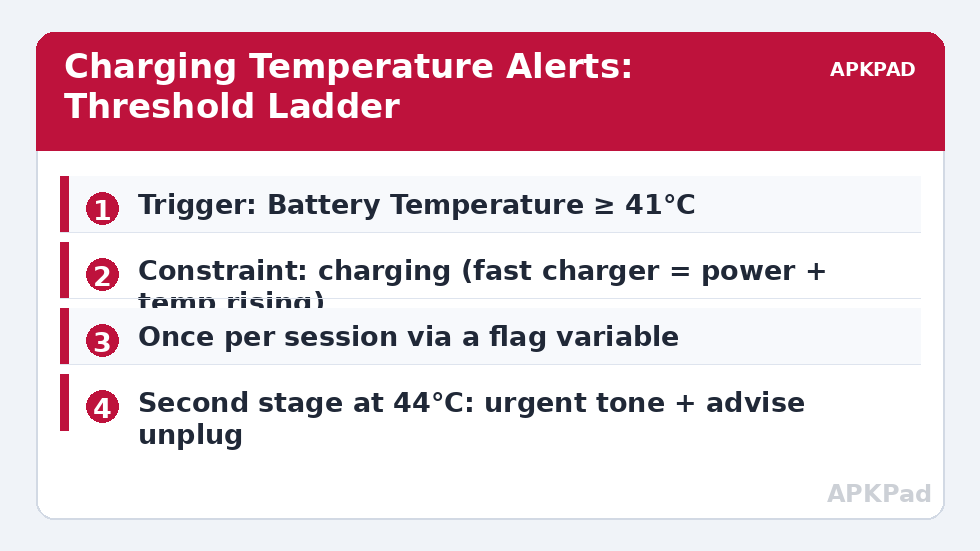
Battery temperature while fast charging normally rises into the high 30s — that is chemistry and fast current doing expected work, not an emergency. Set the first warning too low and you train yourself to ignore it within a week. A sensible ladder for most phones: 41°C — informational (“Battery warm while charging”), spoken once, calmly. 44°C — act (“Battery hot — consider unplugging”), with a distinct sound before the voice so the urgency registers before the words do. Above that, the phone’s own protections engage regardless. If your phone idles unusually warm or cool, shift the ladder by the difference after a week of observation — thresholds should describe your device, not a forum poster’s.
The Macro, With Once-Per-Session Discipline
| Element | Configuration |
|---|---|
| Trigger | Battery Temperature rises above 41°C (second macro cloned for 44°C) |
| Actions | If session-flag is unset: Speak Text warning at media volume; set session-flag. At 44°C additionally: Play Sound (alarm) before speaking |
| Constraints | Power connected; not in a call (do not shout over a conversation) |
| Reset | Separate macro: Power Disconnected → clear session-flag |
The flag variable is the whole ballgame for alert design. A temperature trigger without it re-fires at every evaluation while the battery hovers at the threshold — a phone announcing “battery warm” every ninety seconds during a long charge is a phone whose owner disables MacroDroid by Friday. Once per session per stage is the dose. The reset-on-unplug closes the loop so tomorrow’s charge starts clean. This pattern — trigger, flag, reset — is reusable across the battery hacks collection wherever repeated alerts would otherwise stack up (compare the 80% charge alert’s loop cap).
How to read this: the estimate adds a small always-on idle cost for MacroDroid itself (about 0.4% of battery per day) to a per-class daily cost for each trigger type you use, scaled slightly by how many macros you run. These are planning estimates from that transparent model — not measurements from your phone. Use them to compare setups before you build, then confirm against the real numbers under Android Settings → Battery.
Voice Versus Sound: Picking the Channel
Speak Text has one decisive advantage: it tells you what is wrong without you touching the phone — “battery hot” needs no interpretation, whereas a beep sends you to the screen to decode it. Its costs are social (a phone that talks in a quiet office) and mechanical: the speech engine must be installed and the media volume audible, both worth a manual test after building. A pragmatic hybrid: voice at home (add a location or Wi-Fi SSID constraint if you like), sound-only elsewhere. Also route the alert to the media stream at a set volume rather than “current volume” — an alert played at the 10% volume you left for music is an alert that never happened.
What To Do When It Speaks (the Part Automation Can’t)
The warning buys you a decision, not a solution. In rough order of effect: unplug and let it rest (stops the heat source entirely); remove the case (cases insulate measurably during fast charging); move it out of sun or off the wireless pad you stacked badly; pause the game or navigation loading the system while it charges. If the phone crosses 44°C while doing nothing but charging on a mild day, repeatedly, treat that as diagnostic information — an aging battery or a charger behaving badly — and have it looked at rather than building ever-more-elaborate alerts around a hardware fault.
Fast Charging Technologies Are Not Interchangeable
“Fast charging” hides several different electrical bargains, and your temperature ladder will sit differently on each. High-voltage/low-current schemes push conversion heat partly into the charger brick; high-current schemes (the VOOC/Dash/SuperVOOC family and some others) generate more of their heat inside the phone’s charging circuitry; USB Power Delivery splits the difference and varies by negotiated profile. Practically: a phone that peaks at 39°C on its bundled charger may peak at 43°C on a third-party brick negotiating a different profile, and a warning ladder tuned on one charger will look miscalibrated on the other. Tune on the charger you actually use nightly, note the other chargers’ behaviour when you travel, and treat a sudden change in your usual charger’s temperature curve as information about the charger or cable ageing — cables, in particular, degrade into resistance, and resistance is heat. The alert system, in other words, doubles as instrumentation for the whole charging chain.
Household Diplomacy and the Mute Button
A phone that speaks needs social permission. The refinements that earn it: a quiet-hours constraint aligned to the household’s real sleep (not the phone’s charging schedule), a first stage that is notification-only with voice reserved for the 44°C stage in shared spaces, and a physical mute ritual — flipping the phone face-down during a charge as the understood “I have seen the state, do not narrate it” signal, implemented with a face-down constraint suppressing further stages. Partners and housemates forgive a safety voice that is rare, staged and suppressible; they do not forgive a narrator. The same principle disciplined the escalation caps in the 80% charge alert, and it is the difference between a household automation culture and a household automation feud.
Seasonal Recalibration: Summer Is a Different Phone
The ladder you tuned in a mild spring will false-alarm through a hot summer if your life includes cars, beaches or un-airconditioned rooms — ambient temperature shifts the entire curve, and a phone charging at 30°C ambient starts where an autumn phone peaks. Two responses preserve the system’s credibility. The lazy one: accept more frequent warm-stage messages in summer as accurate reporting (the battery genuinely is warmer; the wear genuinely is faster), and let only the frequency cap (once per session) protect your sanity. The engineered one: make the first threshold adaptive with a seasonal constraint — two macro variants, summer and not-summer, switched by date — or, more elegantly, key the stages to temperature rise rate rather than absolute value, alerting when the battery climbs unusually fast for its charger. Rate-based alerting is cleverer and more fragile; absolute thresholds with a seasonal variant are dumber and work. Choose dumb, and spend the saved cleverness on consistency: an alert system whose rules you can recite is one you will still trust in year two.
Frequently Asked Questions
What temperature should I actually worry about while charging?
Occasional low-40s during fast charging is normal on many phones. Sustained 44°C and above is where accelerated wear becomes a real consideration, and any temperature that makes the phone uncomfortable to hold deserves immediate unplugging, macro or no macro.
Why use voice instead of a notification?
Because the phone is usually face-down, in another room, or in a pocket while charging — a notification is invisible precisely when it matters. Voice reaches you without a screen. If voice is socially impossible in your context, use a loud, distinct sound plus notification instead.
The warning repeats every few minutes. How do I stop that?
Add the session-flag logic described above: set a variable when the alert fires, require “flag unset” as a constraint, and clear the flag when the charger disconnects. Threshold-hover repetition without a flag is the classic beginner bug in alert macros.
Can MacroDroid slow the charging itself when hot?
Not on a normal phone — it cannot command the charging circuit. A few OEMs offer a “protect battery” or slower-charging toggle that the macro might reach on specific models, but the general tools are the alert and your response to it.
Does this work with wireless charging?
Yes, and it matters more there: wireless charging is less efficient and typically warmer, and a misaligned coil can cook quietly for an hour. The power-connected constraint includes wireless power on Android — the macro neither knows nor cares which charger is attached.