Battery degradation does not announce itself. Capacity slips a little each month, overnight drain creeps up, and one day a phone that used to finish the day comfortably is hunting for a charger at dinner. A scheduled macrodroid weekly battery health check report fights that invisibility with rhythm: the same few measurements, taken the same way, logged where you can compare them. MacroDroid cannot run laboratory diagnostics, and this guide will not pretend otherwise — but a consistent trend you collected yourself beats a single mysterious health percentage every time.
What a macrodroid weekly battery health check report should actually measure
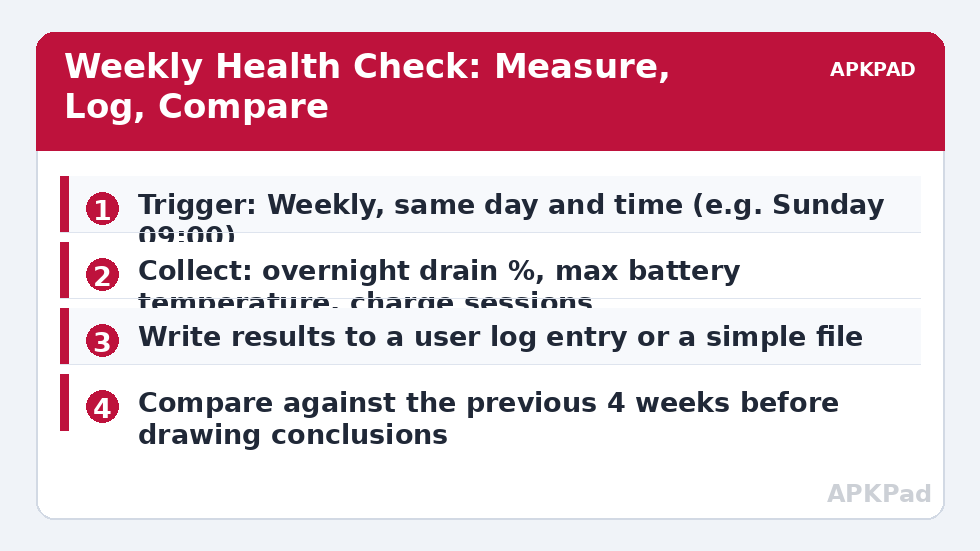
Choose four measurements you can collect honestly every week. First, overnight drain from a normal unplugged night: note the level before sleep and on waking, and the hours between. Second, the highest battery temperature you noticed or logged during the week, especially around charging. Third, charge habits: how many times the phone sat at 100% for hours, and how often it ran below 15%. Fourth, one subjective line — did the phone finish typical days comfortably? Numbers without that line can mislead; a week of travel will wreck every figure while the battery itself is fine. These four fit in a two-minute review, which is deliberate: a health check that takes twenty minutes will be abandoned by week three, the same failure mode the log audit warns about for over-built routines.
Set expectations for what the trend can show. A slow rise in overnight drain over months, alongside shorter comfortable days, is consistent with normal aging. A sudden jump in a single week is usually an app, an update or a signal change — investigate before blaming the cell. The report’s job is to separate those two stories early.
How to read this: the estimate adds a small always-on idle cost for MacroDroid itself (about 0.4% of battery per day) to a per-class daily cost for each trigger type you use, scaled slightly by how many macros you run. These are planning estimates from that transparent model — not measurements from your phone. Use them to compare setups before you build, then confirm against the real numbers under Android Settings → Battery.
Step by step: building the weekly check
- Create a macro named Weekly Battery Check with a day-and-time trigger — Sunday morning suits many people because the week is complete and the phone is usually in hand.
- First action: display a dialog or notification listing the four items to check, so future-you remembers the exact routine.
- Add actions that record what the phone can record itself: current battery level, battery temperature, and whether it is charging, written to the MacroDroid user log with the date.
- Leave a structured prompt for the manual figures — overnight drain and the week’s high temperature — and write your answers into the same log entry or a notes app.
- Add a constraint that the macro does not fire during Do Not Disturb sleep hours if your chosen time ever shifts; a health check that wakes you at 03:00 will not survive the month.
| Signal in your report | Likely meaning | Sensible response |
|---|---|---|
| Overnight drain doubled for 2–3 weeks | New app behaviour, update regression, or worsening signal | Run a log audit; check per-app battery use before assuming aging |
| Regular temperatures in the mid-40s while charging | Heat habit: fast charging in a case, warm room, heavy use while plugged in | Change the habit; review the heat alerts in the temperature guide below |
| Slow, steady decline over 6+ months | Normal chemical aging | Adjust expectations; consider charge-limit habits to slow further wear |
| Phone dies suddenly from 20–30% | Calibration drift or a failing cell | Try one full calibration cycle; if it repeats, seek a battery service assessment |
Two companion habits multiply the report’s value. If heat appears in your notes, the staged alerts in our temperature voice warning guide give you a real-time counterpart to the weekly review. If charging habits are the weak point, pair the check with the 80% charge limit alert, so the report measures a habit you are actively improving rather than one you merely regret.
Reading four weeks of reports without fooling yourself
Compare like with like. A week containing a long drive with navigation, a software update and a night in a weak-signal hotel is not comparable to a quiet week at home, and your notes should say so in one line. Mark exceptional weeks rather than deleting them; the pattern of exceptions is itself information. Look for direction over at least four readings, and be suspicious of any conclusion drawn from a single dramatic night. Also record the boring context when it changes — a new case, a new charger, a house move — because those changes explain future shifts better than memory does six months later. You will find this report template alongside the other routines in the battery hacks collection on APKPad, and it pairs naturally with deferring heavy tasks until charging, since both are about putting battery stress where it costs least.
Permissions, limits and honest boundaries
The check needs no exotic permissions: reading battery level and temperature and writing a log are ordinary MacroDroid abilities. The limits are informational, not technical. MacroDroid cannot see the manufacturer’s internal cycle count or design capacity on most devices, cannot measure true remaining capacity without a long controlled discharge you should not perform weekly, and cannot distinguish a tired battery from a newly greedy app without the audit step. Any app or macro claiming a precise health percentage from a quick reading is presenting an estimate as a measurement; your dated trend is the more honest instrument.
Troubleshooting: reports that drift or disappear
The macro stopped firing on Sundays. Check battery optimisation for MacroDroid first; an app put to sleep misses time triggers, and a weekly trigger is the easiest kind to lose silently. My overnight figures are all over the place. Standardise the measurement: similar bedtime charge, similar hours, phone in its usual room. Signal differences between rooms alone can swing the figure, which is data, not failure — note the room. I have twelve reports and no insight. Plot three numbers only — overnight drain, high temperature, comfortable-day yes/no — on one line each. The trend you need is visible at that simplicity; detail beyond it is decoration.
Turning a month of reports into one decision
Four weekly reports are raw material; the value arrives when you convert them into a single, small decision. Lay the four lines side by side and ask three questions. Is overnight drain trending in one direction, or bouncing randomly around a stable middle? Random bounce means your phone is fine and your measurement conditions vary — tighten the conditions, not the phone. Are high temperatures clustering around one behaviour — a particular charger, a particular game, a particular hot car journey? A cluster names a habit, and a habit can be changed in a week. And is the comfortable-day answer drifting from yes to mostly? Drift, unlike bounce, is what real aging looks like from the inside. Choose exactly one response per month: adjust one habit, run one audit, change one charging pattern, or consciously decide that the numbers are acceptable and no response is needed. That last option is legitimate and underused. A health routine that demands action every month manufactures anxiety; a routine that mostly confirms normality, and occasionally catches a real change early, is doing precisely the job it was built for.
Share the habit if the phone is shared. A partner who knows why Sunday morning includes a two-minute battery note stops experiencing the check as fussiness, and may contribute the context — a long drive, a signal-poor hotel — that explains the week’s outlier better than any figure on the screen.
Frequently Asked Questions
Can MacroDroid read my battery’s true health percentage?
On most phones, not the manufacturer’s internal health figure. Some devices expose extra information through system settings or diagnostics, but MacroDroid generally works with level, temperature and voltage-type readings. The trend you log yourself is usually more useful than a single health number anyway.
What overnight drain figure should worry me?
There is no universal threshold, because signal, apps and Doze behaviour differ. Worry about change: if your typical overnight loss doubles and stays doubled for two or three weeks with the same routine, that trend deserves investigation.
How long before a trend is real and not noise?
About four weekly readings in the same conditions. Single weeks are distorted by travel, updates and signal changes. That is why the report compares against the previous month rather than reacting to one bad night.
Can this check extend my battery’s lifespan?
The check itself extends nothing; the habits it prompts can help — less time at full charge, less heat, and catching a draining app early. Treat it as an early-warning system, not a treatment.
Should the report run while the phone is charging?
The scheduled prompt can run any time, but the overnight drain figure only makes sense from an unplugged night. If the phone charged overnight, record that fact in the report instead of inventing a number.