Your macro reaches the Wi-Fi action and fails — or worse, it “succeeds” and the Wi-Fi state never changes. If you are trying to fix wifi toggle actions blocked android 10 changes introduced, start with the uncomfortable fact: from Android 10 onwards, ordinary apps are not allowed to turn Wi-Fi on or off programmatically at all. This is not a permission you forgot to grant. Google removed the capability, and MacroDroid has to work around the removal, not through it.
That single fact reorganises the whole diagnosis. On Android 9 and earlier, a Wi-Fi toggle action needed a permission and worked. On Android 10 and later, the same action needs a workaround — the MacroDroid Helper, an accessibility-based interaction, a settings panel, or a redesign of the macro — and each workaround fails in its own distinctive way. Identify which workaround your macro is using before you change any settings.
Why Android 10 Blocked the Toggle
Android 10 deprecated the API that let apps enable and disable Wi-Fi, and made it a no-op for apps targeting modern Android versions. The stated reasons were privacy and user control: Wi-Fi state can be used to infer location and to manipulate connections without the user noticing. Later versions tightened the surrounding rules further — nearby-devices permissions for scanning, restrictions on automatically joining networks, and user-confirmation requirements for suggested connections.
Practically, that means three things for automation:
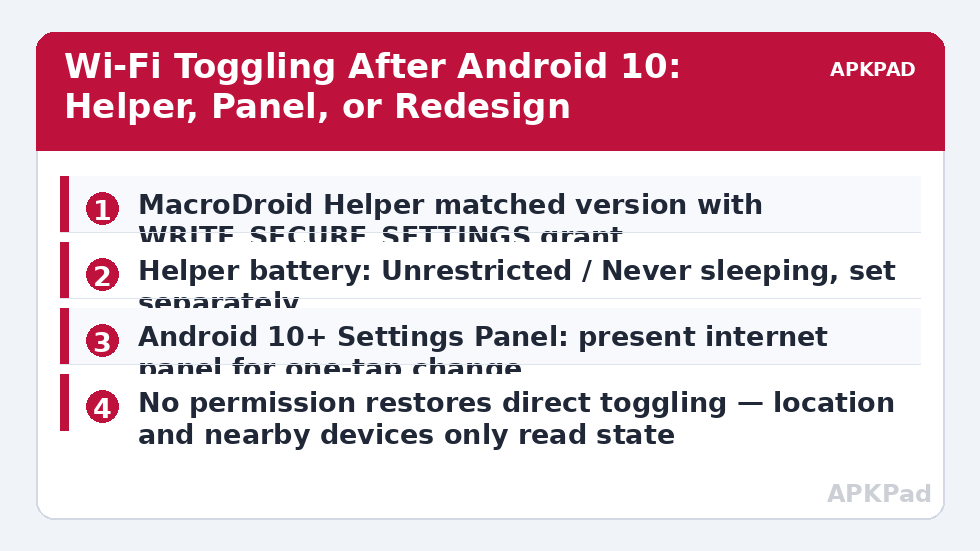
- No ordinary permission grant — not location, not nearby Wi-Fi devices, not modify system settings — restores direct toggling. Those permissions solve neighbouring problems, such as reading the current network name, not this one.
- Any method that still works is indirect: a privileged helper, a simulated tap on the real settings or quick-settings UI, or asking the user with a system panel.
- Methods that worked on one OEM skin or Android version can break on the next update, because they depend on UI and vendor behaviour rather than a stable API.
Fix Wifi Toggle Actions Blocked Android 10: The Helper Route
MacroDroid’s intended answer is its helper file, a companion app with the elevated grants needed to perform actions the main app no longer can, including Wi-Fi control on many builds. If your Wi-Fi action fails, check the helper first:
- Confirm the helper is installed, enabled, and the version matched to your MacroDroid release. A stale helper is the top cause of toggle failures after an app update — see fixing helper file version mismatch bugs, and only ever install the helper from MacroDroid’s official channels.
- Re-grant the helper’s ADB permission if the phone has been reset, restored, or updated:
adb shell pm grant com.arlosoft.macrodroid.helper android.permission.WRITE_SECURE_SETTINGS. The wider grant workflow, and why grants vanish, is covered in fixing ADB grants that reset after reboot. - Exempt the helper — separately from MacroDroid — from battery killing: Pixel, Settings > Apps > MacroDroid Helper > Battery > Unrestricted; One UI, add it to Never sleeping apps; MIUI / HyperOS, No restrictions plus Autostart; ColorOS, Allow background activity. A helper that is asleep at trigger time fails exactly like a helper that is missing.
How to read this: the estimate adds a small always-on idle cost for MacroDroid itself (about 0.4% of battery per day) to a per-class daily cost for each trigger type you use, scaled slightly by how many macros you run. These are planning estimates from that transparent model — not measurements from your phone. Use them to compare setups before you build, then confirm against the real numbers under Android Settings → Battery.
Route 2: Accessibility and UI Interaction Workarounds
Where the helper cannot do it — some builds and hardened ROMs — the fallback is simulating the user’s own taps: pull down quick settings and tap the Wi-Fi tile, or open the Wi-Fi settings screen and tap its switch, using MacroDroid’s UI interaction actions driven by its accessibility service.
Be honest about this route’s fragility. It needs the screen unlocked or an unlock step in the macro, it breaks when an OEM redesigns its quick-settings panel, and the tile’s position matters. MIUI / HyperOS has two control-centre styles with different layouts; One UI quick settings differ between collapsed and expanded panels; ColorOS tiles move between pages. Build the interaction against the panel state your macro will actually find at trigger time — usually locked or asleep, which is precisely when this route is weakest. It also depends on MacroDroid’s accessibility service staying alive, a recurring problem on aggressive skins.
A middle path exists on Android 10 and later: the system settings panel. Instead of toggling Wi-Fi itself, your macro can present the official internet panel and let a single user tap complete the change. That is not full automation, but it is reliable, survives updates, and for macros that run while you are holding the phone — leaving home, arriving at work — one tap is often acceptable.
Route 3: Redesign the Macro Around the Restriction
Sometimes the correct fix is to stop needing the toggle:
- Instead of turning Wi-Fi off, use actions that achieve the goal differently — enable airplane mode only where a helper or root makes that possible, disconnect logic based on network state, or simply notify and let the panel route handle the change.
- Instead of toggling on arrival, trigger from the connection event you actually care about: many “turn Wi-Fi on at home” macros really mean “when I get home, be on my network,” and modern Android will usually reconnect to a saved network by itself once Wi-Fi is merely left on.
- On rooted devices and some custom ROMs, shell-command actions can toggle Wi-Fi directly. This works, but tie it to that device only; the macro will fail silently if you export it to a non-rooted phone. Similar privilege issues affect Bluetooth automation, covered in fixing Bluetooth and tethering automation failures.
Leaving Wi-Fi on permanently and automating around connection state, rather than radio state, is the design most long-term MacroDroid users land on for Android 10+ — it trades a small amount of idle scanning for macros that survive every update.
Verification: Prove the Radio Actually Changed State
- Build a test macro with a manual trigger and only the Wi-Fi action, set to the opposite of the phone’s current state.
- Note the current state from the status bar, run the macro, wait five seconds, and check the status bar and Settings > Network & internet again. The radio state itself is the result — not the macro completing, and not the absence of an error.
- Check MacroDroid’s System Log for the action’s entry and any helper or permission error at that timestamp.
- Test a second time in the conditions the real macro faces: screen locked, phone asleep for ten minutes, helper exempted. A toggle that only works while you watch it has not been fixed.
More action and permission failures are diagnosed across the Fixes & Errors category, including the helper, ADB, and background-execution guides this fix depends on.
When This Fix Won’t Work
On a fully stock, non-rooted phone where the helper route is blocked — a work-managed device that forbids installing the helper, or a hardened ROM that restricts it — there may be no fully automatic Wi-Fi toggle available to you, and no setting hidden anywhere will change that, because the limitation is at platform level. The settings-panel route and the redesign route remain, and for many macros they are enough. Also accept that UI-interaction workarounds have a lifespan: expect to rebuild them after major OEM skin updates, and do not build anything safety-critical, such as a child’s phone connectivity, on top of a simulated tap.
Frequently Asked Questions
Why did my Wi-Fi toggle macro work on Android 9 but not after updating?
Android 10 removed the ability for ordinary apps to enable and disable Wi-Fi programmatically, and the old API became a no-op for modern apps. The macro did not break and no permission was revoked — the platform capability disappeared, so the action now needs the MacroDroid Helper, a UI interaction, or a redesign.
Which permission do I grant to restore Wi-Fi toggling?
None, by itself. Location and nearby-devices permissions let apps read connection details such as the network name, but they do not restore toggling on Android 10 or later. The working route is the MacroDroid Helper with its ADB grant applied, kept exempt from battery killing so it is awake when the trigger fires.
Is the accessibility quick-settings workaround reliable?
It works, but it is the most fragile route. It needs an unlocked or unlockable screen, it depends on your OEM’s quick-settings layout — which differs between MIUI control-centre styles and One UI panel states — and it can break after skin updates. Use it when the helper route is unavailable, and retest it after every major update.
Can MacroDroid show the Wi-Fi panel instead of toggling directly?
Yes. On Android 10 and later, a macro can present the system internet settings panel so a single tap completes the change. It is not fully automatic, but it is stable across updates and is often the most practical option for macros that trigger while you are already holding the phone.
Should I just leave Wi-Fi on and automate around connection state?
For most users, yes. Modern Android reconnects to saved networks automatically, and macros triggered by connecting to or disconnecting from a named network survive OS updates that break toggle workarounds. It costs a small amount of idle scanning, and in exchange your automation stops depending on a capability the platform removed.