To fix battery optimization exclusion reset update failures, first confirm the exclusion actually reset — do not assume it. When you fix battery optimization exclusion reset update problems after a MacroDroid, plugin, or system update, open Settings, find MacroDroid under battery optimisation, and read its current state out loud: Optimised, Unrestricted, or not listed at all. Macros failing after an update has at least four other causes, and re-toggling a setting that never changed wastes the one test that would have told you the truth.
Note what updated: the MacroDroid app, Android itself, or an OEM skin such as One UI or HyperOS. Each update type resets different things, and the fix sequence below follows that order.
Why Exclusions Reset in the First Place
Android stores the battery optimisation exemption per app, per package signature and install state. Anything that makes the system treat the app as newly installed can drop it: uninstalling and reinstalling, clearing through a cleaner app, restoring from a backup onto a new phone, or an OEM update that rebuilds its own power database. Separately, Samsung, Xiaomi, and Oppo maintain their own sleeping-app and autostart lists on top of Android’s list. An update can leave Android’s exemption intact while resetting the OEM layer, which is why the toggle can look correct while macros still stop overnight.
| Update event | What commonly resets | What to re-check first |
|---|---|---|
| MacroDroid app update from Play Store | Usually nothing, but first-launch permission prompts may reappear | Open MacroDroid once, clear any banner, retest |
| Uninstall and reinstall | Exemption, autostart, notification access, accessibility, all grants | Everything, in the order below |
| Android version upgrade | Exemption state, foreground service rules, unused-app permission removal | Battery state plus unused app settings |
| OEM skin update (One UI, HyperOS, ColorOS) | Sleeping apps list, autostart list, OEM power database | OEM battery screens, not just Android’s |
| New phone restore | Treated as fresh install for power purposes | Full re-setup for MacroDroid and helpers |
Fix Battery Optimization Exclusion Reset Update Problems Layer by Layer
There are three layers, and all three must agree. Work top to bottom and test at the end, not after each toggle, so you know the complete state you ended in.
Layer 1: Android’s Own Exemption
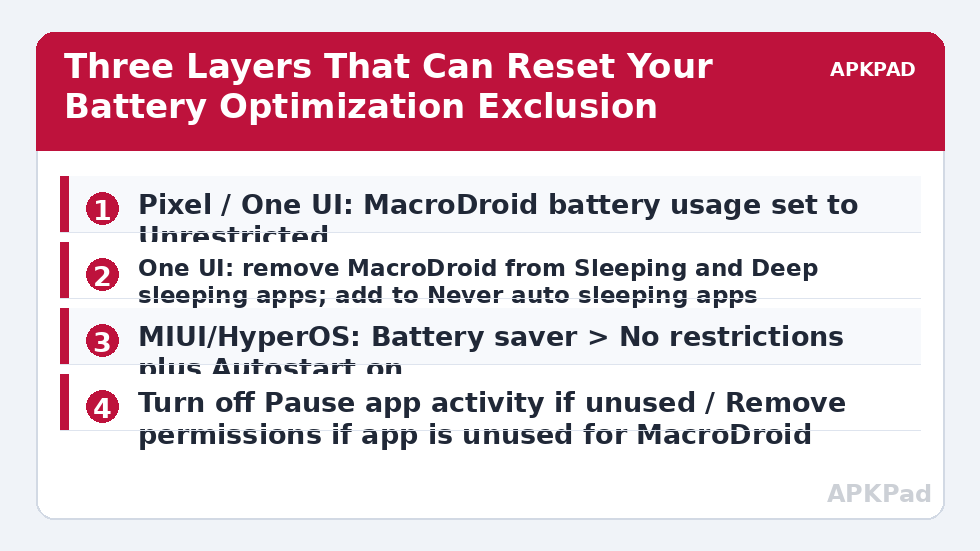
- Pixel: Settings > Apps > See all apps > MacroDroid > App battery usage > Unrestricted.
- One UI: Settings > Apps > MacroDroid > Battery > Unrestricted.
- MIUI / HyperOS: Settings > Apps > Manage apps > MacroDroid > Battery saver > No restrictions.
- ColorOS: Settings > Apps > App management > MacroDroid > Battery usage > Allow background activity.
Also open Settings > Apps > Special app access > Alarms and reminders where present, and allow MacroDroid, because time-based macros need that separate grant on newer versions.
While you are on the MacroDroid App info screen, scroll to any entry labelled Unused app settings, Pause app activity if unused, or Remove permissions if app is unused, and note its state as well. You will deal with it fully in Layer 3, but recording it now tells you later whether the update changed it, instead of leaving you guessing which screen a future reset touched.
Layer 2: The OEM Sleeping and Autostart Lists
On Samsung, go to Settings > Battery > Background usage limits. Remove MacroDroid from Sleeping apps and Deep sleeping apps, then add it under Never auto sleeping apps. Turn off “Put unused apps to sleep” while you stabilise things. On Xiaomi, enable Autostart for MacroDroid under Settings > Apps > Permissions > Autostart, and lock MacroDroid in Recents. On Oppo, Realme, and OnePlus, enable Allow auto launch and Allow background activity for MacroDroid, and lock it in Recents in the same way. If you use the MacroDroid helper app or any plugin, repeat Layers 1 and 2 for that app too — helpers lose their exemptions in exactly the same updates, which is the overlap with helper file version mismatch errors.
Layer 3: Stop the Next Reset Before It Happens
Open Settings > Apps > MacroDroid > Permissions and turn off “Remove permissions if app is unused” (on Pixel this sits under Unused app settings as “Pause app activity if unused”). This Android feature is a frequent silent cause: a phone that decides MacroDroid is unused can pause it and strip grants even with no update involved. Next, avoid cleaner and booster apps that offer to “optimise” battery by resetting app states, and never use “Reset app preferences” in Settings as a casual fix — it clears exemptions for every app at once. If macros broke after a reinstall rather than a simple update, work through ADB-granted permissions resetting as well, because ADB grants do not survive reinstalls at all.
How to read this: the estimate adds a small always-on idle cost for MacroDroid itself (about 0.4% of battery per day) to a per-class daily cost for each trigger type you use, scaled slightly by how many macros you run. These are planning estimates from that transparent model — not measurements from your phone. Use them to compare setups before you build, then confirm against the real numbers under Android Settings → Battery.
Verification: Prove the Exclusion Survived a Night
- Create a test macro: trigger Time of Day at a time 20 minutes from now, action Vibrate plus Write to a MacroDroid variable or send yourself a notification with the timestamp.
- Leave the phone unplugged, screen off, and do not open MacroDroid again.
- When the time passes, check whether the notification arrived on time, then open MacroDroid > System Log and confirm the trigger fired at the scheduled minute, not when you woke the phone.
- Repeat the same test the following night after a reboot. A reboot is the honest test, because several OEM systems only apply their sleeping lists after a restart.
If the macro fires on time after a reboot and an overnight idle, the exclusion is genuinely in place in both the Android and OEM layers. If it fires late in a burst with other delayed work, you are looking at doze behaviour rather than a lost exemption — compare with delayed triggers in deep sleep and doze mode before changing more settings.
When This Fix Will Not Work
Some resets cannot be prevented from inside Android. An OEM major-version update that rebuilds its power management database will sometimes clear sleeping lists no matter what you set, and the only remedy is re-checking after each major update — make it a routine: after any system update, open MacroDroid once, confirm battery state, and run one timed test macro. Work-profile and managed devices add another limit: an employer’s device policy can enforce battery rules that override your personal exemption, and only the administrator can change that. Finally, if the phone itself is aggressively killing apps because it is low on storage or running a third-party “battery saver”, removing that app matters more than any toggle. The full set of related repairs lives in the Fixes & Errors category.
Frequently Asked Questions
Why does my battery exemption reset after every app update?
A normal Play Store update should not reset it, so repeated resets usually mean something else is involved: a cleaner app rebuilding app states, an OEM sleeping-apps feature re-adding MacroDroid, or “Pause app activity if unused” pausing the app. Check the OEM sleeping list and the unused-app setting, and remove any cleaner app’s access before blaming the update itself.
MacroDroid says Unrestricted but macros still stop overnight. Why?
Because Samsung, Xiaomi, and Oppo run a second power layer over Android’s. MacroDroid can be Unrestricted in Android settings while sitting in Samsung’s Deep sleeping apps or with Xiaomi autostart off. Check the OEM layer for your brand, add MacroDroid to the never-sleeping list, enable autostart where offered, and retest overnight after a reboot.
Do I need to re-apply the exemption for the helper app and plugins too?
Yes. The exemption is stored per app, so MacroDroid being Unrestricted does nothing for the helper app or a plugin, and updates reset each app independently. Apply the same Android and OEM settings to the helper and to any plugin your macros depend on.
What is “Pause app activity if unused” and should I turn it off for MacroDroid?
It is an Android feature that pauses apps you have not opened for a long time and removes their permissions and battery exemption. Automation apps are exactly the kind you rarely open but always need running, so turn it off for MacroDroid in its App info permissions screen.
How can I tell a reset exemption from normal doze delay?
Set a timed test macro and leave the phone idle and unplugged. With a reset exemption, the macro often never fires until you open MacroDroid. With normal doze, it fires late, in a maintenance window, and the System Log shows the delayed timestamp. The System Log entry, not the feeling of lateness, is what separates the two.