This article starts with the boundary, because for this topic the boundary is the content. In some countries the camera shutter sound is not a preference — it is a legal or carrier requirement designed to prevent covert photography, and no legitimate technique may remove it. Elsewhere, the shutter sound simply follows your phone’s volume like any other system sound, and quieting it for a sleeping baby, a wildlife hide, or a concert hall is an ordinary, lawful act. This guide covers how to auto-mute camera shutter sound legally, using locale plugin actions and MacroDroid, in the places and on the devices where a legitimate mute path exists — and states plainly where it does not.
Where muting is not available to you — by design
| Situation | Status |
|---|---|
| Phones sold for the Japanese market | Shutter sound is mandatory on Japanese-market devices, enforced by carrier/manufacturer convention against covert photography. It cannot be legitimately disabled — not by volume, not by locale, not by region tricks. |
| Phones sold for the Korean market | South Korea requires an audible shutter sound at a regulated minimum volume on Korean-market devices. Same conclusion: no legitimate mute exists. |
| A device from JP/KR used elsewhere | The enforcement travels with the device build in most cases. Treat it as still mandatory; do not attempt to circumvent it. |
| Devices sold for most other markets (EU, US, South Asia, Middle East, etc.) | Generally the shutter sound follows system/media volume or a camera-app toggle. Muting via the methods below is the device working as designed. |
If your phone is a Japanese- or Korean-market model, stop here: the rest of this article is not a workaround for you, and any app or guide promising one is inviting you to circumvent an anti-voyeurism measure. This site does not publish that, here or anywhere else. Everyone else: continue, and note that the deciding factor is the device’s market build and applicable local law — when travelling, your home country’s rules do not export with you; the law where you are standing does.
How the shutter sound is actually wired (on devices where it can be muted)
There is no universal architecture, which is why “mute the shutter” advice fails randomly:
- Camera-app toggle: many stock camera apps (and most third-party cameras) have their own “shutter sound” switch in camera settings. If yours does, use it — it is the intended, stable path, and no macro is needed.
- Follows the system/ring volume: on many builds, the shutter plays on the system or notification stream, so silent mode or DND silences it too.
- Follows the media volume: on others, it tracks media volume; lowering media volume to zero before shooting works.
- Hard-wired: some builds play it at fixed volume regardless — on non-JP/KR devices this is a manufacturer choice rather than law, but it is still not yours to rewire without modifications this article does not cover.
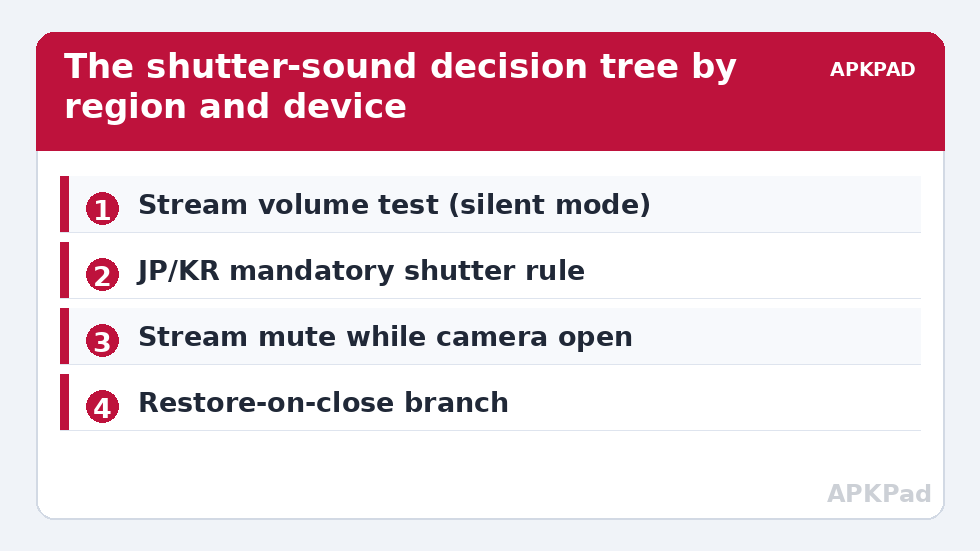
Test which case your phone is, once, manually: set the phone to silent, take a photo; then set media volume to zero and take another. The results tell you which stream the macro must drive.
How to read this: the estimate adds a small always-on idle cost for MacroDroid itself (about 0.4% of battery per day) to a per-class daily cost for each trigger type you use, scaled slightly by how many macros you run. These are planning estimates from that transparent model — not measurements from your phone. Use them to compare setups before you build, then confirm against the real numbers under Android Settings → Battery.
Auto-mute camera shutter sound via locale plugin actions: the MacroDroid build
- Trigger: Application Launched → your camera app.
- Action 1 — remember: save the current system and media volume percentages into MacroDroid variables (
vol_sys_before,vol_media_before). Skipping this step is how people end up with a permanently silent phone and no idea why. - Action 2 — mute: Volume Change action → set the stream your test identified (system, or media, or both) to 0%. MacroDroid’s Locale/Tasker plugin ecosystem is relevant here historically — volume and audio-profile plugins (and MacroDroid’s own plugin-compatible actions) can perform the same set-volume step on builds where a plugin exposes streams MacroDroid’s native action groups differently; the mechanism is identical: set the stream, restore the stream.
- Restore macro: Application Closed (camera) → Volume Change → set each stream back to its saved variable. Add a 2-second delay: camera apps are often reopened instantly for a retake, and a flicker of restored volume mid-burst is harmless, while a stuck mute is not.
- Constraint: exclude the macro when the phone is already in silent/vibrate mode — nothing to do, and the restore step must never raise volume above what the user had set before the camera opened. The saved-variable design guarantees this if you restore exactly what you saved.
A Quick Settings tile variant suits deliberate sessions (wildlife, ceremonies): tap to mute-and-flag, tap again to restore, using the toggle pattern from the tiles guide. For known-quiet contexts you can also fold the volume step into a broader profile macro built from the pieces in automating system UI settings.
Etiquette and edge cases the settings cannot see
Legality is the floor, not the ceiling. A muted shutter in a museum, gym changing area, or quiet carriage can be unwelcome or prohibited by venue rules even where no law applies; several venues ban photography outright, and a silent camera does not make a forbidden photo permitted. Conversely, note the legitimate, sympathetic cases this article exists for: sleeping infants, wildlife, ceremonies where photography is explicitly allowed, accessibility needs, and your own home. Keep the principle: the mute exists to avoid disturbing people, never to avoid being noticed by the subject of a photograph. If that is the purpose, this is the wrong article and there is not a right one on this site.
Technical edges: burst modes and third-party camera apps each need their own test (a GCam port may use a different stream than the stock camera). Video recording start/stop sounds are separate behaviours and may follow different rules on the same device. And if a future OS update changes which stream the shutter uses, your test takes ninety seconds to redo — the macro structure survives unchanged.
Undo
Disable the two macros and your volumes behave exactly as stock; the restore macro’s final run (or one manual trip to the volume panel) returns the saved levels. Nothing in this article modifies the camera app, the system, or any enforcement mechanism — which is precisely why it can promise to be reversible, lawful, and complete. More tweaks built on the same reversible-first doctrine fill the system tweaks category.
A note for travellers and grey-import buyers
The market that matters is the one the device was built for, not the SIM inside it or the country beneath your feet. A Japanese-market phone used in Europe with a European SIM still enforces its shutter sound; that is the common surprise. The reverse trap exists too: a grey-import JP/KR variant bought unknowingly from a marketplace seller announces itself exactly once — the first time you try to silence it in a quiet place. If you are shopping second-hand and a silent shutter matters to you, check the model number against the manufacturer’s regional variants before buying, and test the shutter in the seller’s presence. And wherever you travel, remember the layering: device rules decide what is possible, local law and venue rules decide what is permitted — you must satisfy all three, every time.
Frequently Asked Questions
Why can’t I mute the shutter sound on my phone at all?
If it is a Japanese- or Korean-market device, the sound is a mandatory anti-voyeurism measure enforced by the build, and no legitimate method removes it. Some other manufacturers also hard-wire it by choice. In both cases the correct conclusion is that muting is not available on that device — this article does not offer circumvention routes.
Is it legal to mute the shutter sound where I live?
In most markets outside Japan and South Korea, yes — devices sold there generally tie the shutter to volume controls or provide a camera setting, and using them is the product working as designed. Local law where you are physically located governs, and venue rules can prohibit photography regardless. If in doubt, the camera app’s own toggle is the clearest signal of what your device intends to allow.
Which volume stream does my camera use?
Test it: put the phone in silent mode and take a photo; then, separately, lower media volume to zero and take another. Whichever test silences the shutter identifies the stream (system/notification, or media) your macro must set and restore.
Will the macro leave my phone silent afterwards?
Not if built as described: the launch macro saves current volumes into variables before muting, and the close macro restores exactly those saved values. Never build the mute without the restore, and never hard-code a “normal” volume — restore what was actually there.
Does this work for video recording sounds too?
Sometimes — record start/stop tones may follow the same stream as the shutter, but on many builds they are separate. Test your device; the same macro pattern applies if the tones obey volume, subject to the same market restrictions.