“Force LTE only” is one of the most searched phrases in Android tweaking, usually typed by someone whose phone keeps dropping to a weak 3G signal or ping-ponging between towers. The honest starting point for how to force 4G/5G LTE mode switching automatically via MacroDroid macros: Android guards the radio’s network-mode setting more tightly than almost any other switch, so the real answer is a ladder of methods — from fully automatic on cooperative devices, to one-tap assisted on locked-down ones. This guide climbs that ladder without pretending the top rung exists everywhere.
Force 4G/5G LTE mode switching via MacroDroid: why Android resists
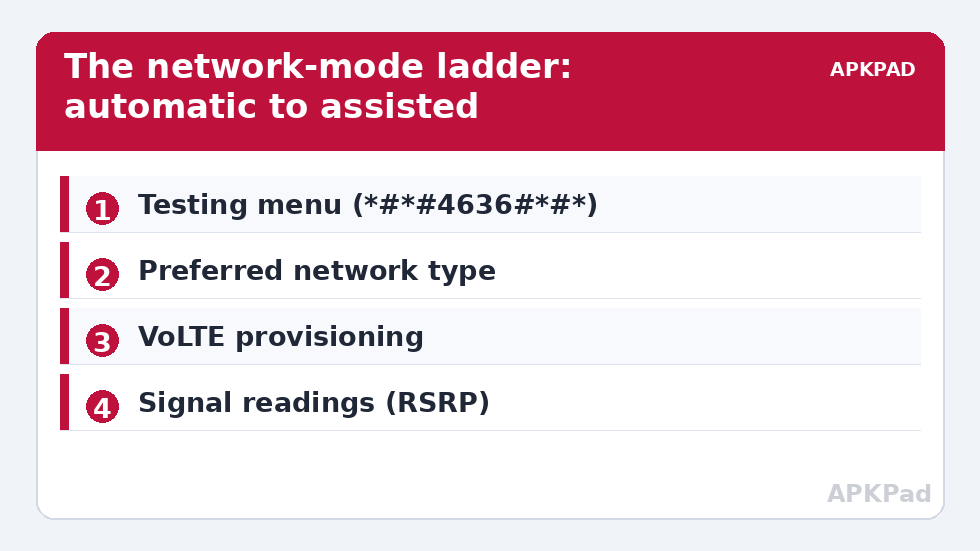
The preferred network mode decides which radio technologies the modem may use. Carriers and regulators both have opinions about it, so the setting lives behind system privileges. A normal app — MacroDroid included — cannot silently rewrite it on a typical unrooted phone. What varies by device is how much the manufacturer exposes:
| Device class | What is available | Automation level |
|---|---|---|
| Pixel and near-stock Android | Testing menu (*#*#4636#*#*) with a “Set preferred network type” list | Macro opens the menu; the selection itself is manual |
| Samsung One UI | Connections settings offer 5G/LTE/3G modes; “LTE only” often hidden or carrier-dependent | Macro can deep-link to the settings screen |
| Xiaomi / HyperOS | Testing menu present; some builds expose more modes | Assisted, as above |
| Rooted or ADB-grant power setups | settings put global preferred_network_mode writes on some builds |
Can be genuinely automatic — verify on your device |
Notice what is missing from the table: a universal, silent, unrooted switch. Anyone selling one is selling the testing menu with extra steps.
The testing menu: what the mode names mean
Dial *#*#4636#*#* and open Phone information. The “Set preferred network type” dropdown lists combinations in shorthand: NR is 5G, LTE is 4G, WCDMA is 3G, GSM is 2G. Useful choices:
- NR/LTE/WCDMA/GSM (or similar “global/auto”) — the factory default; the phone picks freely. Best battery and coverage behaviour.
- LTE only — the modem may not fall back to 3G/2G. Fixes tower ping-pong in areas with strong LTE but a louder, weaker 3G cell.
- NR only — 5G or nothing. Rarely wise outside a fixed test location with known 5G coverage.
- LTE/WCDMA — a middle ground that keeps a 3G fallback for voice in areas where VoLTE is unreliable.
Two warnings belong in bold. First, on networks without VoLTE on your plan or device configuration, “LTE only” can mean no voice calls at all — data works, calls fail silently. Second, the testing menu selection does not always survive a reboot or a SIM/network reset; check after restarting before assuming your macro environment still holds. MacroDroid cannot dial secret codes on all devices either — on builds where the dialer blocks it, the macro’s fallback is opening the Phone information screen via an intent or simply notifying you to the right screen.
How to read this: the estimate adds a small always-on idle cost for MacroDroid itself (about 0.4% of battery per day) to a per-class daily cost for each trigger type you use, scaled slightly by how many macros you run. These are planning estimates from that transparent model — not measurements from your phone. Use them to compare setups before you build, then confirm against the real numbers under Android Settings → Battery.
The macro designs that actually work
Design A — Assisted switching (works everywhere)
- Trigger: a Quick Settings tile or floating button labelled “LTE Fix”. Build it with the method in creating custom Quick Settings tiles.
- Actions: open the testing/dialer screen (or the Connections settings page on Samsung), plus a spoken or heads-up reminder: “Choose LTE only; remember calls need VoLTE.”
- Use case: you arrive at a known bad-coverage location, tap once, choose once. Ten seconds, twice a day — automation of everything except the guarded click.
Design B — Settings-key write (verify on your device)
- Prerequisite: the ADB grant from the WRITE_SECURE_SETTINGS guide.
- First, read before you write:
adb shell settings get global preferred_network_modeand record the number. Also recordpreferred_network_mode1on dual-SIM devices — the second slot has its own key on many builds. - Test a write from ADB with a known mode value for your device family, then confirm in the testing menu that the selection actually changed. Mode numbers are not standardised across vendors; a value that means “LTE only” on one brand can mean something else on another, which is exactly why the read-verify step is not optional.
- Only after ADB verification, move the write into a MacroDroid System Setting action, triggered by location or by entering your problem area.
When forcing a mode is the wrong fix
Half the people who want “LTE only” actually have a different problem. If calls drop but data is fine, the issue is usually VoLTE provisioning — a carrier toggle, not a network mode. If the phone clings to a distant tower, the fix may be as mundane as a network reset or a SIM reseat. If battery drains in a fixed location, the modem is hunting because coverage is genuinely poor, and locking it to the poor band makes the drain worse, not better. Diagnose first: the testing menu’s signal readout (dBm and band) tells you more than any toggle. As a rule, anything below about -115 dBm is a weak signal no mode lock can rescue.
Also weigh battery honestly: excluding fallbacks means the modem transmits at higher power for longer on marginal cells. Users who force LTE at a desk with -80 dBm see no penalty; users who force it in a fringe area cook their battery by evening. The macro designs above are deliberately location- or tap-triggered rather than always-on for this reason.
Undo: returning to automatic mode
Reversible-first, as always in this system tweaks series. In the testing menu, re-select the global/auto entry (the longest list — NR/LTE/WCDMA/GSM or your device’s equivalent) and the phone resumes normal behaviour instantly. If you used Design B, write back the exact preferred_network_mode number you recorded before changing anything. If calls stopped working while you experimented, returning to auto mode is also the fix — do that before any deeper troubleshooting, and mention the experiment to your carrier if problems persist, because they will otherwise chase a network fault that does not exist.
Reading signal like an engineer (so you force the right thing)
The testing menu shows signal strength in dBm, and the number reframes most “bad network” stories:
| Reading (LTE) | Interpretation | Sensible response |
|---|---|---|
| -70 to -90 dBm | Strong | Nothing to fix; forcing modes here is pure preference |
| -90 to -105 dBm | Usable, ordinary | Mode locking can help if a weaker 3G cell is winning selection |
| -105 to -115 dBm | Weak | Locking to this band costs battery; expect mediocrity regardless |
| Below -115 dBm | Fringe | No mode fixes physics — change location, or let the phone use any band it can hear |
Compare both candidate bands before locking: if LTE reads -112 and 3G reads -85, your phone “preferring 3G” is not a malfunction — it is clinging to the only usable signal, and LTE-only mode converts a working phone into a data-only ornament.
Dual-SIM realities
Two SIMs means two radios’ worth of preferences. The testing menu edits the mode for the SIM you select (or the default data SIM, depending on build), and the global settings keys exist per subscription on many devices — hence the preferred_network_mode1 sibling key mentioned earlier. Practical guidance: apply mode experiments to one SIM at a time, keep your primary voice line on the auto/global mode permanently (it is your lifeline), and restrict LTE-only experiments to the data SIM where a mistake costs you a slow afternoon rather than missed calls. Travel eSIMs deserve the same caution doubled: a foreign carrier’s VoLTE arrangements are not yours to assume.
Frequently Asked Questions
Can MacroDroid switch network modes silently without root?
On most phones, no. The network mode is guarded by system privileges. MacroDroid can open the relevant screen automatically (assisted switching), and on some builds a settings-key write works after the ADB grant — but that must be verified per device, and this article shows you how.
Why did my calls stop working in LTE-only mode?
Because voice on many networks still falls back to 3G/2G unless VoLTE is active for your line and device. LTE-only removes the fallback. Re-enable the auto/global mode, and check with your carrier whether VoLTE is provisioned.
Does forcing 5G improve speed?
Only if a strong 5G cell is actually available. Forcing NR-only on a fringe 5G signal usually makes things slower and hotter than letting the phone use solid LTE. Check the signal readout in the testing menu before locking anything.
Does the testing menu choice survive a reboot?
Often not — many devices reset the preferred network type to the carrier default on restart or SIM change. If your routine depends on it, re-apply after reboots, or use the assisted one-tap macro design.
Is there a risk of breaking cellular service permanently?
No. Every change described here is a software preference value. Returning the mode to the global/auto selection, or writing back the recorded settings value, restores factory behaviour completely.