You get out of the car, the head unit disconnects, and your phone’s Bluetooth radio spends the next fourteen hours awake and discoverable for no reason. The fix — automate bluetooth deactivation 5 mins disconnect — sounds like a single action, but the five minutes are doing real work in that sentence: instant-off punishes every brief reconnection (a headset dropping for ten seconds in a lift), while a delayed, re-checked off captures the genuine “session over” moments. This is a small macro that teaches the most reusable pattern in this entire category.
How Much Does Idle Bluetooth Actually Cost?
Keep the claim honest: modern Bluetooth (BLE-era stacks) idles very cheaply, and on a recent phone the pure energy cost of leaving Bluetooth on and connected to nothing is small — often well under 1% across a day. The stronger arguments for turning it off are tidiness and attack surface (a discoverable radio is a radio other devices can talk to) plus the minority of phones and OEM builds where the Bluetooth stack does misbehave after disconnects, holding wake-locks in a reconnect loop. If your phone is in that minority, this macro is a genuine fix; if not, file it under good hygiene with a small bonus. Either way it belongs in a routine, not as a headline saving — the battery hacks headline savings are radios-off-at-night territory.
The Delayed Re-Check Pattern
| Element | Configuration |
|---|---|
| Trigger | Bluetooth Device Disconnected (any device, or your named devices) |
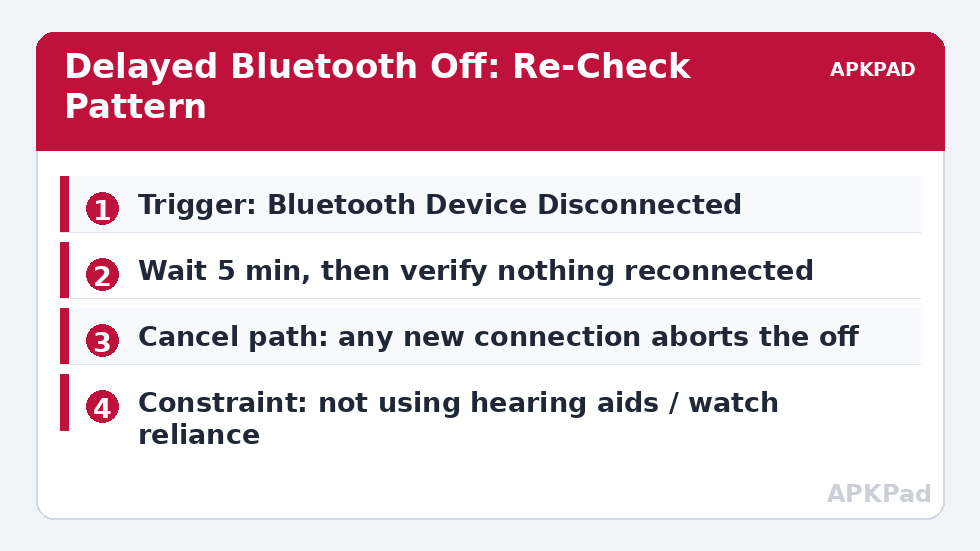
| Actions | Wait 5 minutes → check: if no Bluetooth device is connected → Bluetooth Off |
| Constraints | On the final off action: no Bluetooth device connected; not in a call |
| Implicit cancel | A reconnection during the wait satisfies the “device connected” state, so the constraint blocks the off — no separate cancel macro needed |
The elegance is in the constraint doing the cancellation. When your earbuds reconnect at minute three, nobody has to tell the pending macro to stand down; when minute five arrives, it simply finds its condition false and does nothing. Design every delayed action this way — verify the world at execution time, not at trigger time — and half the race conditions in home automation disappear. The same pattern protects the hotspot watchdog and the screen-off radio toggles elsewhere in this collection.
How to read this: the estimate adds a small always-on idle cost for MacroDroid itself (about 0.4% of battery per day) to a per-class daily cost for each trigger type you use, scaled slightly by how many macros you run. These are planning estimates from that transparent model — not measurements from your phone. Use them to compare setups before you build, then confirm against the real numbers under Android Settings → Battery.
The Companion Problem: Turning It Back On
Auto-off without a plan for on is a tax on your future self — the next morning’s car journey starting with a settings dive is how macros get uninstalled. Options, in order of preference: a widget button on the home screen toggling Bluetooth (one tap, honest, sufficient for most); a location/time hint — Bluetooth on when you leave home on weekday mornings, if your routine is that regular; charger-triggered — Bluetooth on when the car charger connects, for the dedicated commuters. Avoid “Bluetooth on at screen unlock” — it recreates the always-on state you just removed, dozens of times a day.
Who Should Not Run This
Anyone whose Bluetooth is load-bearing: hearing aids and medical devices, continuous glucose monitors, a smartwatch you actually rely on for notifications (the watch is the connected device, so the macro would never fire while it is worn — but arrive home, take the watch off to charge, and five minutes later Bluetooth dies and the watch’s reconnection fails silently). Also smart locks and car key features using Bluetooth. The macro’s disconnect trigger will rarely fire for always-connected users, which makes it harmless; the risk group is intermittent medical and access devices. Read your own device list before enabling, and when in doubt, restrict the trigger to named devices (car, earbuds) rather than “any disconnect”. The general principle — automation must never quietly break a safety or health function — is the same one guarding the GPS gating pattern.
Bluetooth Version Reality: Why Your Mileage Differs
Two phones running “the same” macro live in different radio worlds. Bluetooth 5.x stacks idle more politely than 4.x ones; LE Audio devices change connection behaviour again; and OEM skins add their own reconnect aggressiveness — some builds, upon losing a car kit, scan hard for minutes, which is precisely the post-disconnect wakefulness this macro exists to end. This is why the article refuses a single savings figure: on a healthy BLE phone the macro is hygiene, on a phone whose stack scans desperately after every drive it is a measurable fix. Your own two-day comparison — Bluetooth left on versus this macro, overnight figures via the method in our benchmark guide — settles which world you inhabit, and it is a five-minute experiment rather than an argument.
Composing With Car and Home Routines
The disconnect event is a useful household signal beyond radios: it usually means “the car journey ended”. Mature setups let it do double duty — the same trigger that starts the Bluetooth countdown can mark arrival home (if the car was the last connection and you are in your home cell cluster), cueing the home profile: Wi-Fi confirmed on, sync window opened for the photos from the trip, night postures armed if the hour is late. Keep the composition legible: one macro owns the observation (car disconnected), sets state variables and timestamps; other macros consume that state for their own purposes. The anti-pattern — five macros each listening for the disconnect and each half-acting — is how setups become haunted. One observer, many consumers, and the humble five-minute Bluetooth timer remains exactly what it was designed to be inside a larger, coherent system.
Named Devices Versus Any Device: Choosing the Trigger Scope
The trigger’s scope quietly determines the macro’s manners. Scope it to any Bluetooth disconnection and every dropped gadget starts the countdown — fine on a phone whose only Bluetooth relationship is a car, chaotic on a phone juggling earbuds, a keyboard and a watch, where some device is always disconnecting from something. Scope it to named devices (the car kit, the main earbuds) and the macro expresses an actual intention: when these sessions end, the radio’s job is done. The named scope also composes better: the car’s disconnect can simultaneously mean “journey over” for other routines, while an earbud case closing at a desk means nothing of the sort. Build named first; widen later only if a week’s logs show disconnects you cared about arriving from devices you failed to name. Scoping narrowly is this category’s recurring courtesy — to your future self, who must read these macros in a year and reconstruct what past-you meant.
Frequently Asked Questions
Why wait five minutes instead of turning off immediately?
Because disconnections are often momentary — a lift, a thick wall, a headset power-save blip. Instant-off would kill the radio mid-session repeatedly; you would spend the day turning it back on. Five minutes separates “session ended” from “signal hiccup” reliably.
A device reconnected during the wait. Does the macro still turn Bluetooth off?
No, provided you placed the “no device connected” check as a constraint on the final action (or as a condition inside the macro before the off action). The macro wakes at five minutes, sees a connected device, and does nothing — exactly the intent.
Will this break my smartwatch notifications?
While the watch is connected, the off action’s constraint prevents it firing. The watch only loses its link if Bluetooth was turned off in a window when the watch itself was disconnected (charging, out of range) — if that scenario applies to you, exempt by naming only specific trigger devices.
Does turning Bluetooth off save much battery on a new phone?
Very little in the normal case — modern Bluetooth idles efficiently. The macro’s value is mostly hygiene, privacy, and fixing the minority of builds whose Bluetooth stack misbehaves after disconnects. Do not expect visible percentage gains on a healthy modern phone.
Can MacroDroid turn Bluetooth back on automatically when needed?
Not by mind-reading; by proxy. A home-screen widget toggle, a charger-connected trigger for the car, or a morning schedule are the practical patterns. “When needed” must be translated into an event the phone can observe.