Outdoors, the pattern never changes: you raise the phone to take a photo, the screen looks washed out and dim, you shade it with one hand while squinting at a viewfinder you can barely judge. The fix is to automate screen brightness boost camera gallery sessions so the display is already at full strength when those apps open, and already back to normal when they close. No quick-settings swipe with the sun in your eyes, no forgotten maximum brightness draining the battery on the bus home.
MacroDroid makes this a launch-and-restore pair, much like rotation control but with an extra wrinkle: brightness has two masters, manual level and adaptive mode. A good macro handles both consciously. A sloppy one leaves you at maximum manual brightness indoors at midnight, wondering why the phone feels like a torch.
Before building, decide your normal state. If you live on adaptive brightness, the macro should restore adaptive mode on exit. If you run a fixed manual level, note that level down, because the restore macro will need the exact value.
The pair in full: automate screen brightness boost camera gallery without stranding your settings
Create the boost macro first and test it in isolation indoors, where a jump to maximum is obvious and harmless. Only when the entry is proven should you build the restore, and only when both work should you take the phone outside and trust it in real sunlight.
| Element | Setting in this build |
|---|---|
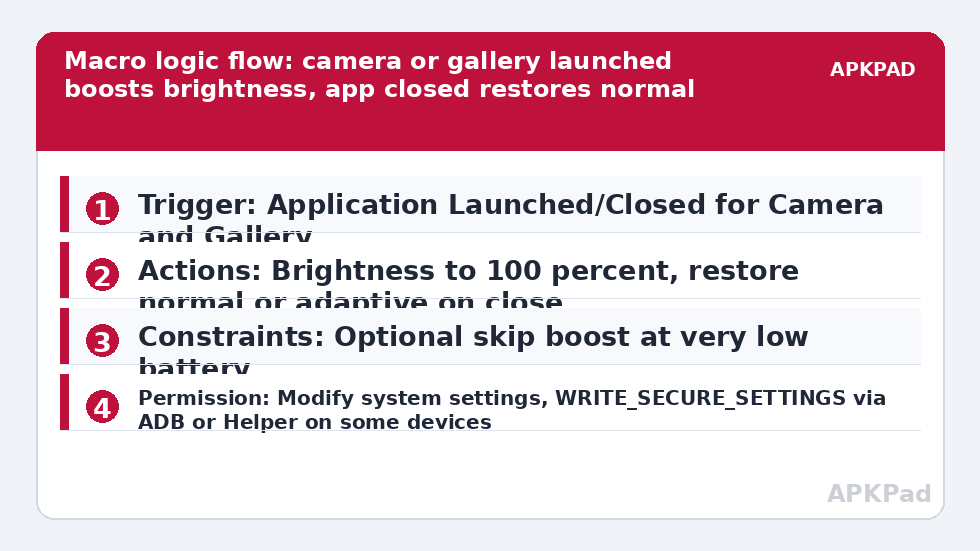
| Trigger | Application Launched/Closed > Application Launched for the Camera app and Gallery / Photos app; companion macro uses the Closed event for the same apps |
| Actions | Brightness action set to 100 percent or your chosen high value, with adaptive brightness off for the boost; restore macro sets Brightness back to your normal value or re-enables adaptive brightness |
| Constraints | Optional Battery Level constraint to skip the boost when battery is very low; optional constraint to avoid running when the screen is off |
Select apps thoughtfully. The stock camera and your main gallery are the obvious pair, but also consider a QR or document scanner you use outdoors, and exclude video streaming apps unless you truly watch them in bright sun. Every extra app on the list is another app that will inherit a battery-hungry display setting for its whole session.
Building the boost macro step by step
- Add a trigger: Application Launched/Closed, launched event, and select your camera and gallery apps.
- Add the Brightness action. Set a high value, typically maximum for outdoor camera work, and note the option in the action relating to adaptive or auto brightness on your device.
- Save and test by opening the camera indoors. The screen should brighten noticeably without you touching the brightness slider.
- Build the companion restore macro with the closed event for the identical app list and a Brightness action returning your recorded normal level or adaptive mode.
- Test the full round trip three times: open camera, close it, open gallery, switch directly from camera to gallery, and confirm the level after each step.
That direct camera-to-gallery switch is the test most people miss. Reviewing a photo straight after taking it is the normal workflow, so if your restore macro fires when the camera closes in the background while the gallery is already open, brightness will drop while you are still reviewing. The clean handling is to keep both apps in both macros, so the gallery’s own boost covers the review session, and the restore only matters when you finally leave both apps.
The permission prompt, at the moment it appears
Writing a new system brightness value is a protected operation. Android will ask MacroDroid for the permission to modify system settings, and on a number of devices the Brightness action also needs WRITE_SECURE_SETTINGS granted through ADB or the MacroDroid Helper app to reliably override the current mode. Grant whichever MacroDroid requests when you configure the action, right there in the build, then retest before assuming the macro logic is wrong. MacroDroid also needs Usage Access for dependable Application Launched/Closed detection. None of this requires root.
How to read this: the estimate adds a small always-on idle cost for MacroDroid itself (about 0.4% of battery per day) to a per-class daily cost for each trigger type you use, scaled slightly by how many macros you run. These are planning estimates from that transparent model — not measurements from your phone. Use them to compare setups before you build, then confirm against the real numbers under Android Settings → Battery.
How bright, and for how long?
Maximum is the honest choice for a camera viewfinder in direct sun, because composition and focus peaking need every nit the panel has. For gallery-only review, a step below maximum is often enough and is kinder to both battery and eyes, which is why splitting camera and gallery into separate boost values is a worthwhile refinement once the basic pair works. What you should not do is leave timing to memory: the restore is automatic, tied to the app closing, not to a timer you hope is long enough.
Brightness interacts with the rest of your outdoor setup. Photographers who also rotate the gallery or protect long shoots will find natural companions in automating screen orientation for video apps and in automating cloud photo backup while charging, so a bright review session is followed by a safe backup when you get home. More patterns like these sit in the Macro Triggers section.
Failure modes specific to brightness
If the boost fires but instantly fades, adaptive brightness is probably still in charge and is reasserting a lower level based on the ambient sensor. Your boost action must take the display out of adaptive mode for the session, and the restore must put it back if that is your normal state. If nothing changes at all, check the system-settings permission first, then the MacroDroid log. If everything worked until yesterday, check for an OEM theme, eye-comfort or sunlight-boost feature that updated and began managing the same value.
The broader reliability warning applies here as well, in a form specific to this macro: if MacroDroid has been put to sleep by the manufacturer’s aggressive battery management, neither the launch boost nor, more annoyingly, the close restore will run, and you will be left at whatever brightness was last set. That background termination is the most frequent reason this pair fails after working initially. Protect MacroDroid by excluding it from battery optimisation, choosing Unrestricted battery use, and enabling autostart or locking it in recents on Samsung, Xiaomi, Oppo and Vivo devices. A restore macro that cannot run is a battery problem you will feel within the hour.
Refinements for regular photographers
- Add a low-battery constraint so a nearly empty phone conserves power instead of boosting the display.
- Store your normal brightness in a MacroDroid variable if you change it seasonally.
- Exclude indoor-only scanner and banking apps even if they contain a camera view.
Done well, this is invisible automation: the screen is simply readable when you need it and ordinary when you do not, which is the highest compliment a display macro can earn.
Frequently Asked Questions
Why does brightness jump back down as soon as the camera closes?
That is the restore macro working as designed. Its Application Launched/Closed trigger fires on close and returns brightness to your saved normal level. If it restores too eagerly while you switch between camera and gallery, align the app lists in both macros so moving between the two treated apps does not trigger a restore.
Will this override my adaptive brightness setting permanently?
It should not if you build the restore correctly. Record whether you normally use adaptive brightness, and have the exit macro return to that mode or to your usual manual level. Test by checking the brightness setting after a camera session and confirming it matches your normal preference.
Do I need ADB or the Helper app for the Brightness action?
On some devices, yes. Changing the system brightness value can require WRITE_SECURE_SETTINGS granted via ADB or the MacroDroid Helper app, and Android will also ask for permission to modify system settings. MacroDroid will prompt when it needs it; grant it at that step and retest.
Can I use a smaller boost for the gallery than for the camera?
Yes. Duplicate the macro, scope one copy to the camera app with a high brightness value, and scope the other to the gallery with a more moderate value. Keep separate restore macros or one shared restore covering both app lists.
Does a brightness boost drain the battery quickly?
A boosted screen is one of the hungriest components while it is on, which is exactly why the boost is scoped to short camera and gallery sessions with an automatic restore. Avoid leaving the boost active in long-running apps, and lower the target value if you review photos for long periods.