Consent first, plainly: this macro belongs on the device owner’s own phone, set up with their full knowledge and agreement, so that they can summon help from people nearby. Configure it together with an elderly parent on their phone so a trusted family member can text a code word and make the phone sound loudly, or set it up on your own phone to trigger emergency alarm siren secret sms yourself and attract attention. Never place it on anyone else’s device to surprise, prank or monitor them.
With that boundary clear, the build itself is a textbook example of a trigger emergency alarm siren secret sms design: a very specific incoming message, from a very small list of people, produces a very loud result. Specificity is the safety feature. A vague version of this macro would be a nuisance and a hazard; an exact one is a deliberate call for help that almost never fires by accident.
Everything in the configuration below pushes in one direction: narrow trigger, trusted senders only, exact code word, and a clear way to stop the sound once help has arrived or the phone has been found.
Narrow by design: trigger emergency alarm siren secret sms without false alarms
Start by agreeing the code word with the owner and the trusted senders. Choose something unmistakable, ideally a invented word paired with digits, that nobody would type in ordinary chat. Agree also who the trusted senders are: one or two family members or a close neighbour, not a group chat. Write both down outside the phone as well, because a code word nobody can remember under stress is decoration, not a safety tool.
| Element | Setting in this build |
|---|---|
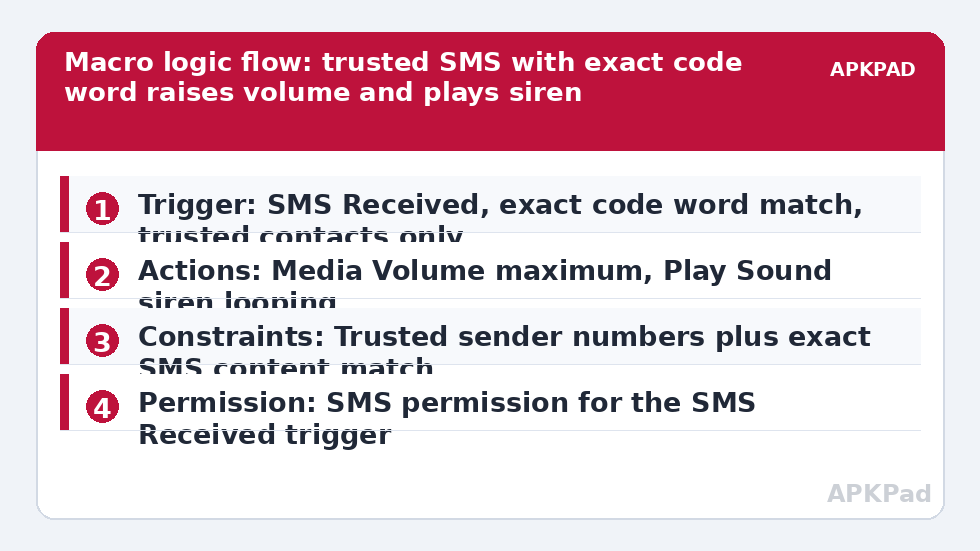
| Trigger | SMS Received, content matches the exact agreed code word, from selected trusted contacts only |
| Actions | Media Volume set to maximum; Play Sound selecting a loud siren or alarm file, set to loop until stopped; optional Torch / flash action for visual attention |
| Constraints | Constraint limiting the macro to the trusted sender numbers, plus exact SMS content matching so partial or casual mentions do not fire it |
Build it in MacroDroid as a new macro called Emergency Siren Code Word. Add the SMS Received trigger and open its configuration carefully, because this screen decides whether the macro is responsible or reckless. Restrict the sender selection to the agreed contacts, then set the content option to match the exact code phrase rather than containing a common word. Test that distinction deliberately later with near-miss messages.
Step by step, with stopping built in
- Add the SMS Received trigger, choose the trusted contacts as senders, and set the message content to the exact code word using the exact-match option.
- Add a Media Volume action and set the media stream to maximum, so a phone left on vibrate still sounds.
- Add a Play Sound action, choose a long, piercing siren or alarm tone stored on the device, and enable looping if the option is offered for that file.
- Create the stop route before you test: a second small macro or MacroDroid widget that stops the sound and restores a normal media volume, and show the owner how to use it.
- Save, then test end to end with a trusted sender standing in the same room, including practising the stop route.
Store the siren file locally on the device rather than streaming it. A safety macro that depends on a data connection to fetch its sound has introduced a failure point for no benefit. Pick a tone that is loud and continuous rather than a pleasant notification chime; the owner needs people in the next room or next flat to hear it through a closed door. If the owner uses hearing aids or has specific hearing needs, test audibility in their actual home, with doors closed, rather than assuming a tone that sounds loud in a shop will carry in a house.
Permissions this macro genuinely needs
SMS Received as a trigger requires MacroDroid to hold the SMS-related permission Android asks for when you configure it, plus notification access if you extend the build to messaging apps later. Raising Media Volume and playing sound through the speaker need no exotic grant, but MacroDroid must be allowed to run in the background and to show its stop controls. If you add a location reply or a follow-up call action in your own variant, each of those brings its own permission prompt, and you should grant them one at a time while testing. No root is needed for this build, and no Helper app is needed for the core sound actions on most devices.
How to read this: the estimate adds a small always-on idle cost for MacroDroid itself (about 0.4% of battery per day) to a per-class daily cost for each trigger type you use, scaled slightly by how many macros you run. These are planning estimates from that transparent model — not measurements from your phone. Use them to compare setups before you build, then confirm against the real numbers under Android Settings → Battery.
Testing like a safety feature, not a toy
Run three kinds of test message. First, the exact code word from a trusted number: the siren must start at full media volume. Second, a near miss: the same word inside a longer ordinary sentence, or with different capitalisation if your match is case sensitive. Depending on your exact-match settings it should not fire, and if it does, tighten the content rule. Third, the exact code word from a number that is not on the trusted list: it must not fire. That third test is the one people skip and the one that proves the constraint is doing its job.
Also test the unglamorous states: phone locked, phone on silent, phone with Do Not Disturb on, and phone after a reboot. Note which states delay the sound and adjust expectations honestly with the owner and family. This macro is a helpful layer, not a replacement for emergency services, a personal alarm service or regular human check-ins. For calmer family communication patterns, compare creating auto-reply SMS and WhatsApp macros and auto-reading SMS aloud while driving, both in our Macro Triggers library.
The background failure you must prevent
A siren macro that worked in testing and fails a month later is worse than no macro, because the family believes protection exists. The dominant cause is the handset maker’s power saving killing MacroDroid in the background so the SMS trigger is never processed. Prevent it as part of setup, not after a scare: exclude MacroDroid from battery optimisation, set its battery use to Unrestricted, and on Samsung, Xiaomi, Oppo and Vivo phones also switch on autostart or lock the app in recents. Then send a fresh test code word a week later and again after any system update. Treat those retests as part of the feature, in the same spirit as the scheduled checks in automated low battery alert messages.
House rules to agree with the owner
- The code word is used only when help is genuinely needed or during an agreed test.
- Trusted senders confirm with a normal call or visit after any real activation.
- The stop method is practised, not just described, before the macro is left live.
- If the phone, number or trusted senders change, the macro is reviewed the same day.
Handled this way, a loud phone becomes a considered safety signal between consenting people who know each other, which is the only framing this automation should ever have.
Frequently Asked Questions
Is it appropriate to put a siren macro on someone else’s phone?
Only with that person’s clear knowledge and consent, on a phone they own, for their own safety, and configured together with them. This feature is for the device owner summoning nearby help or finding their own phone. Never install or trigger it on another person’s device without their agreement.
What code word should I choose for the secret SMS?
Pick a distinctive phrase that would never appear in normal conversation, such as a made-up word plus a number, and use MacroDroid’s exact content matching so ordinary messages containing similar words do not set it off. Share the phrase only with the trusted senders who are meant to use it.
Will the siren play even if the phone is on silent?
That is the point of the build: the macro raises Media Volume to maximum before playing the sound, so a silent or vibrate profile does not block it. Test this on your own phone with the ringer off before relying on it, because OEM skins handle volume streams slightly differently.
How do I stop the siren once it starts?
Open the phone and run the stop route you built in: a MacroDroid widget, a notification button, or simply pausing or stopping playback from the macro’s stop action. Practise stopping it during setup so the owner is never faced with a loud phone they cannot quieten.
Can this work if the phone has no signal or is in aeroplane mode?
No. The trigger is an incoming SMS, so the phone must be able to receive that message. If reception is unreliable where the owner lives, treat this macro as one layer among others, such as a wearable call button or a neighbour check-in routine, not as the only safety measure.