Pairing is not the hard part. The annoying part is the daily sequence after pairing: phone connects, you tap Spotify, you pick a playlist, you set the volume, all while the car is already moving. A macro to automate bluetooth car connection open spotify removes that fiddling by reacting to the one event that already happens every trip, the Bluetooth Device Connected event for your head unit, and then launching Spotify in the right order with a short settle delay.
A macro to automate bluetooth car connection open spotify, in the right order
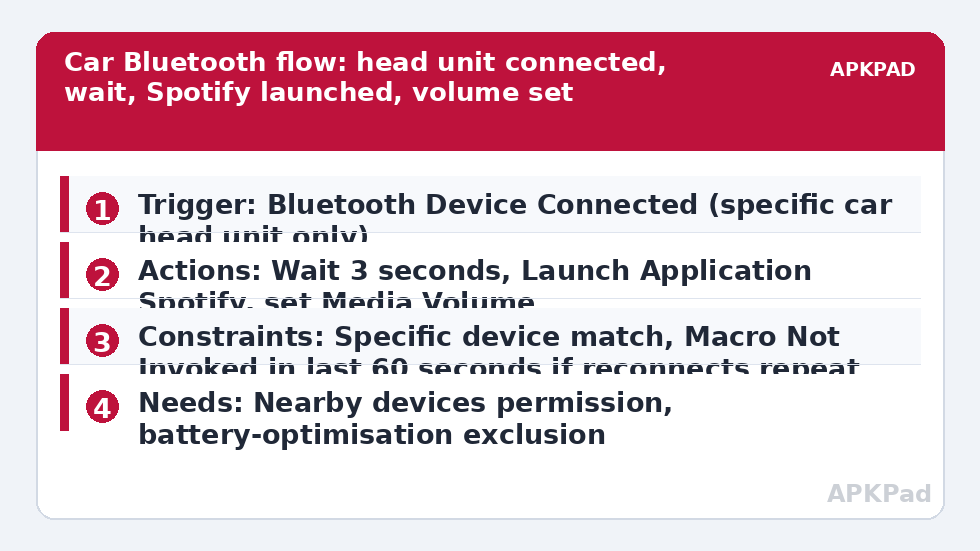
Order matters more than people expect. If MacroDroid launches Spotify in the same instant the Bluetooth audio route is still negotiating, Spotify may play through the phone speaker for a few seconds or not start output at all. A two to five second Wait Before Next Action between the trigger and the launch gives the head unit time to become the active audio output. You can observe your own car: watch how long the head unit display takes to show the Bluetooth source after you start the engine, and set your delay just beyond that moment.
| Part | MacroDroid setting |
|---|---|
| Trigger | Bluetooth Device Connected, your specific car head unit device |
| Actions | Wait Before Next Action (short delay), Launch Application: Spotify, Media Volume set to your driving level |
| Constraints | Bluetooth device name or address matches the car only, not any Bluetooth device |
Select the specific device in the trigger. Do not use Any Bluetooth Device unless you genuinely want Spotify launching when your earbuds, watch, or a passenger’s speaker connects. That single selection is what separates a useful car macro from a macro that surprises you at home.
How to read this: the estimate adds a small always-on idle cost for MacroDroid itself (about 0.4% of battery per day) to a per-class daily cost for each trigger type you use, scaled slightly by how many macros you run. These are planning estimates from that transparent model — not measurements from your phone. Use them to compare setups before you build, then confirm against the real numbers under Android Settings → Battery.
Build it and test it parked
- Pair the phone and head unit normally first, play Spotify once manually, and confirm audio comes from the car speakers. MacroDroid cannot fix a pairing that does not work manually.
- Create the macro. Add trigger Bluetooth Device Connected and choose your head unit from the list of paired devices.
- Add action Wait Before Next Action, starting with three seconds. You will tune this after a parked test.
- Add action Launch Application and select Spotify. If you prefer a specific playlist or album, use the Launch Shortcut or Open URL approach only if Spotify exposes it reliably on your device; test it parked, because a link that opens a browser instead of the app is worse than simply opening Spotify to its last screen.
- Optionally add Media Volume as a final action, set to a level you have already chosen as safe and audible in your car. Do not set maximum volume as a default.
Test with the car parked, engine or accessory power on, and the phone locked as it would normally be. Turn Bluetooth off and on, or disconnect and reconnect from the head unit, and watch the sequence. If Spotify opens but audio still routes to the phone, increase the wait. If Spotify opens to a login or update screen, deal with that in Spotify itself; MacroDroid cannot bypass another app’s sign-in state.
Permissions and the limits of launching another app
- Bluetooth permission: on modern Android, grant Nearby devices permission to MacroDroid so it can detect which Bluetooth device connected.
- Display over other apps or background launch: some Android versions restrict launching an application from the background. If MacroDroid prompts for a permission or for its Helper app for the Launch Application action on your handset, follow that prompt at that step. It does not normally need root or device admin for this macro.
- Notification Access is not required for this macro unless you add notification reading later.
Car head units differ widely. Some reconnect aggressively and fire connect and disconnect events several times while starting. If your log shows that pattern, add a Macro Not Invoked constraint of thirty to sixty seconds so Spotify is not relaunched repeatedly during one start-up. Check the log before adding workarounds, so you fix the pattern you actually have.
What to do on disconnect
Consider a companion macro for Bluetooth Device Disconnected for the same head unit. Useful actions there are pausing playback if your player respects it, or lowering media volume so the next time you play something on the phone speaker it does not blast at car volume. Keep the disconnect macro simple and optional. The disconnect event can also fire during a brief signal drop, so a constraint or delay prevents pausing your music mid-drive because the head unit hiccuped for two seconds.
Drivers building a fuller in-car setup often pair this with a hands-free listening pattern like reading SMS and notifications aloud while driving, and with a gesture or plug-in pattern for other vehicles such as the headphone plug-in trigger that launches a music player. Keep each macro focused on one vehicle or one accessory, rather than merging everything into one giant car macro.
When it fails in real use
The number one reason this macro fails is OEM battery management killing MacroDroid in the background. The Bluetooth system event happens, the car shows connected, and MacroDroid never wakes to launch anything because Samsung, Xiaomi, Oppo, Vivo, or a similar manufacturer layer has put it to sleep.
Fix that layer directly. Set MacroDroid to Unrestricted in Android Settings, Apps, MacroDroid, Battery, which excludes it from battery optimisation. Then check the OEM controls: remove MacroDroid from Sleeping apps and Deep sleeping apps on Samsung, set No restrictions and enable Autostart on Xiaomi, or allow background launch in your brand’s manager. Restart the phone, then test with a real engine start and a locked phone, not just the in-app test button.
Other checks are specific. If Spotify launches but nothing plays, remember that Launch Application opens an app; it does not guarantee playback resumes, which depends on Spotify, the head unit’s play command, and whether Spotify was previously paused by another app. Many head units send a play command automatically on connect, which is why the manual test matters. If a different music app keeps taking over, check Android’s default music handling and that other app’s own auto-launch settings. The Macro Triggers index groups these transport patterns together for comparison.
Refining volume, data, and passenger sanity
If you stream over mobile data, a car macro that opens Spotify daily can use more data than you expect if Spotify is set to high quality and downloads are off. Check Spotify’s own download and quality settings separately; MacroDroid should not be blamed or credited for Spotify’s data behaviour. If passengers connect their phones to the same head unit, your trigger’s specific-device selection protects you, because it matches your phone’s connection event for that head unit as configured in MacroDroid, so test after any head unit firmware update or after unpairing and re-pairing, which can change how the device presents itself.
Name the macro with the car, not just Car, if your household has two vehicles. Two similarly named macros firing in the wrong car is a common, avoidable confusion, and the log is far easier to read when names include the vehicle.
Frequently Asked Questions
Why does Spotify open but play through the phone speaker?
The launch probably happened before the Bluetooth audio route finished switching. Add or increase the Wait Before Next Action after the Bluetooth Device Connected trigger, and test parked until audio consistently comes from the car speakers.
Can MacroDroid start a specific Spotify playlist automatically?
Sometimes, using a Spotify shortcut or link that your device handles reliably, but behaviour varies. Test it parked first. If the link opens a browser or the wrong screen, simply launching Spotify to its last played screen is the more reliable choice.
Will this macro fire for my earbuds or watch as well?
Not if you selected the specific car head unit in the Bluetooth Device Connected trigger. If you chose Any Device, it will fire for other connections, so change the trigger to the named head unit.
Does this need root or the Helper app?
Usually neither. If your Android version restricts background app launches and MacroDroid prompts for the Helper app or a permission for Launch Application, follow that prompt at that step and re-test.
Why does nothing happen when I start the car?
Most often OEM battery management has killed MacroDroid in the background. Set MacroDroid battery use to Unrestricted, check your manufacturer’s sleeping apps or autostart settings, restart, and test with a real start and a locked phone.