Setting up weather rain alert triggers macrodroid routines means one practical thing: before you leave for your commute, your phone checks a weather source you trust and warns you, in plain words, if rain is expected during the journey. Umbrella, earlier start, waterproof shoes: the decisions are small, but they are much easier at the front door than halfway to the station.
Be clear about where the weather comes from. MacroDroid does not forecast weather itself. It can run at a set time, fetch or react to information from a weather app or web service you already use, and present an alert through a notification, a spoken announcement or a message on screen. The quality of the alert is the quality of that source, so choose one weather provider, use it consistently, and phrase alerts as a prompt to check, not as certainty about the sky.
How weather rain alert triggers macrodroid checks should be timed
Timing is the design. A rain alert at midnight is trivia. The same alert forty-five minutes before you normally leave is a decision tool. Use a Day/Time Trigger on commute days only, early enough to change shoes and route but late enough that the forecast reflects the actual morning. Most commuters need two checkpoints at most: one the night before for planning, and one on the morning itself for the final call. More than that trains you to ignore all of them.
| Checkpoint | MacroDroid setting |
|---|---|
| Evening before | Day/Time Trigger on workday evenings, fetch weather summary, notify only if rain is mentioned for tomorrow morning |
| Morning of commute | Day/Time Trigger before leaving, repeat the check, speak or notify the rain warning clearly |
| Constraint | Workdays only, and optionally only when at home, so a holiday morning stays silent |
How MacroDroid reads the forecast depends on your chosen source. Common routes are a weather app notification that MacroDroid reacts to, an HTTP request to a weather service that offers one in a format you can use, or launching your weather app to a morning summary you read yourself with a spoken prompt from MacroDroid. The first build below uses the notification-reaction route where possible because it keeps the forecast inside the app designed for it.
How to read this: the estimate adds a small always-on idle cost for MacroDroid itself (about 0.4% of battery per day) to a per-class daily cost for each trigger type you use, scaled slightly by how many macros you run. These are planning estimates from that transparent model — not measurements from your phone. Use them to compare setups before you build, then confirm against the real numbers under Android Settings → Battery.
Build a morning rain alert step by step
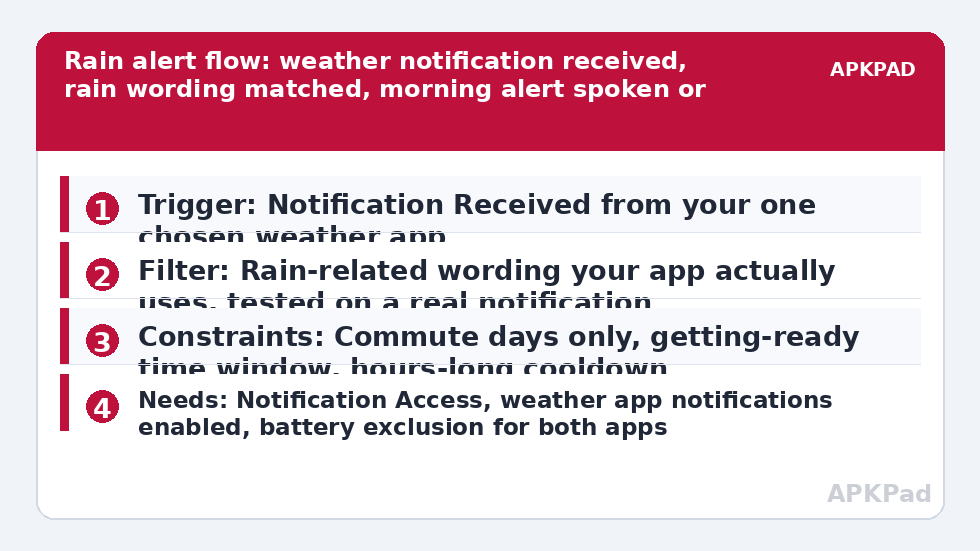
- Choose one weather app or service you trust and enable its morning or severe-weather notifications for your home location, with permission for it to show notifications. Keep only one source active for this macro so conflicting forecasts do not double-alert you.
- Create a MacroDroid macro with the trigger Notification Received, selecting your weather app, and add a text filter for rain-related wording your app actually uses, such as rain, showers or thunderstorms. Test the filter against a real notification from the app before relying on my example words.
- Add your alert actions: a clear Notification of your own with the wording Leave with an umbrella today, and optionally a Speak Text version for when you are getting ready away from the screen.
- Add constraints: Day of Week for commute days, and a Time of Day window covering the hours when getting-ready alerts help. A rain notification at midday should not trigger a commute routine.
- Add a cooldown so an app that updates its notification three times in an hour alerts you once. Macro Not Invoked in the last few hours suits a morning checkpoint.
- Save and observe for a week of real weather. Compare each alert against what actually happened on your route and tune the wording filter, not your trust in the whole idea, when a false alarm appears.
If your weather app offers no useful notifications, use the fallback honestly: a timed macro that launches the weather app to its forecast screen and speaks Check the forecast before you leave. That is less automatic and still valuable, because the habit, not the technology, is what keeps you dry. The departure side of the morning connects to building a commute mode that auto-texts your ETA when you leave work for the evening return, and to building a sunrise wake-up routine if you want the weather check woven into waking rather than leaving.
Permissions, data and honest limits
- Notification Access: required for the Notification Received trigger to read your weather app’s alerts.
- Notification permission for MacroDroid itself: needed so your own rain alert can be posted prominently.
- Location permission: needed by your weather app for local forecasts. MacroDroid only needs location if you add location constraints of your own.
- An internet connection at checkpoint time: forecasts cannot update on a phone that has been offline all night, whatever the macro does.
Forecasts are probabilities, and coastal, mountain and fast-changing climates produce honest misses. Phrase your alert wording as a prompt, carry the umbrella on genuinely uncertain days, and never build safety decisions, flood risk, cycling in storms, or work-at-height choices, on a phone notification alone. Official weather warnings from your national service always outrank this convenience macro. More everyday trigger patterns, including place-based ones, are collected in the Macro Triggers category, reachable from the APKPad homepage, and the arrival logic in geofenced location triggers for smart home routines pairs well when you want a wet-commute routine on the way home too.
Reducing false alarms until the alert stays trusted
An alert that cries rain three dry mornings in a row gets muted on the fourth, which is always the wettest. Tighten the filter words gradually: require rain wording plus your morning window, then observe. Remove broad words that your app uses loosely, such as cloudy, and keep words tied to actual precipitation in that app’s own style. Keep a week’s mental log before changing anything, because one odd morning is weather being weather, not a broken macro.
If spoken alerts suit your mornings better than banners, the sound discipline in smart notification sound triggers for priority contacts shows how to make one alert stand out without making every notification loud. Also separate rain from severe weather in your mind. This guide is about commute comfort. If your region has genuine storm, flood or heat warnings, enable your weather service’s official severe alerts separately and let them bypass your quiet hours under Android’s own rules. Do not filter, delay or duplicate official warnings through a homemade macro chain.
Why alerts stop arriving, and the fix that matters most
When a working rain alert goes quiet, check the weather app’s notification permission and battery treatment first, because a weather app that is itself put to sleep cannot post the notification your macro listens for. Then check the classic MacroDroid cause: OEM battery management killing MacroDroid in the background overnight, so the morning notification arrives while MacroDroid is frozen and the reaction never runs.
Apply the fix to both apps. Set MacroDroid and your weather app to Unrestricted battery use in Android Settings, Apps, Battery. Remove both from Sleeping apps on Samsung, set No restrictions and enable Autostart on Xiaomi where applicable, or allow background activity in your manufacturer’s manager. Restart, then wait for a genuinely rainy morning during your test period rather than declaring success on a dry week. Check the MacroDroid log after each weather notification to confirm the trigger fired and whether the time or day constraint blocked it as designed.
Frequently Asked Questions
Does MacroDroid have its own built-in weather forecast?
No. MacroDroid reacts to a weather source you choose, such as a weather app’s notifications, or it can fetch from a service through an HTTP request if that service offers a suitable feed. The forecast quality, location accuracy and wording all come from that source, which is why this guide builds around one trusted provider.
Why did I get a rain alert on a completely dry morning?
Either the forecast itself was wrong for your exact route, which happens, or your text filter matched loose wording such as a small chance of rain mentioned in a longer summary. Tighten the filter to your app’s definite precipitation wording, keep the morning time window, and judge the macro over a week of weather rather than one morning.
Can the alert speak instead of showing a notification?
Yes. Add a Speak Text action with a short sentence such as rain is expected this morning, take an umbrella. Keep it brief and place it inside your getting-ready time window only, so a forecast update at another hour does not start the phone talking unexpectedly.
Should I rely on this macro for severe weather safety?
No. This is a commute-comfort prompt built on a consumer forecast. For storms, flooding, extreme heat or other dangerous weather, follow official warnings from your national weather service and local authorities, and enable their alerts directly rather than filtering them through MacroDroid.
What should I check first when the rain alerts stop?
Check battery management for both MacroDroid and your weather app, then notification access. Set both apps to Unrestricted battery use, review your manufacturer’s sleeping apps or autostart list, confirm MacroDroid still has Notification Access, and watch the log on the next rainy morning.