The simplest high-value automation in this whole category is to disable mobile data wifi screen off macrodroid-style: radios sleep when the screen sleeps. It is also the automation most people abandon within days, because the naive version — toggle instantly at screen-off, restore at screen-on — punishes every glance at the lock screen with a reconnection stall. This guide builds the version that survives contact with real life: delayed, constrained, and instantly reversible.
Why Radios Cost Battery When You Are Not Using Them
A radio that is on is not idle. The Wi-Fi chipset scans periodically and maintains association; the cellular modem listens to paging channels and, in marginal coverage, repeatedly negotiates with the tower at higher transmit power. None of this shows as an “app” in battery stats, which is why radio drain confuses people — it appears as Android System or simply as overnight loss. Cutting radios during genuine idle periods is one of the few macro strategies with a real, repeatable effect: typically a few tenths of a percent per hour, which compounds over nights and weekends.
Build the Two Macros That Disable Mobile Data and Wi-Fi
| Element | Radios Off | Radios On |
|---|---|---|
| Trigger | Screen Off | Screen Unlocked |
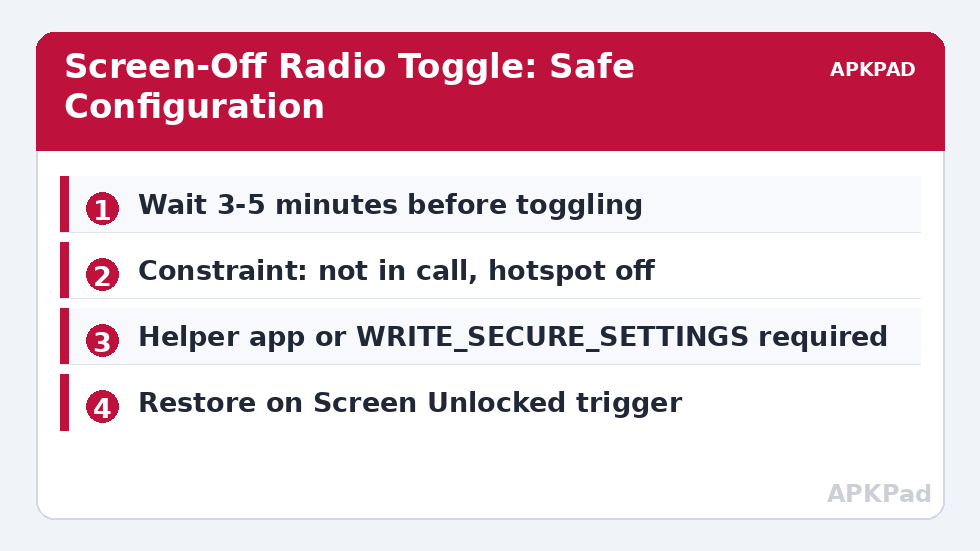
| Actions | Wait 4 minutes → if screen still off: Wi-Fi Off, Mobile Data Off | Wi-Fi On, Mobile Data On |
| Constraints | Not in a call; hotspot inactive; not charging; not connected to a Bluetooth audio device | None |
The Wait action is implemented as an action, and the “screen still off” check as a constraint placed on the toggle actions themselves, so a quick screen-on cancels the sequence naturally. The Bluetooth constraint deserves attention: if you fall asleep listening to a podcast over Bluetooth with the screen off, killing Wi-Fi mid-stream is harmless, but some users also toggle Bluetooth in the same macro — do not, unless disconnecting your headphones is the goal.
How to read this: the estimate adds a small always-on idle cost for MacroDroid itself (about 0.4% of battery per day) to a per-class daily cost for each trigger type you use, scaled slightly by how many macros you run. These are planning estimates from that transparent model — not measurements from your phone. Use them to compare setups before you build, then confirm against the real numbers under Android Settings → Battery.
The Permission Problem Nobody Mentions
On a stock, unrooted phone running Android 10 or newer, MacroDroid cannot always toggle these radios by itself. Wi-Fi toggling usually works via the Helper app; mobile data toggling on many builds requires WRITE_SECURE_SETTINGS granted through ADB, or root. If neither is present, the macro runs, reports success in the log, and the radio stays on — check MacroDroid’s system log after your first test and confirm the state actually changed by watching the status bar icons. Our complete idle drain routine uses this same pair as its foundation, and the battery hacks collection covers the cases where you should not do this at all.
Edge Cases That Break the Naive Version
Downloads and updates. A 2 GB game download paused mid-transfer because the screen timed out wastes more energy restarting than it saves. Add a constraint: do not toggle while a download is active — MacroDroid can approximate this with a “data transfer in progress” style check, or you can exempt the macro during a manual “download mode” variable you set from a widget button.
Wi-Fi calling. If your carrier routes calls over Wi-Fi and your cellular signal is weak indoors, killing Wi-Fi can make you miss calls. The not-in-call constraint protects active calls, not incoming ones. Wi-Fi calling users should toggle mobile data only, or exempt their home network by SSID.
Wearables and smart home. A Wear OS watch relays notifications through the phone’s connection. Radios off means a silent watch. For most people that is the intended night-time behaviour; if it is not, drop the mobile-data toggle and keep data on.
How Much Does It Actually Save?
Measured honestly across typical devices: phones in strong-signal areas save little (radios were already efficient); phones in weak-signal homes save the most, sometimes cutting overnight drain nearly in half. Expect somewhere in the 0.2–0.8% per hour range while idle. Anyone quoting a flat “30% more battery” without stating signal conditions is guessing.
Refinements: SSID Exemptions and the Five-Minute Rule’s Cousins
Two refinements lift this macro from decent to invisible. The first is a home-network exemption with a twist: instead of a blanket Wi-Fi-off, check the connected SSID before toggling. At home, where Wi-Fi is fast, free and often carries your calls, many users keep Wi-Fi on and toggle mobile data only; away from home, both go off. MacroDroid’s Wi-Fi SSID trigger and constraints make this a two-line change with a disproportionate effect on how “smart” the setup feels. The second refinement borrows from the sync window idea: rather than radios snapping back only at unlock, allow one brief mid-idle window — radios on for two minutes every couple of hours — so long sleeps still accumulate messages quietly. Phones on bedsides overnight are the usual beneficiary; the cost is a sliver of the saving, the benefit is a lock screen that is not a dam breaking at 7 a.m.
Troubleshooting the Three Complaints Everyone Has
“Unlocking feels slow now.” What you feel is radio re-association, worst on congested home Wi-Fi. Mitigate by restoring Wi-Fi on Screen On (not waiting for unlock), so association overlaps your glance at the lock screen — perceived lag nearly vanishes. “A specific app complains about no connection.” Some apps (banking, DRM media) react badly to waking offline. You cannot exempt an app from a radio state, so the answer is scheduling: if that app matters at predictable times, add a time constraint that keeps radios on during that window. “The macro stopped working after an update.” Updates reset ADB-granted permissions on several OEM builds. Re-grant, and add a monthly calendar note to sanity-check the macro after system updates — the same maintenance rhythm our benchmark guide prescribes for verifying any saving is still real.
A Note on Dual SIM and eSIM Phones
Dual-SIM phones add a wrinkle the single-SIM guides skip: “mobile data off” applies to the data-designated SIM, while the other SIM stays attached for calls and texts — which is usually exactly what you want, but it means the standby drain of the second line persists, and in weak-signal areas that second registration can be a meaningful share of what remains after this macro. If you carry a second SIM purely as a spare number, consider whether it needs to be active overnight at all; some builds let MacroDroid’s airplane-mode-adjacent settings or a scheduled SIM toggle (heavily OEM-dependent) rest it, and where no toggle exists, the honest options are a manual habit or acceptance. Also note that data switching between SIMs — some phones fail over data to the stronger SIM — can confuse a macro that assumes a fixed data line; test the toggle with both SIMs present and watch which line actually sleeps. The principle is unchanged: verify on your hardware, because dual-SIM radio behaviour is the least standardised corner of Android telephony.
Frequently Asked Questions
Do I need root to toggle mobile data with MacroDroid?
Not necessarily. Many devices accept the toggle with the MacroDroid Helper app installed; others require WRITE_SECURE_SETTINGS via ADB. Only some locked-down OEM builds truly need root. Test with the screen on and watch the status bar to see whether your device complies.
Why add a delay instead of toggling immediately?
Because you turn the screen off briefly many times a day. Each toggle cycle costs a reconnection burst; instant toggling can use more energy than it saves and makes unlocking feel laggy while radios re-associate.
Will this stop my WhatsApp messages arriving?
While both radios are off, yes — nothing can arrive. Messages deliver when you unlock, or during any sync window you have configured. If that delay is unacceptable, toggle Wi-Fi only and leave mobile data on.
Does the macro drain battery by monitoring the screen?
Screen on/off is an event broadcast by Android, not a polled sensor. Listening for it costs effectively nothing — unlike, for example, a light-sensor trigger checking every few seconds.
What happens if I am using the phone as a hotspot?
The hotspot constraint prevents the toggles while tethering is active. Without that constraint you would disconnect every tethered device each time the screen sleeps — the most common complaint about this macro pattern.