Meetings, dinners, and library desks all share the same small social ritual: a call comes in, and you turn the phone face down to silence it without fumbling for buttons or rejecting the caller outright. Building a flip phone screen down mute calls macrodroid automation makes that gesture reliable even on phones whose built-in flip-to-mute is missing, inconsistent, or buried in a gesture menu that an update quietly reset. The caller hears normal ringing, you get instant quiet, and nobody across the table watches you interact with the phone at all.
This guide belongs to the Macro Triggers series. It combines well with auto-rejecting calls during calendar meetings, which handles the calls you never want to ring, and with smart notification sounds for priority contacts, which handles the callers who should break through anyway.
What the flip phone screen down mute calls macrodroid gesture should do
Precision matters in the wording here: mute, not reject, and not answer. Rejecting sends the caller to voicemail immediately and can look deliberate if they are watching their screen. Answering by accident is worse. Muting simply stops the audible ring and vibration on your side while the call continues to ring normally for the caller until they hang up or voicemail takes over on its usual timing. That is exactly what MacroDroid’s volume and silent-mode actions are good at, provided the trigger understands the difference between a phone already face down on a desk for an hour and a phone actively flipped during a ring. That distinction is the whole design problem, and the next section solves it with the constraint layer rather than the trigger alone.
Macro breakdown: trigger, actions and constraints
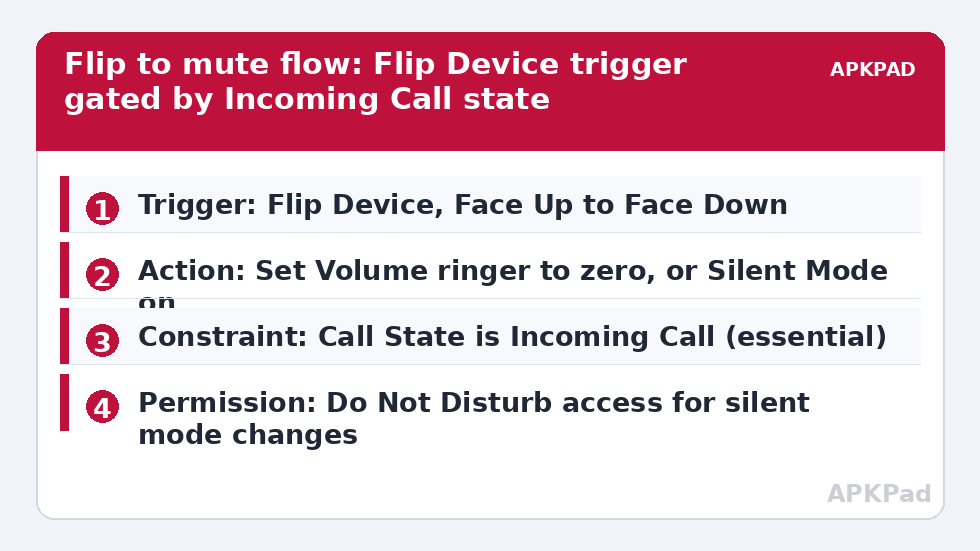
| Trigger | Flip Device trigger (Face Up to Face Down) as the primary trigger. Alternative on devices where it behaves better: Device Facing Down trigger. Pair either with the constraint below so it only matters while a call is ringing. |
| Actions | Set Volume for the ringer stream to zero, or Silent Mode action to enable silence, or Vibrate Mode off plus ringer volume down if you want haptics gone too. Many users add a short Wait then a low Vibrate confirmation. Do not use Answer Call or End Call actions here. |
| Constraints | Call State constraint set to Incoming Call (ringing). This is the essential constraint. Optional: Time of Day, Location, or MacroDroid Mode constraints if the gesture should only apply at work or in meetings. |
Without the Call State constraint, a Device Facing Down trigger fires constantly in pockets, on sofas, and on every desk, constantly reapplying silent mode long after the call ended and leaving you wondering why the phone never rings anymore. With the constraint, the macro becomes a single-purpose instrument: it can only act in the few seconds a call is ringing, and outside those seconds it is physically incapable of changing your volume. That narrowness is a feature. Guard it when you later edit the macro.
Building the gesture
-
Create a new macro and add the Flip Device trigger, choosing the Face Up to Face Down direction. If your version of MacroDroid or your phone’s sensors make Flip Device unreliable in testing, remove it and use Device Facing Down instead. Both are real MacroDroid triggers in the Sensors area; choose by test results on your hardware, not by name preference.
-
Immediately add the Call State constraint, set to Incoming Call. Add it before the actions, as a reminder to yourself that this macro lives or dies by that constraint.
-
Add the action Set Volume, choose the ringer and notification stream, and set it to zero. Alternatively add the Silent Mode action and set it to On. The volume route is more explicit and easier to restore; the silent mode route is closer to what a physical mute switch does. Pick the volume route if you plan to add the restore macro below, since restoring a known volume value is simpler than tracking mode state.
-
Decide about vibration. A muted ring with full vibration on a wooden table is not muted in any social sense. Add the Vibrate Mode or ringer vibration control your MacroDroid version exposes alongside the volume action, so the flip produces real quiet, not relocated noise.
-
Save and test properly: have someone call you while the phone lies face up on a table, let it ring once so you know the call is live, then flip it in one natural motion. The ring should stop within about a second, the call should remain on screen, and the caller should report that it kept ringing at their end.
How to read this: the estimate adds a small always-on idle cost for MacroDroid itself (about 0.4% of battery per day) to a per-class daily cost for each trigger type you use, scaled slightly by how many macros you run. These are planning estimates from that transparent model — not measurements from your phone. Use them to compare setups before you build, then confirm against the real numbers under Android Settings → Battery.
Restoring sound after the call
Muting is only half the job, because a ringer left at zero will silently swallow the next call too, possibly an important one. Build a small companion macro: trigger Call Ended, or more precisely Call State changing to No Call, with the action Set Volume restoring the ringer stream to your normal level, for example seventy percent. That hard-coded restore value is a compromise worth understanding. MacroDroid variables let you store the ringer volume at the moment of the flip and restore exactly that value afterwards, which is the polished version: in the mute macro, save the current ringer level into a user variable before setting it to zero, and in the restore macro, set the volume from that variable. Start with the fixed value, graduate to the variable once the basic gesture is proven, and test the restore path as carefully as the mute path, including the case where the caller hangs up quickly and the case where the call goes to voicemail.
Permissions, and the failure that bites everyone
This macro needs MacroDroid to be able to change volume and mode, which on modern Android means Do Not Disturb / notification policy access if you use Silent Mode in a way that touches the DND state. Grant it when Android prompts, in the Notification Policy / Do Not Disturb Access settings, for MacroDroid specifically. Phone state reading for the Call State constraint uses the phone state permission MacroDroid requests. No step in this guide needs the MacroDroid Helper app, no step needs an ADB grant of WRITE_SECURE_SETTINGS, and nothing needs root or device admin. The number one reason the macro fails is OEM battery management killing MacroDroid in the background. Sensor triggers are cheap, but a frozen MacroDroid process registers no flip at all, so the gesture does nothing exactly when the phone has been sitting idle in the meeting for an hour. The fix is to exclude MacroDroid from battery optimisation in Android settings and to also allow autostart and unrestricted battery use in your OEM’s own battery menu, because Samsung, Xiaomi, Oppo, Vivo, and others run both layers. Retest after the phone has sat untouched for half an hour, not straight after setup.
Sensor reality checks
Flip detection uses the accelerometer and, on some phones, the proximity sensor, and both have personalities. Thick cases, magnetic mounts, and charging stands can confuse orientation or hold the phone at an angle that never registers as face down, so test with your real case on your real desk. Also test the phone sliding face down in a bag while ringing: that case is genuinely ambiguous, and most users accept it because a bag-muted call behaves like a missed call, not a rejected one. On a foldable, test it open flat and closed, because detection can differ between forms.
Frequently Asked Questions
Will flipping the phone reject the call or send it straight to voicemail?
No, not with the actions in this guide. Setting the ringer volume to zero or enabling silent mode only silences your side. The caller keeps hearing normal ringing until they hang up or your voicemail answers on its usual timing. Only an End Call or reject action would change the caller’s experience, and this macro deliberately contains neither.
Why does the flip work sometimes and do nothing other times?
The usual cause is OEM battery management freezing MacroDroid after the phone has been idle, so the sensor trigger never registers. Exclude MacroDroid from battery optimisation, allow autostart and unrestricted battery in the OEM menu, then test after the phone has sat untouched for at least half an hour. A thick case confusing orientation is the second most common cause.
How do I get my ringtone volume back after the call ends?
Build a companion macro triggered by the call ending, with Set Volume restoring the ringer stream to your normal level. The refined version stores your ringer volume in a MacroDroid variable at the moment you flip, then restores that exact stored value afterwards, so a phone that was on low volume before the call returns to low, not loud.
Should I use the Flip Device trigger or Device Facing Down?
Start with Flip Device set from Face Up to Face Down, because it describes the actual gesture during a ring. If testing on your phone shows it missing flips or firing late, switch to Device Facing Down and keep the same Call State constraint and actions. Judge purely by repeated tests on your own desk, with your real case fitted.
Does this work if the phone is already face down when the call arrives?
Not with the Flip Device trigger, because no flip happens during that call, and honestly it does not need to: a phone face down in your pocket or bag is a separate scenario. If you want pre-muted behaviour for desk hours, handle that with a time or meeting routine instead of stretching this gesture macro beyond the job it does well.