There is a specific, sinking moment parents and carers know: you call your teenager, your partner on a long drive, or an older relative, the phone rings out, and later you learn it simply died hours earlier with nobody aware. An automated low battery alert messages macrodroid setup on that person’s own phone fixes the awareness gap: when their battery crosses a threshold they agreed to, their phone sends a short text from their own number to a family member they chose, saying the battery is low and they may soon be unreachable. It is opt-in, set up with the phone owner’s knowledge, sent to family contacts the owner picks, and it stops the worry spiral before it starts.
That framing — the owner sets it up, family receives it, one message at a chosen threshold — is also what keeps this macro sensible and welcome rather than annoying. Nobody wants five texts as a battery dribbles from twenty percent to five, and nobody wants an alert sent to the wrong person at three in the morning. So the design work here is mostly restraint: pick one threshold that leaves time to act, send one clear message per discharge cycle, and pick recipients who would genuinely rather know. Get those three choices right and the macro itself, built on MacroDroid’s Battery Level trigger and Send SMS action, takes ten minutes.
Designing automated low battery alert messages macrodroid alerts that people welcome
Choose the threshold by thinking about what the recipient can do with the information. An alert at twenty percent, on most phones, means an hour or more of light use remains — enough for the owner to find a charger, send their location, or make the important call first. An alert at five percent is a farewell note; by the time anyone reads it, the phone is likely off. For a child’s phone, twenty percent works well. For a partner on a long drive with a car charger, fifteen percent may be the realistic point where the battery should not be there at all. Avoid stacking multiple thresholds for multiple messages unless a second, truly final warning at a much lower level adds real value for your family; if you do add one, make its wording different so the recipient can tell a heads-up from a last call.
| Component | MacroDroid setting |
|---|---|
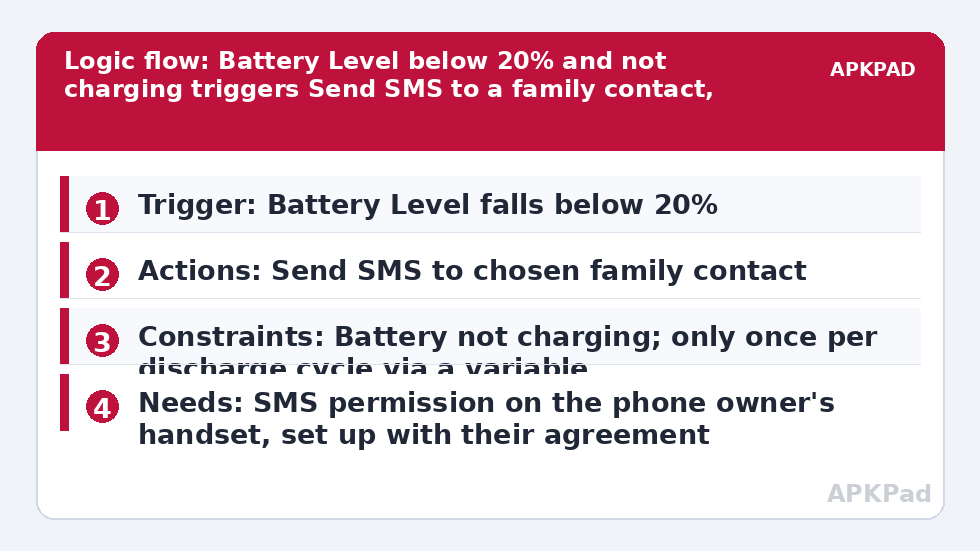
| Trigger | Battery Level — falls below your chosen level, for example below 20% |
| Actions | Send SMS to the chosen family contact with a short agreed message; optional second Send SMS to a second family member |
| Constraints | Battery not charging; only once per discharge cycle using a variable or macro-run constraint so the alert does not repeat; optional Time constraint if the family prefers no overnight alerts except at a critical level |
The charging constraint is easy to overlook and important. A phone sitting at eighteen percent but plugged in is recovering, not dying, and alerting the family about it trains them to ignore the messages. The Battery Level trigger plus a not-charging check keeps alerts meaningful. Similarly, the once-per-cycle logic matters because battery percentage hovering around a threshold — nineteen, twenty, nineteen as temperature and load change — can otherwise re-trigger the macro repeatedly.
How to read this: the estimate adds a small always-on idle cost for MacroDroid itself (about 0.4% of battery per day) to a per-class daily cost for each trigger type you use, scaled slightly by how many macros you run. These are planning estimates from that transparent model — not measurements from your phone. Use them to compare setups before you build, then confirm against the real numbers under Android Settings → Battery.
Permissions the macro needs on the owner’s phone
Build this on the phone that will send the alert, which means obtaining that owner’s agreement and unlocking their phone with them present — this is a tool a family sets up together, not something to install on someone’s handset without their knowledge. MacroDroid on that phone needs SMS permission to use Send SMS, and Contacts permission if you want to pick the recipient from the address book rather than typing the number. Sending a text from the owner’s own SIM also means the message costs whatever their plan charges for a normal text, usually nothing on modern plans, and arrives as an ordinary message from a number the family recognises, which is exactly why it works better than an app notification they might have muted.
Reliability on someone else’s phone deserves extra care, because you will not be there to notice failures. The number one reason it fails is OEM battery management killing MacroDroid in the background — a Battery Level trigger in a dead app alerts nobody. On the owner’s phone, exclude MacroDroid from battery optimization, set it to Unrestricted, enable the OEM autostart settings if the brand has them, and then run a real discharge test over the following day rather than assuming your setup survived. Also check that MacroDroid’s SMS action does not require the Helper app or an additional grant on that particular handset; where telephony-related actions prompt for the Helper or a permission at setup, complete that step with the owner at that moment and retest, because handsets vary more than guides admit.
Building the alert macro together
- On the owner’s phone, add a macro with the Battery Level trigger and set it to fire when the level falls below your agreed threshold, such as 20 percent.
- Add the Send SMS action, select the family recipient, and write a short message in the owner’s voice, for example: My battery is under 20 percent and my phone may go off soon — I am fine, will charge it as soon as I can.
- Grant SMS permission when MacroDroid prompts for it.
- Add a constraint so the macro does not run while the battery is charging.
- Add once-per-cycle protection: use a MacroDroid variable that the macro sets when it sends, with a constraint that the variable must be unset, and a second small macro or trigger at a high battery level, such as above 80 percent or when charging starts, that clears the variable ready for the next discharge.
- Save the macro and test by setting a temporary high threshold, such as below the current level plus a margin, letting it fire once, then restoring the real threshold.
That temporary-threshold test is the honest way to verify the whole chain — trigger, permission, SMS delivery — without waiting days for a natural low battery. Ask the recipient to confirm the text arrived and that the wording makes sense to them, then put the threshold back and double-check it, because a test value left in place is the classic reason families get a strange alert the next afternoon at sixty percent.
Wording, recipients, and family etiquette
Write the message as the owner, addressed to someone who cares about them, and include the one fact that prevents panic: that they are fine and simply may become unreachable. If the phone is a child’s, agree the wording with the child so the alert feels like a safety net they control rather than surveillance — they chose the recipient, they can change the threshold, and they can disable the macro, and knowing that makes teenagers far more likely to leave it running. Keep recipients to one or two family members who will actually act calmly on the information. More recipients means more replies, more group worry, and more pressure on the person whose phone is dying. If a second relative needs to know, the first recipient can forward the news like a human; automation does not need to.
Related setups often grow from this one, and the wider Macro Triggers library has the natural companions: automatic photo backup when charging starts pairs well because a phone that is charging is a phone that can back up, and a voice alert when charging stops helps the same forgetful moments from the other side. If your real worry is a family member driving, look at reading messages aloud while driving rather than adding more alerts to this macro.
When alerts are not enough
Be clear-eyed about the limit of this tool: it sends one text and then the phone may die anyway. It does not share location, it does not extend battery life, and it does not replace the boring, effective habits — a power bank in the school bag, a charger in the car, a ten-second battery check before leaving. Some families add a location link habit to the message exchange manually, where the owner, on receiving their own low-battery warning, chooses to share location with family before the phone fades. Keep that choice manual and in the owner’s hands. The macro’s job is timely awareness, done once, politely, and it does that job well when battery optimization has been dealt with and the threshold, wording, and recipients have been agreed by everyone involved.
Frequently Asked Questions
How do I stop the alert sending over and over as the battery hovers near the threshold?
Use once-per-cycle logic. Set a MacroDroid variable when the alert sends and add a constraint that the macro only runs while that variable is unset, then clear the variable with a second trigger when the battery is well charged again, so each discharge cycle produces a single alert.
Does the alert cost money or need an internet connection?
It is an ordinary SMS sent from the phone owner’s own number, so it costs whatever their plan charges for a standard text, which is typically nothing on modern plans. It does not need mobile data or Wi-Fi, which is useful because a dying phone may already have patchy connectivity.
Should I set up this macro on my child’s or relative’s phone without telling them?
No. Set it up together with the phone’s owner, let them choose the recipient, threshold, and wording, and make sure they know they can change or disable it. Apart from being the right thing to do, an alert the owner resents will simply be switched off.
Why did no alert arrive when the battery ran low?
The usual causes are OEM battery management killing MacroDroid in the background, SMS permission not granted, or the phone being on charge at the threshold so the not-charging constraint correctly blocked it. Exclude MacroDroid from battery optimization on that handset and run a temporary-threshold test to verify delivery.
What battery percentage is the best threshold?
Around 20 percent suits most people because it leaves time to find a charger, make a call, or tell family where they are. Much lower and the phone may die before anyone acts on the message; much higher and alerts become routine noise that family learns to ignore.