You landed at midnight, slept, and your 07:00 routine fired at 03:00 — or politely waited until 11:00. To fix time triggers wrong timezone macrodroid problems, start from an uncomfortable truth: MacroDroid almost certainly fired exactly when the phone told it to. Time triggers are scheduled against the system clock and the system time zone, so a wrong-hour macro after travel is usually a phone that still believes it is somewhere else, with the macro as the messenger.
Measure the error before fixing it. If the trigger fired early or late by a round number of hours — exactly the difference between home and where you travelled — the zone is the suspect. If it fired late by minutes, or in a clump with other macros when you picked the phone up, that is sleep batching, a different fault covered by the delayed triggers in Doze guide. Open Settings, look at the time zone the phone currently claims, and compare it with the city you are standing in. That one comparison decides which half of this article applies to you.
Why the Hour Is Wrong: Causes in Order
Travel exposes time settings that sit quietly wrong for months at home. These are the causes, from the phone-level faults that affect every trigger to the macro-level one that affects a single routine.
- Automatic time zone off: the phone kept the zone it was manually set to, or the last network zone, and never adopted the destination’s zone on landing.
- Network zone not received: some carriers and Wi-Fi-only situations never broadcast a zone, so even an automatic setting has nothing to adopt until a restart or a network change.
- Automatic time off with a drifted clock: a manually set clock that was wrong by the flight duration stays wrong, and triggers follow it exactly.
- A hard-coded offset inside the macro: a Wait or a time calculation adjusted by hand while abroad keeps applying the foreign offset after you return home.
- Doze batching mistaken for a zone error: the trigger fired at the right hour but minutes late, or was released with a batch on wake, which feels like a scheduling fault but is a power one.
Fix Time Triggers Firing at the Wrong Hour
The fix is mostly a settings correction plus one honest overnight test. Resist editing each macro’s times to compensate — that bakes today’s error into every routine and guarantees the same problem in reverse on your next trip.
Step 1: Correct the Phone’s Time and Zone State
Open Settings, search for Date & time, and turn on both automatic date and time and automatic time zone. Read the zone the phone now displays and confirm it names your current region, not your departure city. If both automatic options were already on and the zone is still wrong, toggle aeroplane mode on for thirty seconds and off again to force a fresh network registration, and restart the phone if the zone still refuses to move — some builds only re-read the zone at boot or on a fresh cell registration. Travellers who cross zones with the phone off should expect the correction to land a few minutes after the first unlock, not instantly.
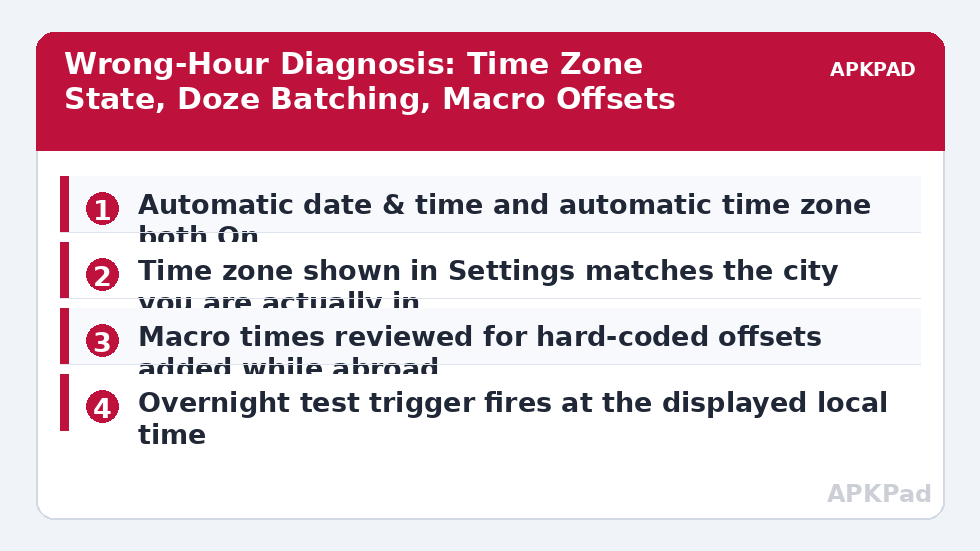
- Automatic date & time: On.
- Automatic time zone: On, and the displayed zone matches your current city.
- If stale: aeroplane mode cycled once, or a restart, then the zone re-read.
- Clock checked against a known-correct local time source.
How to read this: the estimate adds a small always-on idle cost for MacroDroid itself (about 0.4% of battery per day) to a per-class daily cost for each trigger type you use, scaled slightly by how many macros you run. These are planning estimates from that transparent model — not measurements from your phone. Use them to compare setups before you build, then confirm against the real numbers under Android Settings → Battery.
Step 2: Remove Travel Offsets From Your Macros
Search your time-sensitive macros for anything you adjusted while away: trigger times you moved by hand, Wait actions standing in for a zone difference, or variables storing an offset. Restore trigger times to the local times you actually mean, and delete manual offsets entirely. If one macro genuinely must follow another city’s clock — a report that runs on a foreign server’s morning — rebuild that single macro to calculate from the zone explicitly and label it clearly in its name, so a future you does not mistake it for a bug. Documenting the exception is the fix; the rest of your macros should be pure local time with no arithmetic.
- Time triggers restored to intended local times.
- Hand-added hour offsets and compensating Waits deleted.
- Foreign-zone macros, if any, renamed to say so and calculated from the zone.
Step 3: Rule Out the Sleep Layer Before You Blame the Zone
With the zone correct, run one trigger while the phone is awake: if it fires on the minute, scheduling is healthy. Then check the power layer that creates the minutes-late pattern: MacroDroid’s battery setting should be Unrestricted, and on Android 12 and later the Alarms & reminders special access should be allowed, because that permission is what lets time triggers claim exact timing rather than a maintenance window. Samsung’s Never sleeping apps list and MIUI’s Autostart are the usual OEM additions. This is the same ground as the battery optimisation exclusion reset guide, and a major update on a trip is a classic moment for those exclusions to be quietly reset.
- MacroDroid battery: Unrestricted / No restrictions per brand.
- Alarms & reminders access allowed for MacroDroid on Android 12+.
- Awake test trigger fires exactly on the minute.
Verify the Fix: An Overnight Test You Do Not Touch
Create a test macro set for an unusual minute tomorrow morning — 06:47 is better than a round hour because you will recognise it in the log — with a Speak Text action and a log entry. Leave the phone locked, unplugged if that is your normal habit, and untouched overnight. In the morning, compare three things: the time the action actually happened, the timestamp in the System Log, and the zone displayed in Settings. All three should agree in your current city. Then cross-check a second routine that matters, such as your wake-up macro, for one more day before deleting the test. Travellers who hop zones weekly should repeat the check after the next landing rather than assuming the fix travels. The APKPad homepage and the Fixes & Errors index gather the related scheduling guides, and if the corrected clock reveals your announcements now arrive twice, the sibling guide on macros running twice deals with the doubled delivery.
When This Fix Won’t Work
A few situations sit outside MacroDroid’s reach. A phone on a network that never broadcasts a zone, used in a region the build’s zone database maps poorly, may need its zone set manually after each move — in which case the discipline is the fix, not a setting you set once. Employer-managed devices can pin time settings by policy. Dual-clock home screens and widgets can display a second city’s time and make a correct trigger look wrong, so always judge by the System Log timestamp and the Settings zone, not by a widget. And if triggers are late by unpredictable minutes rather than exact hours, stop chasing zones entirely: that is power management, and it will still be there after every time setting is perfect.
Frequently Asked Questions
Why did my time triggers fire at the old country’s time after my flight?
Because the phone itself was still on the old time zone — the network had not pushed the new zone, automatic time zone was off, or the change only registered after a restart. MacroDroid schedules against the system clock and zone, so when the system zone is stale, every time trigger is faithfully wrong by exactly the zone difference.
Should MacroDroid triggers use automatic time zone or a fixed zone?
For routines tied to your local day — wake-ups, work hours, medication reminders — automatic time zone is correct, because the routine should follow you. A fixed zone only suits a macro that must follow another city’s clock, such as a check-in aligned to a server abroad. Most travel problems come from the phone being fixed when the user expected automatic.
Why is my trigger late by minutes rather than hours after travel?
Minutes of lateness is a different fault from a wrong zone. That is Doze and alarm batching deferring the trigger while the phone sleeps, which travel merely made you notice. Check the Alarms & reminders permission and battery exemption, and compare against the delay pattern rather than changing time settings.
Do time triggers update themselves when I land?
They follow the system zone once the system zone actually changes. If the phone picks up the new zone on landing, the triggers fire at the new local time with no macro edits. If the zone never updates — aeroplane mode habits, a manual zone, or a network that does not broadcast it — the triggers keep the old zone until you correct the system setting.
My macro adds an hour offset for a server abroad. How do I stop it breaking at home?
Replace the hard-coded offset with a calculation from the current system zone, or gate the offset behind a condition that checks which zone or network you are on. An offset typed in while travelling is invisible in the trigger list, which is why it survives the trip home and confuses the next diagnosis.