A long gaming session drains a battery in two ways: the game itself, which is honest work you chose, and everything else competing underneath it — photo uploads starting, accounts syncing, group chats buzzing, a hotspot someone forgot. A macrodroid gaming session battery profile attacks only the second drain. It trims the background for the length of the session, then — and this is the part most profiles get wrong — it ends automatically and restores your normal phone the moment you stop playing.
Designing a macrodroid gaming session battery profile that restores itself
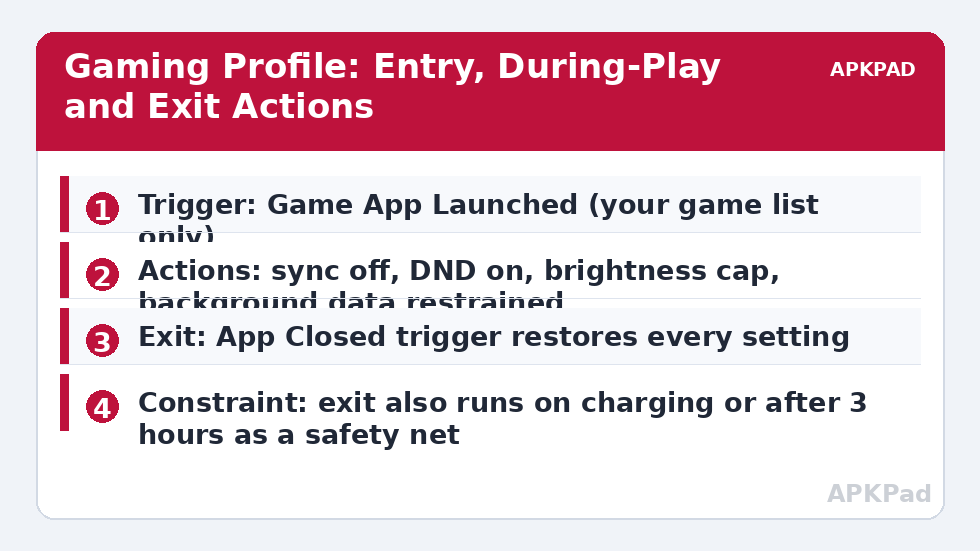
Every action in the entry macro must have a named opposite in the exit macro. Write the pairs down before you build: sync off pairs with sync on, Do Not Disturb on pairs with DND off, a brightness cap pairs with restoring your usual brightness mode. If an action has no clean opposite, leave it out of the profile. This pairing discipline is borrowed from the extreme saver at 15%, which also lives or dies by how cleanly it exits. A gaming profile you have to remember to undo is a profile you will delete after the first missed message.
Be honest about the size of the win, too. As a typical estimate, background restraint might save a few percent across a two-hour session compared with an unmanaged phone, varying by device and by how noisy your background apps are. The bigger prize is often smoothness and heat: fewer background jobs means fewer mid-game stutters and a slightly cooler phone, not a dramatically longer session.
How to read this: the estimate adds a small always-on idle cost for MacroDroid itself (about 0.4% of battery per day) to a per-class daily cost for each trigger type you use, scaled slightly by how many macros you run. These are planning estimates from that transparent model — not measurements from your phone. Use them to compare setups before you build, then confirm against the real numbers under Android Settings → Battery.
Step by step: the entry macro
- Create a macro named Gaming Profile On with an App Launched trigger listing only the games you actually play for long sessions.
- Add a short wait of 20–30 seconds, with a constraint that the game is still in the foreground, so a game opened by accident does not trigger the full profile.
- Turn auto sync off, and set Do Not Disturb to allow calls from your starred contacts only — games should mute group chats, not family emergencies.
- Cap brightness at a level you find comfortable indoors, or switch adaptive brightness off and set a fixed moderate level for the session.
- If you use a separate late-session rule, set a variable such as gaming_profile = on so other macros can see the state.
- Add constraints: do not run if the phone is already in your extreme low-battery mode, and do not change any radio state while a call is active.
Notice what is not in the list: killing apps. As our honest look at auto-killing background apps explains, force-closing everything triggers cold relaunches that cost energy and can restart the very downloads you wanted to stop. Restraint beats eviction.
The exit macro and the safety net
| Exit path | Trigger | Restores |
|---|---|---|
| Normal exit | Game app closed / no longer foreground | Sync, DND, brightness mode, profile variable cleared |
| Safety timer | Profile variable still on after 3 hours | Same full restore, plus a notification telling you it ran |
| Charging exit | Power connected during a session | Sync restored early; DND and brightness cap may stay |
| Low-battery handover | Battery falls to your emergency threshold mid-game | Gaming profile hands over to the extreme saver instead of stacking rules |
The safety timer matters because App Closed triggers are not perfect on every OEM build; aggressive phone managers can delay or swallow them. A three-hour backstop means the worst case of a missed exit is a few quiet hours, not a day of missing mail. Test the exit deliberately: open the game for one minute, close it, and confirm each setting returns before you rely on the pair for a real session.
Optional layers: heat, refresh rate and network
Add layers only when a real session shows a real problem. If the phone gets uncomfortably warm, pair the profile with the staged responses in our thermal protection guide rather than inventing your own temperature steps inside the gaming macro — one owner per job keeps troubleshooting sane. If you play an online game, do not toggle radios at all: a mid-match reconnection costs more than any saving. If you play offline, an optional step can disable mobile data for background apps, but keep it out of the default build. Refresh rate is the most requested layer and the most permission-bound: stepping 120 Hz down to 60 Hz at, say, 25% battery can stretch the end of a session as a typical estimate, but on many phones it needs WRITE_SECURE_SETTINGS granted via ADB, and some gamers would rather finish the match smoothly and charge sooner. Make it a separate macro gated on battery level, so you can remove it without touching the core pair. For longer trips, combine the profile with the charging-aware approach in deferring heavy tasks until charging, so the uploads your profile postponed run while the phone is plugged in at your destination. Browse the rest of the battery hacks collection from the APKPad home page for those companion pieces.
Permissions and limits to know up front
App Launched triggers need MacroDroid’s usage access or accessibility support to be reliable on many builds, and your phone’s own battery manager must not be killing MacroDroid in the background — exclude it from optimisation if sessions start but profiles never end. DND control requires notification policy access, which Android asks you to grant explicitly. None of these rules can protect unsaved game progress, and no profile should ever include actions that close the game itself; if a game is using cloud saves, also avoid cutting its network access mid-session, because a save that fails to upload is a loss no battery figure justifies.
Troubleshooting: sessions that start but never end
The profile starts, but nothing is restored afterwards. Check MacroDroid’s log for the exit macro: if it never fired, your OEM delayed the app-closed event — rely on the safety timer and shorten it. DND stays on. Your exit macro’s DND action may need the same notification policy access as the entry; test it manually. The profile fires when a game updates in the background. Tighten the entry wait and foreground constraint; a store update launching a component is not a session, and the 30-second foreground check exists precisely to filter it out.
Per-game tuning: not every title deserves the full profile
After a week with the generic profile, split it by game type. Competitive online titles get the full treatment — sync restrained, DND strict, network untouched — because a background upload spiking your ping is a real cost there. Single-player story games get a lighter version: DND and sync restraint, but no brightness cap, because visual quality is the point of the session and the battery cost of the display is one you chose knowingly. Puzzle and turn-based games that you play in ten-minute bursts should arguably have no profile at all; the entry wait will filter most sessions anyway, and adding machinery to a coffee-break game is automation for its own sake. Finally, review the profile after any major game update: titles change their background behaviour, add cloud features and shift their download patterns, and a profile tuned for last season’s version can quietly fight this season’s. The goal was never the most aggressive profile — it is the least profile that makes each kind of session feel clean.
Frequently Asked Questions
Will this profile improve my game’s frame rate?
Not directly. It reduces background competition for network and CPU, which can smooth stutters caused by sync or downloads starting mid-game, but it does not overclock anything or change how the game itself renders.
Why not just kill all background apps when a game starts?
Because blanket killing usually backfires: apps relaunch cold, costing more energy and sometimes restarting downloads or services mid-session. Restraining sync and data is safer, and you should never kill music, calls, chat overlays or anything holding unsaved work.
What if I forget the profile is on after a short session?
That is exactly why the exit macro matters. The profile is restored by the app-closed trigger, and a long-session safety timer restores it anyway, so a missed trigger cannot leave sync and notifications off all day.
Does capping refresh rate belong in a gaming profile?
Only as an optional late-session step. Many gamers would rather keep high refresh while battery is healthy and step down only at a low-battery threshold. Changing refresh rate may also need WRITE_SECURE_SETTINGS via ADB, depending on the device.
Can the profile tell two games apart?
Yes. Create the game list per title rather than one generic rule: a turn-based puzzle game needs almost no restraint, while an online shooter benefits from the full profile. Per-game lists keep light games free of unnecessary restrictions.