Using weekday weekend routine triggers macrodroid schedules is how one phone lives two honest lives: workdays that start early, guard your focus and end with a commute, and weekends that start slower, sound different and leave your work apps alone. MacroDroid’s Day/Time Trigger already knows the day of the week. The skill is in organising paired routines so weekday and weekend versions never fight each other.
Most people discover this need the annoying way. A 6:30 alarm routine fires on a Saturday. A strict work focus mode enables itself on a bank holiday. A gentle weekend volume profile stays active into Monday’s first meeting. None of these are MacroDroid faults; they are missing day constraints on otherwise good macros. This guide builds the day layer properly, as a system you can reuse across every routine you own.
Structuring weekday weekend routine triggers macrodroid profiles cleanly
Start by listing what actually differs between your weekdays and weekends. For most people it is four things: wake time, sound profile, which apps and notifications matter, and when the day winds down. Automate those differences and leave everything else shared. A brightness preference or a headphone safety net does not care what day it is, and duplicating day-neutral macros into weekday and weekend copies creates maintenance you will regret by the second month.
| Setting | Typical weekday version | Typical weekend version |
|---|---|---|
| Wake routine | Earlier Day/Time Trigger, full routine, commute checks | Later trigger or none, gentle volume, no commute actions |
| Sounds | Priority notifications, work contacts prominent | Family and friends prominent, work apps quiet |
| Wind-down | Earlier Do Not Disturb for a work night | Later DND, entertainment apps welcome |
Volume is a good example of a setting that often does differ: the per-app levels in automating media volume lowering for quiet apps may suit workday reading but feel too hushed for a weekend film, which is exactly the kind of difference a day pair should capture. Name every day-sensitive macro with its days in the title, such as Wake Weekday or DND Weekend On. Six months from now, reading the macro list should tell you the whole weekly pattern without opening a single macro.
How to read this: the estimate adds a small always-on idle cost for MacroDroid itself (about 0.4% of battery per day) to a per-class daily cost for each trigger type you use, scaled slightly by how many macros you run. These are planning estimates from that transparent model — not measurements from your phone. Use them to compare setups before you build, then confirm against the real numbers under Android Settings → Battery.
Build the weekday and weekend pair step by step
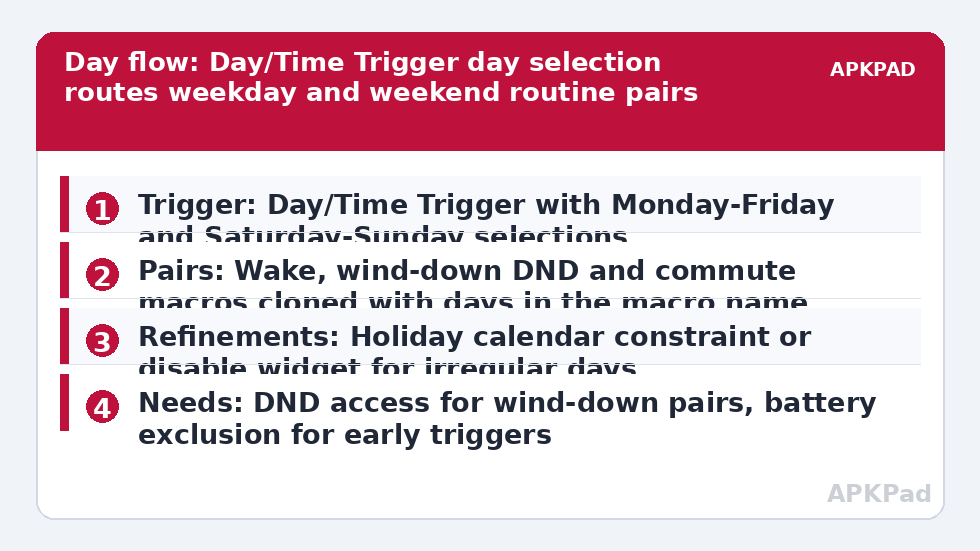
- Pick one routine to convert first, ideally your wake routine. Open its Day/Time Trigger and confirm the day selection covers Monday to Friday only, with your workday start time.
- Clone the macro. In the clone, change the trigger days to Saturday and Sunday, adjust the start time to your genuine weekend pattern, and soften or remove work-only actions such as commute checks or work app launches. Rename both copies immediately with their days included.
- Repeat the pairing for your wind-down routine: a weekday version that enables Do Not Disturb earlier, and a weekend version that enables it later, each with its matching morning release macro following the pattern in time-based Do Not Disturb routines on Android.
- Audit your existing macros for day blindness. Any macro with a fixed early time and no day selection is a Saturday accident waiting to happen. Add day selections to triggers, or day constraints to macros triggered by events rather than clocks.
- For event-driven macros, such as a leaving-home routine, add a Day of Week constraint where the behaviour differs, or clone the macro with day-specific actions if the difference is large, as in the commute build in commute mode that auto-texts your ETA when you leave work, which should never run on a weekend.
- Live with the pair for two full weeks, one log review per week, before converting the next routine. Weekly patterns reveal themselves weekly; a three-day test cannot validate a Saturday rule.
Notice that the sunrise build in building a sunrise wake-up routine with gradual volume and light already uses this exact day-selection approach for its fade, so if you built that guide first, this article is about extending its discipline across your whole macro list rather than learning a new trigger.
Bank holidays, shifts and irregular weeks
A rigid weekday-weekend split fits office rhythms and misfits everyone else a little. Shift workers should treat day selection as shift selection: build trigger sets around your rota days and name them by the shift, not by weekday labels that change meaning every fortnight. For bank holidays on an office schedule, the practical tool is a single holiday variable or a calendar constraint: many users keep one macro that disables the weekday-only group on dates they mark in a dedicated calendar, accepting a minute of setup per holiday in exchange for a silent lie-in.
Whatever your pattern, keep an obvious off switch. A MacroDroid widget that disables the day-sensitive macro group, or pauses the current profile, is what saves a sick day, a travel day or a house guest morning from a cascade of well-meant automation firing at the wrong life. Off switches are not a lack of confidence in the system; they are what makes the system safe to keep.
Permissions and profile notes
- Do Not Disturb access: needed for any routine in the pair that changes DND mode, granted once for MacroDroid rather than per macro.
- Calendar access: only needed if you add the holiday-calendar refinement described above.
- No extra permissions are created by day selection itself. Day and time triggers are internal to MacroDroid.
- If you use a work profile, remember day routines in your personal MacroDroid install affect the personal side; test work-profile app behaviour separately.
Resist the urge to automate other people’s days. A partner’s phone should run routines they chose, on their schedule, set up with them. Shared household routines, such as a weekend morning music start in a communal space, work best when everyone affected knows the trigger and the off switch. The rest of the day-pattern library lives in the Macro Triggers category, linked from the APKPad homepage.
Why the wrong day’s routine fires, and the fix that matters most
When Saturday behaves like Tuesday, read the MacroDroid log before rebuilding anything. Usually the cause is an older duplicate macro you forgot, still enabled, with no day selection. Disable experiments ruthlessly; a macro list is a system, not an archive. The second cause is subtler: a routine triggered by an event, such as unlocking or arriving home, that never had a day constraint added when you converted its timed sibling.
The background cause behind missed day routines is the standing one: OEM battery management killing MacroDroid in the background, especially overnight before an early weekday trigger. Set MacroDroid battery use to Unrestricted in Android Settings, Apps, MacroDroid, Battery, then clear the manufacturer layer: remove MacroDroid from Sleeping apps on Samsung, set No restrictions and enable Autostart on Xiaomi, or allow background launch in your brand’s manager. Restart, and validate across a full week boundary, Friday night into Saturday morning, because that single transition tests both directions of the split at once.
Frequently Asked Questions
Should every macro have weekday and weekend versions?
No. Only routines whose correct behaviour genuinely differs by day need pairing, typically wake, wind-down, sound profile and commute macros. Day-neutral automations such as headphone safety pauses or brightness restores should stay as single shared macros, or your macro list doubles in size for no benefit.
How do I handle bank holidays on a weekday schedule?
Use a calendar-based constraint or a simple holiday switch you set the night before. A dedicated calendar whose event days suppress the weekday group is the tidy option if holidays are frequent in your work. For occasional holidays, a widget that disables the weekday macros for one day is honestly enough.
What if I work shifts that rotate every week?
Build trigger sets around your shifts rather than weekday names, and name macros by shift type. Enable the set that matches the coming rota period, or drive day selection from a calendar of your shifts if your rota is published that way. The pairing discipline in this guide still applies; only the labels change.
Why did my weekday routine fire on Saturday morning?
Most often an older duplicate macro without a day selection is still enabled, or the routine is event-triggered and never received a Day of Week constraint. Read the MacroDroid log to find which exact macro fired, then add the day selection or constraint to that macro rather than rebuilding the pair.
What should I check if a Monday routine never fires at all?
Check OEM battery management first, especially after a quiet weekend when the phone may have put MacroDroid to sleep. Set battery use to Unrestricted, review sleeping apps or autostart settings, restart the phone, and confirm the trigger’s day selection genuinely includes Monday at the intended time.