A mobile hotspot is one of the hungriest states a phone can be in — two radios working, the modem transmitting at room scale, the CPU routing. The classic loss pattern is not using the hotspot; it is forgetting it: the laptop lid closes at 18:00 and the hotspot burns until the battery warning at 21:00. A watchdog macro to auto turn off hotspot no devices connected targets exactly those forgotten hours, which for many users is worth more than every other trick in the battery hacks collection combined.
The Detection Problem, Honestly Stated
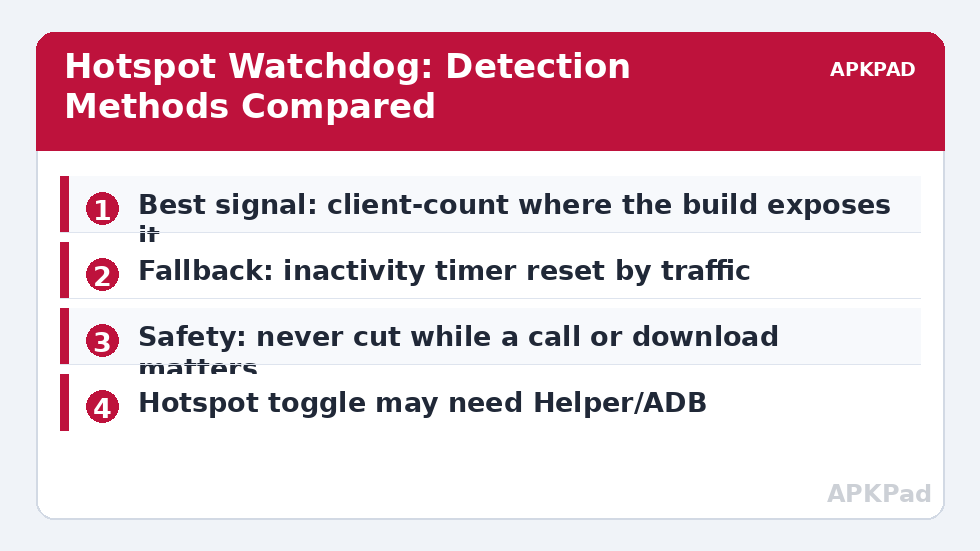
MacroDroid needs to know “no devices are connected”, and Android does not hand this information to apps cleanly. Depending on your device and Android version, you have three imperfect signals. Client count: some builds expose the number of connected hotspot clients to a system setting or a notification MacroDroid can read — accurate where it exists, absent on many phones. Hotspot state changes: MacroDroid can react to hotspot on/off events but not always to client join/leave. Inactivity inference: if no meaningful data has flowed for N minutes, assume nobody is using it — a heuristic that misfires on a connected-but-idle laptop waiting for email. Design for imperfection: combine a generous inactivity window with an announcement before shutdown, so a false positive costs a tap, not a dropped transfer.
The Watchdog Design: Auto Turn Off Hotspot Logic
| Element | Configuration |
|---|---|
| Trigger | Hotspot Enabled (starts the watchdog) + a repeating check every 10 minutes while hotspot is on |
| Actions | Check connected clients where the build exposes a count; if zero (or no traffic) for 2 consecutive checks → Speak “Hotspot turning off in one minute” → Wait 60 seconds → if still no clients, Hotspot Off |
| Constraints | Not charging (a charging hotspot is presumably intentional); not in a call |
The announce-and-wait step is the difference between a watchdog and a menace. A spoken warning plus a one-minute grace period lets a present user cancel — give them a way: any screen unlock or volume press during the wait sets a cancel variable the final check reads. Two consecutive zero readings are required because a single reading during a client’s brief reconnection (Wi-Fi power save on a sleeping laptop drops and rejoins constantly) would otherwise kill hotspots that are very much in use.
How to read this: the estimate adds a small always-on idle cost for MacroDroid itself (about 0.4% of battery per day) to a per-class daily cost for each trigger type you use, scaled slightly by how many macros you run. These are planning estimates from that transparent model — not measurements from your phone. Use them to compare setups before you build, then confirm against the real numbers under Android Settings → Battery.
The Simpler Alternative Most People Should Use
Before building the watchdog, check your phone’s hotspot settings: many Android builds include a native “Turn off automatically” option that disables the hotspot when no devices are connected for a chosen period. If yours has it, use it — it has privileged access to the real client list and none of the heuristic wobble. The MacroDroid watchdog earns its complexity when the native option is missing, or when you want conditions the native one lacks (charging exception, warning announcement, different timeouts at home versus travelling). Duplicating a working system feature with a macro is how setups accumulate the very wake-ups the wake-lock guide warns about.
Permissions and Failure Modes
Toggling the hotspot programmatically carries the usual radio caveats: the MacroDroid Helper, WRITE_SECURE_SETTINGS via ADB, or root may be required, varying by build — as with the screen-off radio macro, test the toggle action alone first. The dangerous failure mode is the false negative that never fires (watchdog silently broken after an update, hotspot immortal) — mitigate it with a maximum-lifetime backstop: a second macro that turns the hotspot off unconditionally after, say, 4 hours of continuous hotspot-on time while uncharging, regardless of clients. A crude ceiling plus a smart watchdog covers both error directions.
Travellers, Cars and Other Non-Standard Hotspots
The watchdog’s defaults assume a home pattern. Three contexts bend it. The car: a hotspot feeding a head unit or the children’s tablets should die with the ignition, not with a client count — trigger the off-check on car Bluetooth disconnect instead, which signals “journey over” far more reliably than traffic inference, and keep the maximum-lifetime backstop as the guard for the day the Bluetooth signal lies. The train and café: public-place hotspots deserve a shorter leash (two checks, twenty minutes) because the cost of a forgotten hotspot in a bag is a dead phone at destination; the announcement step, however, should be a vibration or notification, not a voice reading your automation aloud to strangers. The work phone: if the hotspot serves colleagues or clients, a watchdog that kills it during a lull in their work is a career-limiting automation — either do not run one, or set the window so generous (an hour of true zero) that it can only ever catch the genuinely forgotten evening case. Context is a constraint like any other; encode it in the macro rather than remembering it.
What the Watchdog Teaches About Every Other Macro
Notice how much of this design is not about hotspots at all: verify state at execution time; require two consecutive confirmations; announce before acting; set an absolute backstop for the silent-failure direction; exempt the safety-relevant case explicitly. That is the general grammar of trustworthy automation, and it recurs from the delayed Bluetooth off to the thermal stages elsewhere in this category. A reader who internalises the grammar can evaluate any macro — theirs or a downloaded one — in a minute: where is the verification, where is the announcement, where is the backstop, what is exempt? Macros that answer all four are machinery; macros that answer none are anecdotes waiting for a victim. Build the former, and your battery system ages into reliability instead of into a folder of disabled experiments.
Metering Your Own Hotspot Habit
Before tuning the watchdog’s thresholds, spend a week learning your actual pattern — it takes no effort beyond reading a number MacroDroid can surface: log hotspot on/off events with timestamps to a file (two tiny logging macros riding the same triggers the watchdog uses), and after a week you will know your sessions’ true shape. Most users discover their hotspot life is bimodal: many short, deliberate sessions (train journeys, café work — well under an hour, always ended deliberately) and a small number of monsters (the forgotten evening, the weekend at a relative’s house) that account for nearly all the waste. Bimodal data justifies bimodal policy: leave short sessions entirely alone — no checks, no announcements, zero friction — and aim the entire apparatus (watchdog plus backstop) at the tail beyond, say, ninety minutes. A watchdog tuned to your real distribution almost never speaks; one tuned to a generic distribution nags at the end of every honest session. Measure, then automate — the standing order of this category.
Frequently Asked Questions
How much battery does a forgotten hotspot actually waste?
An idle hotspot commonly draws several percent per hour — the phone is transmitting beacons, maintaining the Wi-Fi AP and keeping the modem ready. Three forgotten evening hours can cost 15–25% on many devices, dwarfing most other idle losses.
Can MacroDroid see exactly how many devices are connected?
Only on some builds. Where the client count is not exposed, the practical approach is the inactivity heuristic: repeated checks plus a warning and grace period. Treat any tutorial promising exact client counts on every phone with suspicion.
My phone already has an auto-off hotspot setting. Macro or setting?
Setting, almost always. It reads the true client list and costs nothing to run. Build the macro only for behaviour the setting lacks — charging exceptions, spoken warnings, location-dependent timeouts.
The watchdog turned the hotspot off during my download. What went wrong?
A connected-but-quiet client — or a download over a connection that appeared idle during a check gap. Lengthen the window (three checks over 30 minutes), keep the announcement and cancel path, and add the charging constraint so desk downloads are exempt.
Does turning hotspot off need root?
Often not, but the Helper app or an ADB grant is commonly required on Android 10+. As always with radio actions: test the single action on your exact device before building the schedule around it.