Search results promise a lot on this topic, so let us start with the truth: to automate cpu throttle power saving sync rules as a single idea mixes one thing MacroDroid mostly cannot do (CPU throttling) with one thing it does very well (sync rules). This guide separates them, tells you exactly which permission unlocks which behaviour, and builds the version that works on a real, unrooted phone.
CPU Throttling: The Honest Map
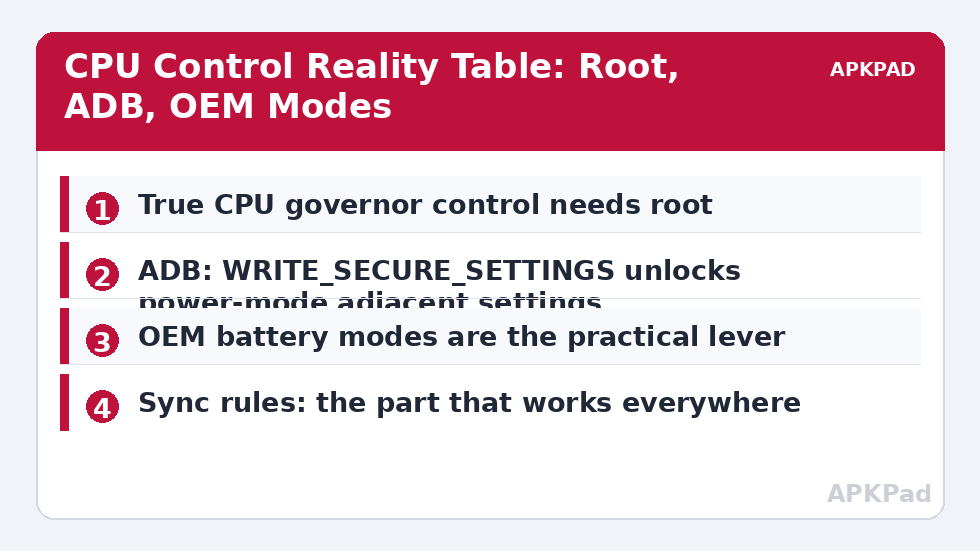
CPU frequency governors live in the kernel. On an unrooted phone, no app — MacroDroid included — can set a governor, cap a frequency, or pin a core. Anyone’s tutorial claiming otherwise is either rooted, mistaken, or toggling something else and mislabelling it. What IS reachable without root:
| Lever | Requirement | Effect |
|---|---|---|
| System Battery Saver / OEM power mode | None (MacroDroid can toggle on most builds) | Indirectly limits background CPU, animations, sync — the practical throttle for unrooted phones |
| Refresh rate, brightness, radios | Some need WRITE_SECURE_SETTINGS (ADB) | Cuts the loads that make the CPU/GPU work hard in the first place |
| Per-app battery restriction | Manual setting; MacroDroid can deep-link you there | Stops specific apps from consuming background CPU |
| Actual governor / max-frequency control | Root + a kernel manager | Real throttling — outside MacroDroid’s reach without root |
On a rooted device the picture changes: MacroDroid’s shell action can write governor parameters via root shell, and users do build day/night profiles that way. If you are rooted, the pattern is a shell command action with the governor path for your kernel — which is device-specific enough that copying commands from a forum for a different SoC is how phones end up in bootloops. Know your exact device or leave it alone.
How to read this: the estimate adds a small always-on idle cost for MacroDroid itself (about 0.4% of battery per day) to a per-class daily cost for each trigger type you use, scaled slightly by how many macros you run. These are planning estimates from that transparent model — not measurements from your phone. Use them to compare setups before you build, then confirm against the real numbers under Android Settings → Battery.
The Macro That Substitutes for a Throttle Profile
Trigger: Battery Level drops to 40% (or a time trigger for your commute home). Actions: enable system Battery Saver, set refresh rate to 60 Hz if your ADB permission allows, disable auto-sync (the sync rules below govern its return), reduce brightness cap. Constraints: not charging, not navigating. Exit macro at charger-connected restores everything. This delivers most of what people want from a “throttle profile” — a phone that visibly sips instead of gulps when the battery gets serious — using levers that actually exist. It pairs naturally with the extreme saver at 15% as the earlier, gentler stage of the same system.
Sync Rules: The Half That Works Everywhere
Account sync is a scheduled CPU and radio consumer fully inside MacroDroid’s control. The high-value rules: sync only on Wi-Fi (constraint on any macro that enables sync), sync in windows — ten minutes every two hours covers mail and calendars, detailed in our smart sync routines guide; sync while charging, unrestricted — plugged-in time is free energy, so let everything catch up then; and per-account honesty — MacroDroid controls the master sync toggle and can invoke sync, but which accounts sync is set in Android’s account settings, so trim dead accounts there (the old tablet account syncing contacts forever helps no one). A realistic combined effect for a sync-heavy user is a few percent of daily battery; for a light user, near zero. Both answers are fine — the point of the battery hacks approach is matching effort to evidence.
What Changes If You Are Rooted (and the Risks That Come With It)
Rooted readers can take the direct route this article has carefully fenced off: MacroDroid’s shell action, running as root, can write to the governor and frequency nodes under /sys for your specific SoC — typically setting a powersave-biased governor during the day profile and restoring the stock interactive/schedutil behaviour at a charger or a gaming trigger. Three disciplines make this survivable. First, device exactness: governor paths and available governors differ per kernel, so derive every path from your own device’s /sys listing, never from a post about another phone. Second, conservative deltas: prefer switching governor policy over hard frequency caps, because a cap set below the big cores’ efficient range can increase total energy (tasks run longer — the “race to idle” effect). Third, a panic exit: a boot-completed macro that restores stock values unconditionally means no experiment can strand you in a throttled or unstable profile across a reboot. Root converts this article’s “mostly cannot” into “can, carefully” — and converts MacroDroid from a settings remote into a systems tool with a systems tool’s capacity for harm.
Scheduling the Profile Around a Real Day
A throttle-substitute profile keyed only to battery level reacts late by design, since level is a lagging indicator. Anchor it to your day instead: a morning-commute profile (podcasts downloaded, screen mostly off — sync windows tight, radios managed), a desk profile (charging or charged — everything unrestricted, updates and backups encouraged), an evening-out profile (level-aware step-downs armed earlier, at 50%, because a charger is far away), and the night profile from the idle routine. Time-and-place triggers with level as a constraint beat level triggers alone, because they express intent (“I am out for the evening”) rather than emergency. Build them incrementally — one profile a week, verified against your benchmark numbers — and stop adding when the overnight and bedtime numbers stop improving.
Background Data and the Forgotten Third Lever
Between CPU and sync sits a third lever this category underuses: per-app background data. Android lets you revoke an app’s background mobile data (and, on many builds, background Wi-Fi via data-saver whitelists in reverse) — the app works fully in the foreground and goes quiet behind it. For the classic offenders (shopping, news and social apps that prefetch feeds you may never open), background-data revocation saves radio wake-ups and CPU cycles simultaneously, permanently, with no macro to maintain and no relaunch penalty, because nothing is killed — only deferred. MacroDroid’s role reduces to what it is best at here: context. A travel profile that enables system Data Saver wholesale when you roam, restored at home, is a two-action macro with a category-sized effect. Audit order matters: set the per-app data and battery restrictions first (they are free and permanent), then let profiles and sync rules handle the remainder — most users find the remainder is a third of what they feared.
Finally, keep the profile’s paperwork as honest as its claims: write the expected effect of each action into the macro’s description field when you build it (“sync windows: ~1–2%/day for me, measured March”), and revisit those notes after a month. Automations accumulate folklore; a profile whose every action carries its measured justification stays lean, because the actions that never earned their place become visible — and removable — at a glance.
Frequently Asked Questions
Can MacroDroid underclock my CPU without root?
No. CPU governors and frequency tables are kernel-level and require root. Without root, the achievable equivalent is a profile built from Battery Saver, refresh rate, radios and sync — which covers most of the real-world benefit people seek from throttling.
What does WRITE_SECURE_SETTINGS actually unlock here?
Depending on the device: refresh-rate switching, some display and power-adjacent settings, and reliable radio toggles. It does not unlock CPU governor control. It is granted once via ADB and persists until the app is reinstalled or permissions are reset by an update.
Is throttling the CPU manually bad for performance?
A hard frequency cap trades responsiveness for endurance, and on a rooted phone a badly chosen governor can cause stutter that makes you use the phone longer — negating the saving. The OEM power modes exist precisely because they balance this trade with knowledge of the specific chip.
How much do sync rules save compared with CPU tricks?
For most unrooted users, sync rules save more in practice because they are actually implementable: eliminating dozens of daily wake-and-fetch cycles. CPU throttling’s theoretical saving is larger but unreachable without root, so its practical saving is zero.
My OEM battery mode already does all this. Do I need the macro?
If your OEM mode can be scheduled or triggered by battery level automatically, possibly not. MacroDroid adds value when you need conditions the OEM mode lacks — location, time, charger state, or per-situation profiles.