Nobody plans to be the person whose phone rings loudly in the middle of a client presentation. It happens because silencing the phone is a manual habit, and habits fail on busy days. Setting up an auto reject calls calendar meeting macrodroid rule removes the habit from the equation: when a calendar event you mark as a meeting is running, incoming calls on your own phone are rejected automatically, and when the event ends, your phone behaves normally again. This is a personal focus tool for your own handset and your own callers — nothing to do with call centres, bulk calling, or screening anyone else’s phone.
That scope matters for how you build it. The macro should be narrow, polite, and reversible. Narrow, because it should only apply during genuine meetings, not all day. Polite, because a rejected caller deserves a quick explanation by text rather than silence. Reversible, because the moment the event ends, normal ringing must resume without you remembering to undo anything. MacroDroid’s calendar triggering gives you all three properties, but you have to define what counts as a meeting carefully, because your calendar contains birthdays, reminders, and all-day events that should not be rejecting calls.
Defining the meeting: auto reject calls calendar meeting macrodroid logic
MacroDroid offers a Calendar Event trigger that can watch a chosen calendar and match events in several ways, including events that are currently active. The most robust pattern for most people is to create a dedicated calendar — call it Meetings or Focus — or to use a keyword in the event title, depending on which option your MacroDroid version exposes for matching. Putting work meetings in a dedicated calendar is cleaner: dentist appointments and school runs stay on your personal calendar and never trigger call rejection, while anything placed on the Meetings calendar is an intentional signal that you do not want to be interrupted.
| Component | MacroDroid setting |
|---|---|
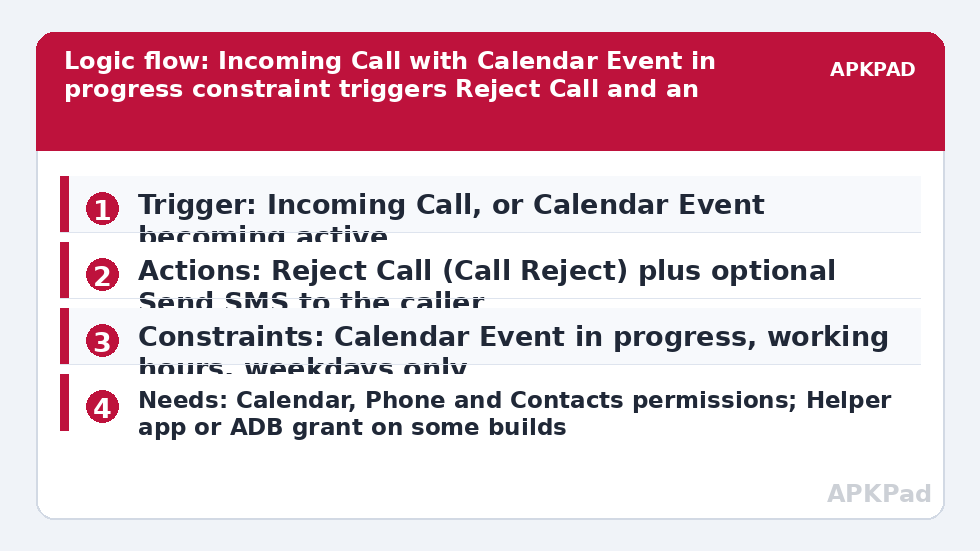
| Trigger | Calendar Event — event in selected calendar becomes active / is in progress; or Incoming Call trigger with a calendar constraint |
| Actions | Reject Call (Call Reject); optional Send SMS to the caller with a short meeting message; optional Volume Change during the event |
| Constraints | Calendar Event in progress; Time of Day within working hours; Day of Week weekdays only |
You will actually build two companion pieces, or one macro with a matching exit behaviour where your version supports it. One handles the meeting state, and the normal state must be restored when the event ends. Read the trigger options in your version carefully: some setups use the Calendar Event trigger for the start and a second macro, triggered when the event ends, to undo any volume or mode changes you applied.
How to read this: the estimate adds a small always-on idle cost for MacroDroid itself (about 0.4% of battery per day) to a per-class daily cost for each trigger type you use, scaled slightly by how many macros you run. These are planning estimates from that transparent model — not measurements from your phone. Use them to compare setups before you build, then confirm against the real numbers under Android Settings → Battery.
Permissions, and why calendar access is non-negotiable
This macro needs Calendar permission, Phone / Call permission so MacroDroid can reject a call, and Contacts permission if you want to treat known and unknown callers differently or send a courteous text. Rejecting calls is a telephony action, and on some Android versions and OEM builds it requires MacroDroid’s Helper app, an ADB permission grant, or notification / telecom-related permissions before it works. Test the Reject Call action on its own at the step where you add it, using a second phone or a family member’s phone calling yours, and if the test fails, follow the prompt MacroDroid shows at that point — install the Helper app or grant the requested permission then and there, rather than assuming the macro will somehow work later.
As with every macro in this category, the number one reason it fails is OEM battery management killing MacroDroid in the background. A calendar trigger that never fires because the app was killed at 9 a.m. looks identical to a meeting that was never blocked. The fix is to exclude MacroDroid from battery optimization, set its battery usage to Unrestricted, and enable it in your OEM autostart settings if your phone has them, for example on Xiaomi, Oppo, and Vivo handsets. Reboot once and put a test event in the calendar for the next day to confirm it still triggers after an overnight idle period.
Building the rejection macro
- Create or choose the calendar that will mean meeting. Move or copy one real upcoming meeting into it for testing.
- Add a macro with the Calendar Event trigger, select that calendar, and choose the option for when an event starts or is active, following the wording in your version.
- Add the Reject Call action. Note that this action only makes sense when a call is actually ringing, so most users pair the calendar state with a second macro whose trigger is an incoming call and whose constraint checks that a calendar event is in progress. Check whether your version lets the calendar act as a constraint on an Incoming Call trigger — that pattern, incoming call as trigger plus calendar constraint, is often the most reliable structure.
- Add an optional Send SMS action with a short, human message such as: In a meeting until the event ends, will call you back. Keep it factual, send it only to the caller who was just rejected, and only if you have SMS permission granted.
- Add working-hours and weekday constraints if your meetings never happen outside them, to shrink the window in which a calendar mistake can reject a wanted call.
- Save, then test end to end with a live test event and a real incoming call from another phone.
The incoming-call-plus-calendar-constraint structure deserves emphasis because it is where beginners go wrong. A calendar trigger firing at the start of a meeting cannot reject a call that has not happened yet. Rejection has to happen in the moment the phone rings. So either use MacroDroid’s calendar constraint on the call trigger, or set a variable or mode at the meeting start that the call macro checks. Variables are flexible but easier to leave in the wrong state if a meeting is cancelled, so prefer a direct calendar constraint where it is offered.
Being polite to the people you reject
Auto-rejecting a call from your mum, your child’s school, or a delivery driver with no explanation creates problems that a focus tool was meant to prevent. The optional text message solves most of that, but choose its wording and frequency with care. Send it to that individual caller from your own number, explaining you are in a meeting. Do not send multiple texts if the same person calls three times in five minutes; add a constraint or variable-based cooldown so a persistent caller gets one explanation, not three. If your version supports it, a constraint that the macro has not run in the last thirty minutes works well. Think also about exceptions. Parents, partners, and schools are exactly the callers who should be able to break through. If repeated-call breakthrough matters to you, compare this setup with priority contact notification triggers, which take the opposite approach of letting important people stay loud, and consider excluding favourite contacts from rejection using a contact-based constraint.
What about emergencies and repeat callers?
No calendar rule knows that a second call in two minutes is urgent. Be honest about that limitation with yourself when you enable this. A pragmatic compromise is to reject only the first call and let a repeat call from the same number within a few minutes ring, if you can build that logic with variables and time constraints in your version. If that logic feels fragile, do not build it — instead keep the meeting calendar strictly for events where one missed hour is genuinely acceptable, and use a gentler approach such as the routines in time-based Do Not Disturb routines for everything else. Browse the wider Macro Triggers collection for other quiet-hours patterns, including muting calls by placing the phone face down, which gives visitors a visible, manual alternative.
Testing, edge cases, and failure modes
Test with events you control before trusting it in a real meeting. Create a ten-minute test event starting in five minutes, call yourself from another phone during it, and confirm three things: the call was rejected, the optional text arrived once, and after the event ended the next call rang normally. Then test the ugly cases. An all-day event should not silently reject calls for twenty-four hours, so exclude all-day events or keep them off the meeting calendar. A cancelled meeting must stop rejecting, so delete a test event mid-way and call again. A meeting that runs over should continue protecting you, which an active-event check handles naturally because the event is still in progress.
Keep a manual escape route too: a MacroDroid widget or quick tile that disables the macro instantly is worth adding, so one tap restores normal ringing if a family emergency makes the rule inappropriate that day. And if calls are rejected outside meetings, suspect a stale variable or a mode that an end-of-meeting macro failed to undo — another reason the direct calendar constraint design is safer.
Frequently Asked Questions
Will callers know their call was rejected automatically?
Callers hear the call end quickly rather than ringing out, which some will notice. That is why the optional Send SMS action matters: a short message from your own number explaining you are in a meeting and will call back makes the rejection polite and clear.
Can I let family members break through during meetings?
Yes, in most setups. Use a contact-based constraint so calls from favourite contacts are excluded from rejection, or structure the macro so only unknown or non-favourite callers are rejected. Test the exception with the actual family phone before relying on it.
Does rejecting calls need root or the Helper app?
On many phones Reject Call works with normal Phone permission, but some Android and OEM builds require the MacroDroid Helper app or an ADB permission grant for telephony actions. Test the action when you add it and follow MacroDroid’s prompt at that step if the test call is not rejected.
What happens if a meeting is cancelled or moved?
If you use a calendar constraint that checks whether an event is currently active, a cancelled or moved event simply stops matching, so calls ring normally again. Avoid variable-only designs if your calendar changes often, because a stale variable can keep rejecting after the meeting has gone.
Why did the macro work last week and stop today?
The most common cause is OEM battery management killing MacroDroid in the background after an update or battery saver change. Exclude MacroDroid from battery optimization, enable OEM autostart where present, and re-check calendar and phone permissions before rebuilding the macro.