
The macro fires, the HTTP action shows an error, and the service on the other end never hears a thing — or hears it and refuses it. To fix webhook http actions failing macrodroid requests, stop treating “HTTP failed” as one problem. A request crosses four stages — reaching the network, resolving and connecting securely, proving who it is, and being accepted by the server — and each stage fails with a different fingerprint. The status code or error text is the service telling you which stage broke; your first job is simply to read it.
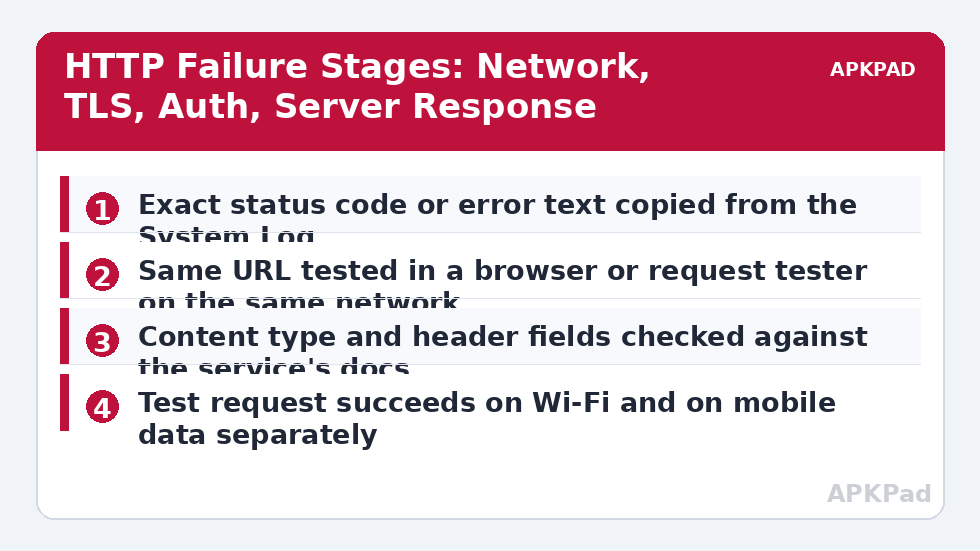
Reproduce with the System Log open and a test you control. Trigger the macro once and copy the exact error line: a number such as 400, 401, 403, 404, or 500, or a text error about timeouts, hosts, or certificates. Then open the same URL in your phone’s browser on the same network. A browser success tells you the host is reachable and shifts suspicion to authentication or request format — but remember the browser may be logged in, so it proves reachability, not that your bare request is valid. If the browser fails too, you are chasing a network or DNS problem and the macro is innocent for now.
Reading the Failure: Causes by Stage
Match your error to a stage before changing anything. Editing headers to cure a DNS problem is the network equivalent of shouting at a locked door.
- No route at all: timeouts and unknown-host errors mean the request never arrived — a DNS failure, a blocked network, a VPN or private DNS misbehaving, or the phone asleep with data restricted.
- TLS or certificate refusal: the connection starts but the secure handshake is rejected, common with self-signed home servers, very old devices, and services that tightened their TLS requirements.
- Authentication refused (401/403): the server received the request and rejected the key, token, or signature — the single most common cause of a webhook that “just stopped working” after a key rotation.
- Request rejected as malformed (400/404/405): wrong URL, wrong method, missing content type, or a body the current API no longer accepts after a service-side change.
- Server-side failure (500/502/503): the request was fine and the service itself failed or is down, which no phone setting can fix.
Fix Webhook HTTP Actions Failing, Stage by Stage
Work in stage order and retest after each change with the same trigger. Keep a known-good test endpoint in your pocket — a request-inspection service or the provider’s own test URL — so you can prove the phone side independently of the real service.
Step 1: Prove the Network Path on Both Radios
Run the failing action once on Wi-Fi and once on mobile data with Wi-Fi off. If it works on one and not the other, the broken layer is that network: check for a private DNS entry that resolves the host badly, a router or hotspot filter, or a VPN that routes the request somewhere it dies. Also test with the phone awake and MacroDroid open once; if that succeeds while screen-off runs fail, battery management is freezing the app before the request completes, and the fix follows the same per-brand exemption pattern as the background killing guide rather than anything in the request itself.
- Same action tested on Wi-Fi and on mobile data, results noted separately.
- Private DNS, VPN, and router filtering checked when one network fails.
- Awake, app-open test compared against a screen-off test.
How to read this: the estimate adds a small always-on idle cost for MacroDroid itself (about 0.4% of battery per day) to a per-class daily cost for each trigger type you use, scaled slightly by how many macros you run. These are planning estimates from that transparent model — not measurements from your phone. Use them to compare setups before you build, then confirm against the real numbers under Android Settings → Battery.
Step 2: Fix Authentication and Headers to Match the Current Docs
Open the service’s current API documentation — today’s version, not the blog post you built the macro from — and compare it field by field with your action: the exact header name for the key, whether the token belongs in a header or a parameter, the content type, and the method. Re-issue the API key if the service lets you, because keys get rotated, scoped down, and revoked silently. While a credential is on screen, handle it like the secret it is: it goes into the action and nowhere else, not into an exported macro you share, and not into a screenshot. If the action suddenly needs capabilities beyond normal permissions on your build, the system setting denied guide shows the careful way to think about elevated grants — though most webhook failures need nothing of the kind.
- URL, method, and content type compared against the service’s current documentation.
- API key re-issued or confirmed active, placed in the documented header or parameter.
- Response saved to a variable in a test run and read in full.
Step 3: Repair the Body and the Variables Inside It
A 400 with working authentication usually means the payload is wrong: a variable that was empty at run time, a JSON body broken by a quote or newline inside a variable’s value, or a field the API renamed. Log every variable the body uses, immediately before the HTTP action, and reconstruct what was actually sent. Build the body back up one field at a time against the test endpoint until the rejection appears — the last field added is your culprit. Text from notifications and messages is the classic JSON-breaker, so any macro that forwards message content into a JSON body needs its escaping thought through.
- Every variable used in the body logged just before the action in a test run.
- Body rebuilt field by field against a test endpoint.
- Untrusted text (message bodies, titles) checked for characters that break the format.
Verify the Fix: Two Networks, One Server-Side Confirmation
A fix is verified when the receiving end says so, not when the phone stops complaining. Confirm in the service’s own dashboard, log, or received-events list that your test request arrived with the right content, then repeat the run on the other network — Wi-Fi if you fixed it on mobile data, and vice versa. Run it once more through the real trigger with the screen off, because a webhook that only works while you watch it is not fixed. The APKPad homepage and the Fixes & Errors index collect the neighbouring network and permission guides, and if the request turns out to be firing at the wrong local time after travel rather than failing outright, the sibling article on time triggers in the wrong timezone covers the scheduling side.
When This Fix Won’t Work
A 500-series error that reproduces from every network and device is the service’s outage or bug, and the correct action is to check its status page and wait, not to keep editing the macro. A service that has shut down an API version or moved to a different authentication system entirely may need the integration rebuilt, not repaired. Self-signed certificates on home servers will keep failing TLS checks on stock builds unless the setup is changed at the server end. And captive portals — hotel and café Wi-Fi sign-in pages — intercept requests wholesale, so a webhook macro on travel Wi-Fi can fail in ways that vanish the moment you are back on a real connection.
Frequently Asked Questions
Why does my HTTP action return 401 when the same URL works in my browser?
Because the browser request carries your logged-in session or saved credentials and the MacroDroid request does not. A 401 means the server received the request and refused it for missing or wrong authentication. Put the API key or token in the action’s header or parameters exactly as the service documents, and never assume a browser success proves the bare request is valid.
What does it mean when the action times out only at home?
A timeout that follows a network is a network problem, not a macro problem: the home router, a private DNS setting, or an ISP filter is stalling that specific host. Test the same action on mobile data. If it succeeds there, investigate the home network — DNS settings and router filtering first — rather than editing the request.
Why did my webhook stop working after the service updated its API?
Services retire endpoints, change required headers, and start demanding newer request formats. When a previously reliable webhook breaks overnight with a 400 or 404, read the service’s current documentation and changelog before changing anything on the phone. The macro usually needs its URL, method, or body updated to the new contract.
Can I see the full response body MacroDroid received?
Save the HTTP response into a variable in the action’s settings where your version offers it, then write that variable to the System Log or a notification in a test run. The response body usually names the exact problem — a missing field, a bad token, a malformed value — in the service’s own words, which is far more useful than the status code alone.
Is it safe to put API keys in a MacroDroid HTTP action?
It is the normal way these integrations work, but treat the macro as a document that contains a secret: do not share exports of it publicly, be careful with cloud backups of your macros, and use a key with the narrowest permissions the service allows so a leaked macro cannot do wider damage.