A headphone disconnect pause media macrodroid macro fixes one of the most embarrassing phone moments there is: your earbuds drop their connection on a train, a wired plug slips out at your desk, and your podcast or music suddenly blares from the phone speaker to an audience that never asked for it. A simple MacroDroid macro that pauses playback the instant headphones disconnect turns that public broadcast into a silent, private hiccup.
Most modern music and podcast apps already pause when a wired plug is pulled, because Android signals that event clearly. Bluetooth is patchier. Earbuds go back in their case, a headset battery dies, a connection drops between rooms, and some apps keep playing to a speaker you forgot existed. This macro is your uniform safety net across apps, wired and wireless, rather than a setting you must remember in every player.
How a headphone disconnect pause media macrodroid safety net works
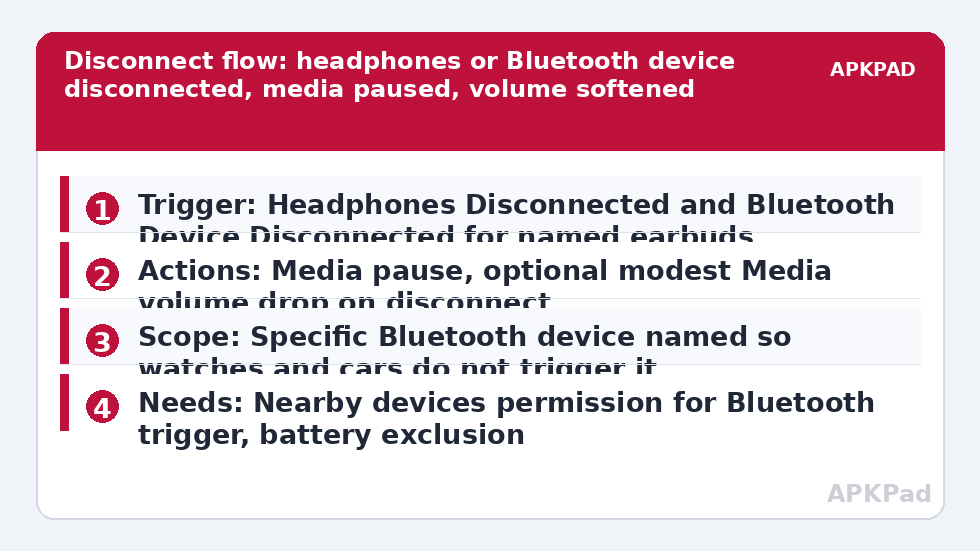
The build uses two related triggers. For wired listening, the Headphones Disconnected event fires when the plug or USB-C audio connection ends. For Bluetooth, the Bluetooth Device Disconnected event, scoped to your specific earbuds or headset, covers the wireless case. Both lead to the same polite action: pause the media. You are not stopping apps, closing anything or changing volumes permanently, just pressing pause faster than a human hand can move.
| Connection | MacroDroid setting |
|---|---|
| Wired headphones removed | Trigger: Headphones Disconnected, Action: media pause |
| Bluetooth earbuds disconnected | Trigger: Bluetooth Device Disconnected for that named device, Action: media pause |
| Optional politeness | Lower media volume slightly on disconnect so any brief sound before the pause stays discreet |
Build the wired version first even if you mostly use Bluetooth. It tests in five seconds with any plug, proves the pause action works with your players, and gives you a known-good action to reuse in the Bluetooth copy.
How to read this: the estimate adds a small always-on idle cost for MacroDroid itself (about 0.4% of battery per day) to a per-class daily cost for each trigger type you use, scaled slightly by how many macros you run. These are planning estimates from that transparent model — not measurements from your phone. Use them to compare setups before you build, then confirm against the real numbers under Android Settings → Battery.
Build the pause safety net step by step
- Create a macro with the trigger Headphones Disconnected. Leave it scoped to the standard disconnect event your version presents.
- Add the media control action that pauses playback. In MacroDroid this is the Play/Pause or media pause style action your version offers for controlling other players; use its test button while music plays through wired headphones, then pull the plug and confirm playback stops rather than transferring to the speaker.
- Optionally add a Volume Change step that drops Media volume a few steps on disconnect. Keep it modest, and never set it to zero as your only defence, because volume alone does not stop a player continuing silently and losing your place.
- Save the macro, then clone it for Bluetooth. Change the trigger to Bluetooth Device Disconnected and select your specific earbuds or headset by name, so disconnecting a watch, car or speaker does not pause music you are hearing another way.
- Test the Bluetooth version realistically: play music, put one earbud in its case or switch the headset off, and listen. Note any delay between disconnect and pause and whether your player resumes correctly when you reconnect and press play yourself.
The mirror image of this build is in setting up a headphone plug-in trigger to launch a music player, where connecting starts your player. Together they give headphones a complete etiquette: connecting prepares your music, disconnecting never embarrasses you. The car version of the same thinking lives in automating a Bluetooth car connection that opens Spotify, where the settle delay before acting matters just as much.
Delays, false pauses and players that behave differently
Expect small delays. Bluetooth disconnects are not always announced instantly; a headset that loses signal may cling on for several seconds before Android declares it gone. During those seconds, sound may already be rerouting. The volume-drop step earns its place here, softening exactly that gap. What this macro cannot do is rewind time: if your player blasts for one second before the disconnect registers, the honest fix is lowering the gap volume and keeping speaker media volume reasonable in shared spaces as a habit.
Some players respond to a generic pause better than others. Test each app you actually use: your music streamer, podcast app, video app and any audiobook player. A player that ignores media controls from other apps is a player limitation, not a MacroDroid fault, and the practical answer is the volume step plus choosing that app only through headphones with a reliable connection. Log results per app while you test, because memory rewrites these details within a week.
Permissions and scope
- Nearby devices permission: needed on modern Android for Bluetooth device triggers, so MacroDroid can see which named device disconnected.
- No notification access, SMS, location or contacts permission is needed for this pause build. Do not grant extras for it.
- Usage Access is not required for the basic disconnect triggers, though MacroDroid may already hold it for other macros you run.
Scope the macro to audio safety and nothing else. It should never lock the phone, send messages or change profiles when headphones disconnect, because disconnects happen accidentally all day: a bud in a case to hear a colleague, a headset off for a doorbell. A pause is proportionate. Anything heavier becomes a punishment for normal behaviour and will be disabled. Explore proportionate patterns across the Macro Triggers category from the APKPad homepage, including the session use in Pomodoro timer triggers where a headset pause protects a focus sprint’s quiet.
Why the pause sometimes arrives too late or not at all
Start with the usual suspect: OEM battery management killing MacroDroid in the background. A disconnect trigger is a background event, and a MacroDroid instance put to sleep by Samsung, Xiaomi, Oppo, Vivo or similar controls may wake too slowly to pause before the speaker takes over, or miss the event completely. The macro passes every test while the app is open and fails on the train, which is the signature of this problem.
Set MacroDroid battery use to Unrestricted in Android Settings, Apps, MacroDroid, Battery. Remove it from Sleeping apps on Samsung, set No restrictions and enable Autostart on Xiaomi, or allow background launch in your brand’s manager, then restart and test after the phone has sat locked and idle. If wired pause works instantly but Bluetooth lags, that remaining gap is the Bluetooth disconnect announcement itself, and the volume-softening step is the correct mitigation rather than more trigger surgery.
Frequently Asked Questions
Do I need this macro if my music app already pauses when I unplug?
For wired unplugging alone, your app may already handle it well. The macro earns its place for Bluetooth drops, case closures and headset battery deaths, and for giving every player the same behaviour. Build it, test your apps honestly, and keep it for the cases your players handle badly.
Why is there still a second of sound from the speaker?
Bluetooth disconnects take a moment to register, and audio can reroute before MacroDroid hears about it. Add the modest volume-drop step on disconnect, keep your everyday speaker media volume sensible in quiet public places, and accept that the macro shortens the embarrassment rather than rewriting how Bluetooth reports a dropped link.
Will this pause media when I take one earbud out to talk?
Only if that action disconnects the device entirely. Most earbuds keep the Bluetooth connection alive with one bud in the case, so the trigger does not fire and playback follows the earbuds’ own pause behaviour. If your model disconnects fully, scope expectations accordingly or rely on its built-in in-ear pause instead.
Can the macro also lower volume instead of pausing?
Yes, and a small volume drop makes a good companion step, but do not use volume alone as the whole macro. A silently playing podcast still loses your place and drains battery. Pause as the main action, and use the volume step to soften the brief rerouting gap.
What should I check if disconnects stop pausing altogether?
Check OEM battery management first. Set MacroDroid battery use to Unrestricted, review your manufacturer’s sleeping apps or autostart list, confirm Nearby devices permission is still granted for the Bluetooth trigger, and test wired first to separate an action problem from a Bluetooth reporting problem.