To auto launch apps after unlock macrodroid routines are for one specific moment: you pick up the phone with a clear intention, unlock it, and want that intention already open. Morning unlock brings your calendar and messages. Work unlock brings your notes. An evening unlock at home brings music. One trigger, Screen Unlocked, plus time and place constraints, turns unlocking into the start of a routine instead of a hunt through the app drawer.
Keep the ambition narrow. Launching four apps in a stack feels impressive in a demo and chaotic in real life, because you can only look at one screen. Most people settle on one primary app launched automatically, with everything else left a tap away. The macro earns its keep by removing the same thirty seconds of searching you repeat every day, not by redesigning how you use the phone.
How to auto launch apps after unlock macrodroid flows without chaos
The Screen Unlocked trigger fires every time you unlock, which can be dozens of times a day. Constraints are therefore not decoration on this build; they are the build. A time-of-day window turns it into a morning routine. A home Wi-Fi constraint turns it into an at-home evening routine. A once-per-period guard, using Macro Not Invoked or a variable, stops the launch repeating every time you lock the phone to check a notification.
| Unlock context | Sensible single launch |
|---|---|
| First morning unlock | Calendar or your day planner, inside a morning time window, once per day |
| Arriving home | Music or smart-home app, with a home Wi-Fi or location constraint |
| Work hours | Notes or tasks app, weekdays only, once per work session |
Decide your resting rule first: if the phone unlocks and no constraint matches, nothing should happen. An unlock with no launch is the normal case, and any design where the exception becomes the rule will be disabled within a week.
How to read this: the estimate adds a small always-on idle cost for MacroDroid itself (about 0.4% of battery per day) to a per-class daily cost for each trigger type you use, scaled slightly by how many macros you run. These are planning estimates from that transparent model — not measurements from your phone. Use them to compare setups before you build, then confirm against the real numbers under Android Settings → Battery.
Build a morning first-unlock macro step by step
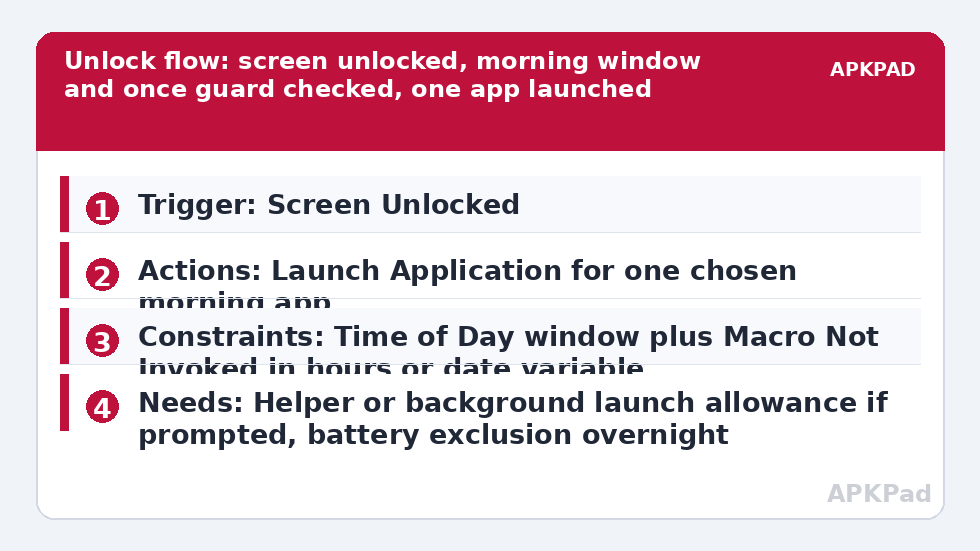
- Create a macro with the trigger Screen Unlocked, sometimes labelled under device unlock events in your version. Confirm with one test unlock that the trigger fires on your handset before adding anything else.
- Add a Time of Day constraint covering your normal first-unlock window, for example the early morning hours when the first unlock of the day realistically happens.
- Add a once guard: a Macro Not Invoked constraint measured in hours, or a date variable your night routine resets. This is what separates first unlock from every unlock.
- Add Launch Application for your one chosen morning app. Resist adding a second launch until the single launch has survived a full week of mornings.
- Optionally add a short Speak Text or Notification summarising the day if you use one, kept brief. Morning speech that drones will be muted permanently by Friday.
- Save and test across two real mornings, phone locked overnight as usual, rather than in a rapid lock-unlock test loop that the once guard will correctly block and confuse you.
For an after-work variant, clone the macro, change the window to early evening, add a home Wi-Fi connected constraint, and launch your music player instead. The pattern in setting up a headphone plug-in trigger to launch a music player covers the listening side, while the sunrise build in building a sunrise wake-up routine with gradual volume handles the gentler start for people who wake before their first unlock.
Background launch limits on modern Android
Android has tightened background activity and app launching across recent versions, and OEM skins tighten it further. A launch that works while MacroDroid is open may fail when the phone has been idle, which is exactly the overnight first-unlock case this guide cares about. If MacroDroid prompts for the Helper app, an ADB grant or a background-launch allowance for the Launch Application action on your device, follow that prompt at that step and retest the real overnight case, not just an immediate unlock.
The evening variant pairs well with automating dark mode at sunset without root, so an at-home unlock lands in an interface already set for the evening. Also respect secure contexts. Banking, payment and authentication apps should not be auto-launched into a foreground stack, and some will refuse or behave oddly when launched by automation. Keep this macro for everyday, low-risk apps: calendars, notes, music, reading and smart-home controls. That restraint keeps the routine welcome on a phone you also use for serious things.
Permissions this macro actually needs
- No special permission is needed for Screen Unlocked itself in most cases, but MacroDroid must be running in the background to catch it, which makes the battery exclusion below essential.
- Launch Application may prompt for Helper or background-launch allowances on some Android versions and OEM skins.
- Wi-Fi or location constraints add their own permissions only if you use them: a home Wi-Fi constraint needs the relevant Wi-Fi state access your version requests, and a location constraint needs location permission.
- Notification permission is needed only if your variant posts or speaks a morning summary.
Notice what is absent: this macro needs no SMS, contacts, call or accessibility access. If a copied macro design asks for those to launch a calendar after unlock, it is asking for more than the job requires, and you should build your own clean version instead. Browse cleaner patterns in the Macro Triggers category through the APKPad homepage, and compare the tap-to-start alternative in using NFC tags as triggers for home and car routines if unlock timing proves unreliable on your handset.
Why the first-unlock launch stops happening
Two causes cover nearly every report. The first is the once guard doing its job after an early check: you unlocked at 5 a.m. for an alarm, the macro ran, and the intended 7 a.m. launch was correctly suppressed. Widen the window logic or use a date-based reset rather than a simple hours-based cooldown if your mornings start irregularly. The second cause, and the most common across weeks, is OEM battery management killing MacroDroid in the background overnight, so the unlock event is missed entirely and no log entry exists.
Set MacroDroid battery use to Unrestricted in Android Settings, Apps, MacroDroid, Battery. Then apply your manufacturer’s layer: remove MacroDroid from Sleeping apps and Deep sleeping apps on Samsung, set No restrictions and enable Autostart on Xiaomi, or allow background launch in your brand’s manager. Restart the phone, leave it locked for a real interval, and test. Check the MacroDroid log in the morning: a fired macro with a blocked constraint tells a different story from a macro that never fired, and the fixes are different too.
Frequently Asked Questions
Can I launch two or three apps in sequence after unlocking?
You can add multiple Launch Application actions, but only the last one stays in front, and the stack often feels chaotic in daily use. Launch one primary app automatically and keep the others a tap away. If two apps genuinely belong together, test the sequence for a week before deciding it helps.
Why does the macro run again every time I unlock?
Because the once guard is missing or too short. Add a Macro Not Invoked constraint measured in hours, or a date variable reset by a night routine, plus a time-of-day window. Screen Unlocked fires dozens of times a day, so the guard is what turns it into a first-unlock routine.
Will this work on the very first unlock after a reboot?
Usually yes once MacroDroid is running again, but aggressive OEM battery managers can delay its restart after boot. Allow autostart for MacroDroid in your manufacturer’s settings, unlock once and give it a moment, and treat the first post-reboot morning as a test rather than a promise.
Does auto-launching apps need root?
No. Screen Unlocked and Launch Application work without root in the normal case. Some devices prompt for the MacroDroid Helper app or a background-launch permission for reliable launching after long idle periods; follow MacroDroid’s prompt for that action if it appears.
What should I check if the morning launch silently stops?
Check OEM battery management first, then the once guard. Set MacroDroid battery use to Unrestricted, review sleeping apps or autostart settings, restart, and read the morning log to see whether the macro fired and was blocked, or never fired at all.