A commute mode auto eta text macrodroid routine answers the message every household sends at the same time each evening: are you on your way, and when will you be home? Built carefully, MacroDroid can notice you leaving work, start your driving setup, and send one agreed text to one agreed person with a simple estimated arrival based on your usual journey time. No group broadcasts, no repeated updates, no texting while driving.
Be precise about the estimate. MacroDroid does not know live traffic unless another app supplies it, so an honest ETA here is a personal estimate: your typical journey duration added to the leaving time, worded as an estimate in the message itself. On a clear evening it lands close. On a bad evening it is a starting point your family already understands, because the text says roughly, not a promise. Anything more precise belongs in your navigation app’s own sharing feature, which this macro can launch alongside.
Designing a commute mode auto eta text macrodroid flow honestly
The trigger choice decides reliability. Leaving work can be detected by exiting a work geofence, disconnecting from office Wi-Fi, or a scheduled time on workdays. Geofence exit is the most truthful, because it fires when you actually leave, early or late. Wi-Fi disconnect is cheaper on battery but fires when you pop to a nearby shop at lunch unless you add time constraints. Most commuters do best with a geofence exit combined with a late-afternoon time window, so a Saturday visit near the office never texts the household that you are commuting home.
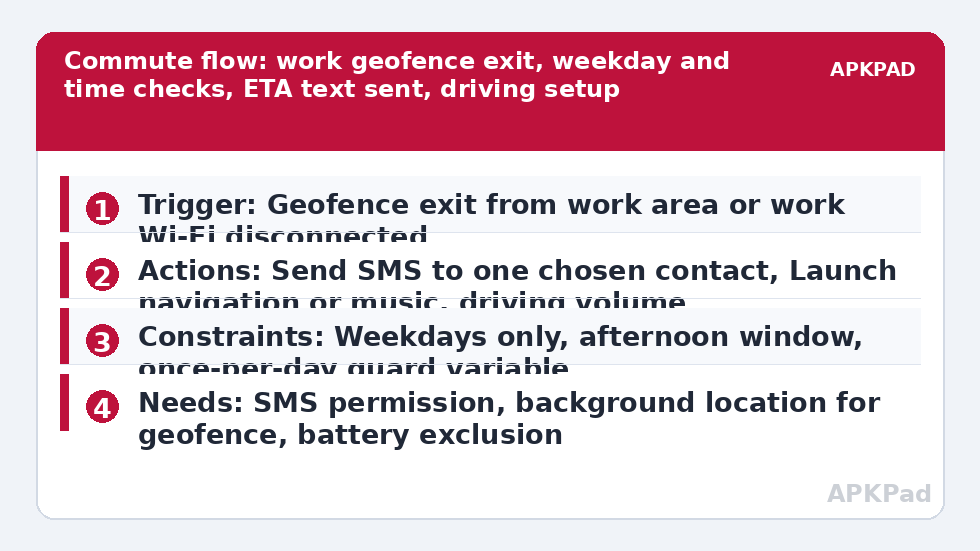
| Part | MacroDroid setting |
|---|---|
| Trigger | Geofence exit from work area, or work Wi-Fi disconnected, within a time window |
| Actions | Send SMS to one chosen contact with leaving time plus your typical journey estimate, launch navigation, set driving volume |
| Constraints | Weekdays only, afternoon time window, Macro Not Invoked today guard so it texts once |
Agree the text with its recipient before you automate it. A message that arrives every weekday becomes invisible if it is noisy, and alarming if its wording sounds urgent. Plain wins: Leaving work now, home around 6:10 if traffic is normal. That sentence, from your own number, to a partner or family member who asked for it, is the entire scope of this automation.
How to read this: the estimate adds a small always-on idle cost for MacroDroid itself (about 0.4% of battery per day) to a per-class daily cost for each trigger type you use, scaled slightly by how many macros you run. These are planning estimates from that transparent model — not measurements from your phone. Use them to compare setups before you build, then confirm against the real numbers under Android Settings → Battery.
Build the leaving-work routine step by step
- Create a macro with a Geofence Trigger for exiting your work area, following the radius and background location guidance in geofenced location triggers for smart home routines. Alternatively start with work Wi-Fi disconnected if your building’s network is distinct and reliable.
- Add constraints before actions: Day of Week for your workdays, and a Time of Day window covering plausible leaving times, such as mid-afternoon to early evening. These two constraints prevent most false commutes.
- Add a once-per-day guard. Set a MacroDroid variable when the macro runs and require it unset, clearing it with a small morning reset macro, so re-entering and leaving the geofence at lunch cannot send a second text.
- Add Send SMS to your single chosen contact. Compose it with magic text for the current time and your own typed estimate wording. Keep your typical duration as plain text you can edit when your commute changes seasonally.
- Add your driving actions after the text: Launch Application for your navigation or music app, and Volume Change to your tested driving level. The Bluetooth-first pattern in automating a Bluetooth car connection that opens Spotify can replace the launch step if your car connects reliably.
- Save, then test on a real leaving day with the recipient warned. Check the text time, the estimate wording and that no second text follows when you stop for fuel inside a re-drawn geofence edge.
Cyclists, train commuters and walkers can use the identical structure. The trigger is still leaving work, the estimate is still your typical journey, and only the driving actions change or disappear. Do not add a step that reads or replies to the response while you travel; the reply can wait, and the household knows it.
Permissions and message etiquette
- SMS permission: required for Send SMS from your own number to your chosen contact.
- Location permission, including background location on Android 10 and later: required for a geofence exit trigger to fire while the phone is in your pocket.
- Contacts permission: needed if you pick the recipient from your address book inside the action.
- Notification Access is not needed for this build.
Etiquette is a safety feature here. One recipient, one text, weekdays only, agreed in advance. Never use this pattern for bulk messaging, workplace monitoring of other people, or automated texts to contacts who have not agreed to receive them. It runs on your phone, about your journey, for your household. The related personal-safety build in creating a panic button widget that shares your location follows the same consent-first rule for family location sharing, and the logging pattern in logging missed calls and texts to a spreadsheet can help you review whether the ETA texts actually fired during a test week. More commuter patterns sit in the Macro Triggers category via the APKPad homepage.
Tuning the estimate without pretending it is live traffic
Review the estimate monthly. If roadworks add ten minutes for a season, edit the typed duration. If you change jobs, rebuild the geofence rather than stretching the old one. Some users keep two commute macros, a normal one and a late one with a later time window and different wording, so a 7 p.m. departure does not claim the usual 6:10 arrival. That small honesty keeps trust in the automation, which is what makes the household keep reading the texts.
If your navigation app offers its own live trip sharing, treat it as a complement, not a rival. The MacroDroid text is the dependable, low-effort signal that you have left. The navigation share is the detailed layer for the evenings when someone wants to follow progress. Launching both from one trigger is reasonable; depending on both is not.
Why the ETA text sometimes never sends
Work through causes in order. First, the trigger: geofence exits are missed when background location is set to only while using the app, or when the radius is so tight that position drift crosses it at lunchtime and the once-per-day guard then blocks the real departure. Second, the constraints: a bank holiday schedule change or a late meeting outside your time window will correctly suppress the text. Third, and most common across a whole test week, OEM battery management killing MacroDroid in the background so the exit event is never noticed at all.
Fix the background problem properly. Set MacroDroid battery use to Unrestricted in Android Settings, Apps, MacroDroid, Battery. Remove it from Sleeping apps on Samsung, set No restrictions and enable Autostart on Xiaomi, or allow background launch in your manufacturer’s manager. Confirm location is allowed all the time, restart the phone, and run a three-day test comparing the MacroDroid log against the texts received. A commute macro earns trust slowly, across ordinary days, not from one perfect demonstration.
Frequently Asked Questions
Is the ETA in the text based on live traffic?
No. The estimate in this guide is your typical journey duration added to the time you leave, worded as an estimate in the message. MacroDroid does not calculate live traffic. For live progress, launch your navigation app in the same macro and use its own trip-sharing feature alongside the text.
How do I stop the text sending twice if I leave and return?
Use a once-per-day guard variable. Set a variable when the macro sends, require that variable to be unset as a constraint, and clear it each morning with a small reset macro or a time trigger. Combined with the afternoon time window, this stops lunchtime exits and fuel stops producing duplicate texts.
Can I send the ETA to a group chat or several people?
Keep it to one agreed recipient or your household’s normal arrangement, agreed in advance. This is a personal commute text from your own number, not a broadcast tool. Do not use it for bulk messaging or for contacting people who have not agreed to automated texts from you.
Why did the macro fire on Saturday near my office?
Because the geofence was crossed without a day constraint doing its job. Add a Day of Week constraint for your actual workdays and keep the afternoon time window. If you regularly work Saturdays, accept the Saturday text or maintain a separate schedule rather than removing the weekday protection entirely.
What should I check first if no ETA text arrives?
Check OEM battery management and background location first. Set MacroDroid battery use to Unrestricted, confirm location is allowed all the time, review your manufacturer’s sleeping apps or autostart list, then read the MacroDroid log to see whether the exit trigger fired and a constraint blocked the send.