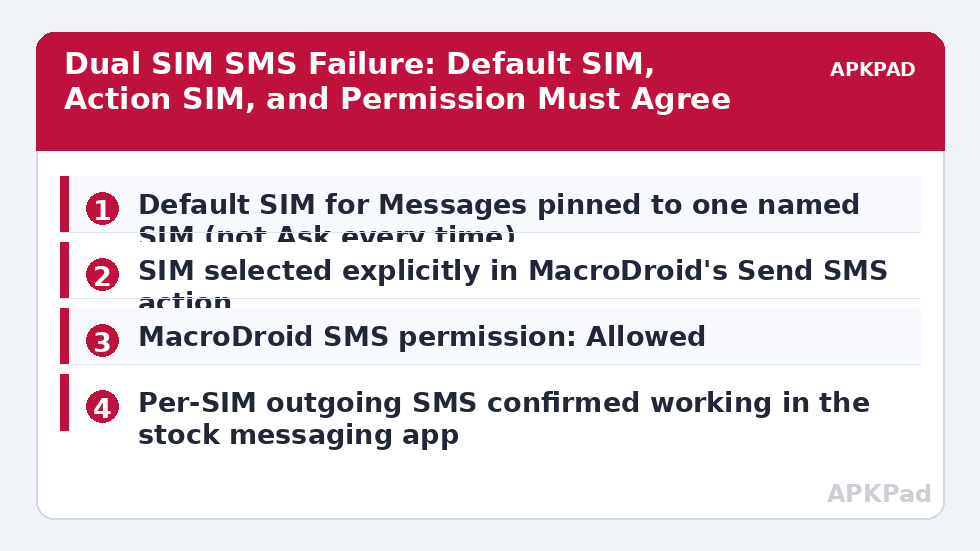
The auto-reply works on your single-SIM test phone and fails on the dual-SIM phone you actually carry. To fix auto reply SMS failed dual SIM Android errors, stop treating “send SMS” as one action — on a dual-SIM device every send is silently a choice of subscription, default SIM settings, and per-SIM permissions, and MacroDroid can only send successfully when all three agree on which SIM should carry the message.
Start With the Failure Code, Not the Settings
Open MacroDroid’s System Log immediately after a failed reply and read the actual entry. A generic failure with no detail usually means Android rejected the send before the carrier was involved. An error naming a radio or subscription points at SIM selection. No log entry for the Send SMS action at all means the macro never reached it — the trigger or a constraint failed upstream, which is a different article’s problem. Also check the obvious once: dual-SIM phones happily receive on a SIM that has no outgoing credit, an expired plan, or outgoing SMS barred by the carrier, and no app setting repairs a carrier-side block.
Run one manual experiment before changing anything. Open MacroDroid, use its test action facility or a simple test macro to send an SMS to your own number, choosing SIM 1 explicitly. Then repeat with SIM 2. In a large share of cases exactly one SIM succeeds — and that single result converts a vague “dual SIM is broken” complaint into a precise “SIM 2 sends fail” diagnosis.
Ordered Cause Tree
- Default SMS SIM mismatch: Android’s default SIM for messages is set to “Ask every time” or to the other SIM. An unattended macro cannot answer the Ask prompt, so the send stalls or fails.
- Macro not specifying a SIM: The Send SMS action is left on its default, which follows the system default above — fine on single-SIM phones, ambiguous on dual-SIM ones.
- SMS permission or default messaging role confusion: MacroDroid lacks the SMS permission, or a vendor messaging app has changed defaults after an update — the permission family also covered by notification access being revoked in the sense that both return silently after updates.
- Trigger SIM versus reply SIM mismatch: The message arrived on SIM 2, but the reply leaves on SIM 1 — some carriers, banking senders, and recipients’ filters treat a reply from a different number as a new, untrusted message, and some macro designs read as failed even when the send succeeded.
- OEM dialler and messaging interference: Vendor “smart dual SIM” features, RCS chat features on one SIM only, and spam filters in the stock messaging app intercept or reroute messages the system SMS path would send cleanly.
Fix Auto Reply SMS Failed Dual SIM Android: Settings, Brand by Brand
Step 1: Pin the System Default SIM for Messages
| Brand | Path | Set this |
|---|---|---|
| Pixel | Settings → Network & internet → SIMs → choose SIM → or Settings → Network & internet → Calls & SMS → Messages | Messages default set to one named SIM, not Ask every time |
| Samsung One UI | Settings → Connections → SIM manager → Messages | One SIM selected for Messages; also review “Data switching and backup calls” so data changes do not surprise you |
| Xiaomi MIUI / HyperOS | Settings → SIM cards & mobile networks → Default SIM for messages (and check per-SIM settings) | One SIM chosen as the message default; confirm the other SIM is not set to data-only behaviour that disables its messaging |
| Oppo / Realme ColorOS | Settings → Mobile network → choose SIM, and Settings → SIM card manager style screen for defaults | Message default pinned to one SIM; confirm both SIMs show as enabled for SMS in their individual SIM settings |
Step 2: Make the Macro Choose the SIM Explicitly
Open the failing macro, edit the Send SMS action, and look for its SIM selection option. Set it explicitly to the SIM that succeeded in your manual test rather than leaving it on system default. If your design should reply from whichever SIM received the message, build two macros — or one macro with a condition on the incoming number’s SIM where your MacroDroid version exposes it — instead of expecting one action to infer it. Explicit beats clever on dual-SIM hardware, every time.
Step 3: Confirm Permissions and Restore Defaults After Updates
Check Settings → Apps → MacroDroid → Permissions and confirm SMS is allowed. If you previously granted it through an ADB session and later rebooted or updated, re-check rather than assuming it survived — the reset behaviour in ADB-granted permissions resetting after reboot catches out exactly this kind of automation. Then send one message manually from the stock messaging app on each SIM to prove the carrier path itself works before blaming MacroDroid for a network failure.
Step 4: Test RCS and Spam Filtering as Suspects
If replies fail only for contacts using RCS chat features, test with chat features temporarily off for that SIM in your messaging app’s settings, or test the auto-reply against a plain SMS sender. Vendor spam protection can also silently quarantine automated-looking replies; check the stock messaging app’s spam and blocked folder after a “failed” test — a message sitting there was sent successfully and filtered locally, which reframes the whole problem. If background reliability is also poor on this phone, work through MacroDroid not working in the background as well, because a frozen MacroDroid cannot send anything on either SIM.
How to read this: the estimate adds a small always-on idle cost for MacroDroid itself (about 0.4% of battery per day) to a per-class daily cost for each trigger type you use, scaled slightly by how many macros you run. These are planning estimates from that transparent model — not measurements from your phone. Use them to compare setups before you build, then confirm against the real numbers under Android Settings → Battery.
Verification: Prove Both Directions on Both SIMs
Build a test matrix and actually complete it: message arriving on SIM 1 gets a reply, message arriving on SIM 2 gets a reply, each verified on the receiving phone as delivered — delivery on the other device is the only proof that counts, not the absence of an error. Then open the System Log and confirm the Send SMS action shows as completed for both, at the times you sent the test messages. Repeat once after a reboot, because dual-SIM defaults are among the settings OEM updates love to reset. Only when all four cells of that matrix pass twice is this closed. The full set of diagnostics lives in our Fixes & Errors category.
When This Fix Won’t Work
If the carrier has barred outgoing SMS on a SIM, restricted short-code or automated traffic, or the SIM is data-only by plan design, no phone setting overrides it — that conversation is with the carrier. Some regions and carriers also restrict app-sent SMS to premium or business numbers entirely. And if your employer manages the device, messaging policy can dictate the default SIM and block changes. In those cases, narrow the design: auto-reply only on the SIM that is permitted to send, and make the other SIM’s macro post a notification reminding you to reply manually.
Frequently Asked Questions
Why does auto-reply SMS fail only on my dual SIM phone?
Because every send on a dual-SIM phone involves a SIM choice. If the system default for messages is set to Ask every time, or the macro leaves SIM selection to a default pointing at a SIM that cannot send, the unattended send stalls or fails. Pin one default SIM and set the SIM explicitly inside the Send SMS action.
How do I make MacroDroid reply from the same SIM that received the message?
Do not rely on the system default. Set the SIM explicitly in the Send SMS action, or build a condition that selects the SIM based on which subscription received the incoming message where your MacroDroid version exposes that detail. Test each SIM separately afterwards, because each one is effectively a separate sending account.
MacroDroid has SMS permission, so why does sending still fail?
Permission is only one of three requirements. The default message SIM may be unset or set to Ask every time, the chosen SIM may have no outgoing SMS service or credit, or a carrier or spam filter may be blocking the send. Test a manual send from the stock messaging app on each SIM to separate phone settings from carrier problems.
Does RCS affect MacroDroid auto-replies?
It can. MacroDroid sends through the standard SMS path, while contacts using RCS chat features may expect replies inside that system, and vendor spam filters can quarantine automated-looking messages. Check the spam folder after a failed test and try a plain SMS contact to isolate whether RCS is the variable.
Why did dual SIM auto-reply break after a system update?
OEM updates commonly reset SIM defaults back to Ask every time, re-apply battery management, and occasionally drop granted permissions. After any major update, re-check the message default SIM, MacroDroid’s SMS permission, and its battery exemption, then rerun the two-SIM test before assuming the macro itself broke.