Your home and work macros used to switch reliably as you moved, then stopped — and they only wake up when you open a maps app. To fix cell tower triggers not updating without GPS, understand what changed underneath you: modern Android ties cell information to location permission and location services in ways older versions did not, so a trigger that once updated passively from the modem can sit frozen until something else requests a location fix.
How Cell Tower Triggers Actually Update
A cell tower trigger does not poll the network on a timer MacroDroid sets freely. MacroDroid learns the cell IDs around a place, then relies on Android’s telephony callbacks to hear when the serving cell changes. Two conditions gate that flow. First, since Android 10, reading cell identity requires location permission — the system treats cell IDs as location data because they reveal where you are. Second, on many builds the telephony callback only delivers fresh cell info while location services are enabled at the system level, even if no GPS fix is ever taken. Disable either condition and the callbacks arrive empty or stop, while the trigger configuration still looks perfectly correct in the app.
That is also why the failure feels haunted. Open Google Maps and everything starts working: Maps holds location permission, requests updates, and the cell data refreshes as a side effect. Close it, and updates stall again. The trigger was never broken — its data supply was.
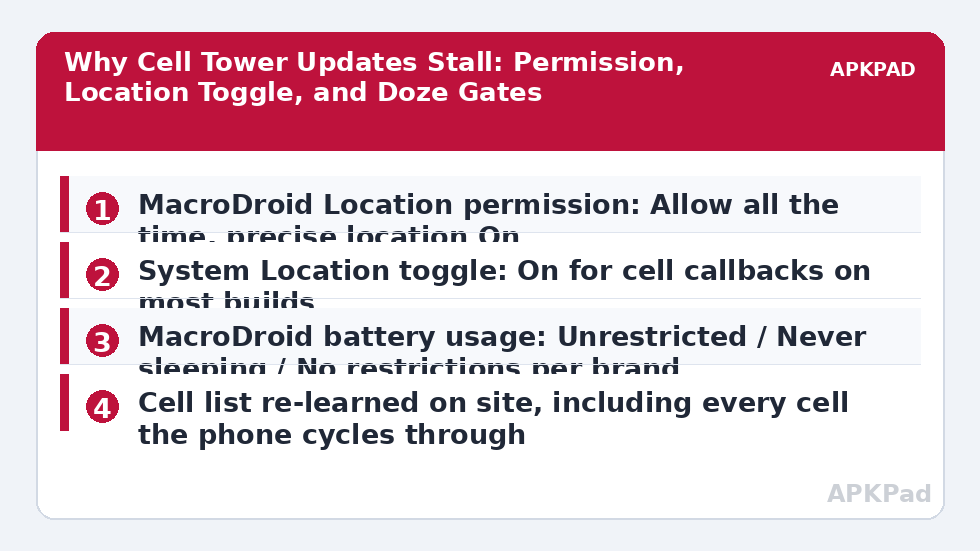
Ordered Cause Tree
- Location permission set to approximate, denied, or “only while in use”: Cell identity needs precise location permission with background allowance for a trigger that must work while MacroDroid is closed.
- System Location toggle off: On many Pixel, One UI, and ColorOS builds, cell callbacks stop delivering when the master Location switch is off, even with permission granted.
- Doze and OEM battery freezing: If MacroDroid is frozen in deep sleep, it misses cell change callbacks and only catches up when the phone wakes — closely related to delayed trigger execution in deep sleep and Doze.
- Stale learned cell list: Carriers refarm towers, 5G adds new cells, and a location learned two years ago may no longer include the cell your phone now camps on at home.
- Dual-radio and network mode changes: Switching between 5G and 4G, a second SIM becoming active, or Wi-Fi Calling taking over can change which cell identity the phone reports.
Fix Cell Tower Triggers Not Updating Without GPS: The Repairs in Order
Step 1: Set Location Permission Correctly
Go to Settings → Apps → MacroDroid → Permissions → Location and choose Allow all the time, with Use precise location switched on. “Only while using the app” is the single most common cause in this tree, because MacroDroid is almost never visibly in use when you cross a boundary. Approximate location is not sufficient either — it deliberately withholds the precision cell reading depends on.
Step 2: Decide Honestly About the System Location Toggle
Here is the trade-off stated plainly. On many current builds, cell triggers need the system Location toggle on, even though the trigger never takes a GPS fix. “Without GPS” in practice means without GPS fixes draining battery — the toggle being on does not mean the GPS radio runs continuously; apps still only get fixes when they request them. If you keep the toggle off for privacy, cell triggers on those builds will stay unreliable, and Wi-Fi SSID or Bluetooth triggers are the better design. Related trade-offs are explored in our article on location triggers not firing on Android 14 and 15.
Step 3: Exempt MacroDroid From Battery Management, Per Brand
| Brand | Setting | Exact path |
|---|---|---|
| Pixel | Battery use: Unrestricted | Settings → Apps → MacroDroid → App battery usage → Unrestricted |
| Samsung One UI | Never sleeping apps | Settings → Battery → Background usage limits → Never sleeping apps → add MacroDroid; also App info → Battery → Unrestricted |
| Xiaomi MIUI / HyperOS | Battery saver: No restrictions, plus Autostart on | Settings → Battery → MacroDroid → No restrictions; Settings → Apps → Manage apps → MacroDroid → Autostart → On |
| Oppo / Realme ColorOS | Allow background activity and auto launch | Settings → Apps → MacroDroid → Battery usage → Allow background activity; and Startup manager → allow MacroDroid |
Reboot after applying the exemption. Telephony callbacks register when MacroDroid’s process starts, and a frozen-then-thawed process can hold a stale registration until the next clean start.
Step 4: Re-learn the Cells at Each Location
Stand in the location, open the cell tower trigger’s configuration, and use the option to add the currently connected cell. Stay a few minutes — phones hop between neighbouring cells while stationary, and a location defined by a single cell ID will flap at the boundary. Add every cell the phone cycles through while you are genuinely there. If your carrier has recently rolled out 5G in your area, expect at least one new cell to appear that your old configuration never saw, which alone explains many “it just stopped” reports.
Step 5: Test a Fallback Trigger in Parallel
For a week, run a duplicate macro triggered by Wi-Fi SSID connection for home, and by disconnection for leaving, alongside the cell macro. Wi-Fi triggers ride connectivity broadcasts rather than telephony callbacks, similar in spirit to the issues in Wi-Fi toggle actions blocked on Android 10 and later. If the Wi-Fi version proves boringly reliable and the cell version keeps missing, keep Wi-Fi as primary and cell as the away-from-home layer, where its wide-area coverage is the actual strength.
How to read this: the estimate adds a small always-on idle cost for MacroDroid itself (about 0.4% of battery per day) to a per-class daily cost for each trigger type you use, scaled slightly by how many macros you run. These are planning estimates from that transparent model — not measurements from your phone. Use them to compare setups before you build, then confirm against the real numbers under Android Settings → Battery.
Verification: Prove Updates Flow Without Opening Maps
Restart the phone, leave Location settings exactly as configured, and do not open any maps or location app. Walk or drive out of the learned cell area — realistically a few streets away, since urban cells are small — with a test macro that writes a timestamped entry to MacroDroid’s User Log whenever the cell trigger fires for leaving and arriving. Afterwards, compare those timestamps with the System Log. Cell changes recorded while no location app ran prove the pipeline works end to end. If entries appear only at moments you woke the phone, Doze is still swallowing callbacks and Step 3 needs revisiting. More verification patterns are collected under our Fixes & Errors category.
When This Fix Won’t Work
Some carriers and regions expose cell identity poorly, particularly on 5G standalone networks where the phone reports the anchor cell inconsistently, and some budget devices throttle telephony callbacks hard. Indoors, deep inside large buildings, your phone may camp on a distant or unexpected cell for hours. And if you insist on keeping the system Location toggle off at all times, several Android builds simply will not feed this trigger — that is a platform decision, not a MacroDroid defect. In those cases, redesign around Wi-Fi, Bluetooth, or geofence triggers and retire the cell trigger without regret.
Frequently Asked Questions
Do cell tower triggers need GPS to be switched on?
They do not take GPS fixes, but on many Android builds they do need the system Location toggle on and MacroDroid holding precise location permission set to Allow all the time. Cell identity counts as location data, so with location fully off the system withholds or stalls the cell updates the trigger depends on.
Why do my cell triggers update only when I open Google Maps?
Maps requests active location updates, which refreshes the telephony and location pipeline as a side effect, so pending cell changes suddenly arrive. That pattern points to missing background location permission or MacroDroid being frozen by battery management, rather than a broken trigger configuration.
Why does my home trigger fire when I am still at home?
Your phone is hopping between neighbouring cells while stationary, and one of them is not in the learned list for home. Re-learn the location over several minutes and add every cell the phone connects to while you are there. Boundary flapping reduces sharply once all local cells are included.
Is a cell tower trigger better than a geofence?
It is cheaper in battery and works without GPS fixes, but it is far less precise — a cell can cover streets or whole rural districts. Use cell triggers for coarse home-versus-away logic, and geofences or Wi-Fi SSID triggers where you need a tight, dependable boundary.
Will 5G break my existing cell tower triggers?
It can. A 5G rollout adds new cells and changes which cell your phone camps on, so a learned list from the 4G era may no longer match. Re-learn each location after a network upgrade in your area before concluding the trigger itself has failed.