Some tweaks survive a reboot; others quietly evaporate, and the difference is rarely documented. Configuring automated ADB command execution on device startup with MacroDroid turns that uncertainty into a system: a boot macro that re-applies the settings your setup depends on, verifies the ones that should have persisted, and logs the result. This guide covers what actually needs re-applying, the correct MacroDroid architecture for running shell work at boot, and the delays and fail-safes that keep a boot macro from becoming a boot problem.
First, know what actually resets
Blindly re-applying everything at boot is wasteful and occasionally harmful (rewriting a value that an update legitimately changed, for instance). The realistic persistence map:
| Item | Survives reboot? | Boot-macro action |
|---|---|---|
| WRITE_SECURE_SETTINGS grant (pm grant) | Yes, stored by package manager | Verify occasionally, no action needed |
| Settings values (system/secure/global keys) | Yes, they are persistent storage | Verify drift-prone ones; re-apply only if changed |
policy_control immersive value |
Usually yes; some OEM updates clear it | Read and restore if empty |
| Deviceidle battery whitelist | Yes | Verify MacroDroid and Helper are still listed |
| Testing-menu network mode selection | Often NO | Cannot be scripted on most devices — notify instead |
AppOps modes set with cmd appops |
Yes | Spot-check the critical ones |
| Runtime states: hotspot, tethering, services | No — runtime by definition | Re-establish if your setup requires them |
The pattern to notice: persistent stores persist. A good boot macro is mostly a verification macro with a short repair list, not a replay of your entire ADB history. If you have not yet applied the foundational grant, start with granting WRITE_SECURE_SETTINGS — the boot macro depends on it to make its repairs.
Automated ADB command execution at device startup: the engine
MacroDroid runs shell commands through its Shell Script action. Two execution contexts exist, and confusing them wastes hours:
- Via the Helper app: the MacroDroid Helper executes commands with the privileges it has been given. With the ADB grant applied to the Helper, commands can write secure/global settings — this is the context most of this site’s tweaks assume.
- As the app itself: without the Helper route, a shell action runs with ordinary app privileges and will fail on privileged operations, sometimes silently.
Neither context is a root shell, and neither is a full ADB shell: the on-device shell cannot run adb commands against itself, and some cmd subcommands refuse non-shell callers. Write boot commands defensively — assume any single command can fail, capture its output to a variable, and never chain the whole repair list into one opaque script that dies on line two. The broader command vocabulary is catalogued in the ADB commands cheat sheet.
How to read this: the estimate adds a small always-on idle cost for MacroDroid itself (about 0.4% of battery per day) to a per-class daily cost for each trigger type you use, scaled slightly by how many macros you run. These are planning estimates from that transparent model — not measurements from your phone. Use them to compare setups before you build, then confirm against the real numbers under Android Settings → Battery.
Building the boot macro
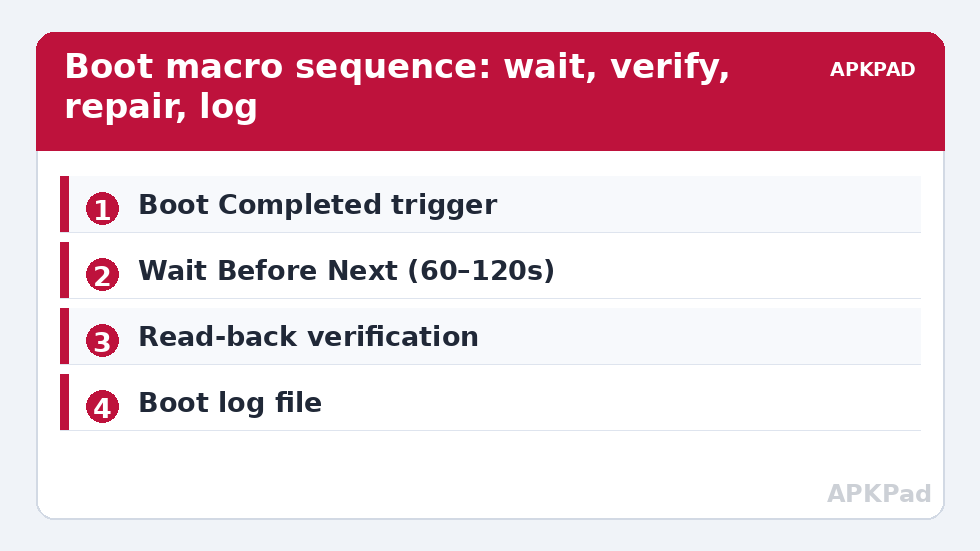
- Trigger: Device Boot. This fires once Android finishes booting and MacroDroid starts.
- First action: Wait 60 seconds. At the moment the boot trigger fires, the system is still starting services, mounting storage, and connecting radios. Commands that touch networking or storage race against that startup and fail intermittently. A 60–90 second delay converts a flaky macro into a reliable one.
- Verification block: read the values you care about into variables — for example a Shell Script action running
settings get global policy_controlwith output saved to a string variable. - Conditional repairs: If-clauses around each repair: if the policy_control variable is empty or “null”, write your value with a System Setting action. If a value already matches, do nothing.
- Whitelist check: run
dumpsys deviceidle whitelistinto a variable and test whether it contains MacroDroid’s package; if a major update dropped it, re-add with the command from the OEM power management guide and log the event. - Log everything: append one line — timestamp, what was checked, what was repaired — to a text file in your Documents folder using MacroDroid’s Write to File action. When something breaks weeks later, this log is the difference between diagnosis and superstition.
- Optional notification: only notify when a repair was needed. A daily “all good” notification trains you to ignore the one that matters.
Fail-safes that keep boot macros safe
- Run once per boot: the Device Boot trigger is once-only by nature, but if you also invoke the macro manually, guard repairs with the same read-before-write pattern so manual runs are harmless.
- No loops at boot: never put a wait-for-condition loop in a boot macro without a timeout action; a loop waiting on a service that failed to start will drain the battery invisibly.
- Keep it short: total execution under a few seconds of active work after the initial delay. Anything heavier belongs in a scheduled macro later in the day.
- Test by rebooting deliberately: after building, reboot twice and read the log. Intermittent failures show up by the second boot.
- Respect updates: after a major Android update, expect the log to show repairs. That is the system working — the macro caught drift. If repairs recur on every boot, an OEM process is actively rewriting the value; move that item to a periodic macro instead of fighting at boot.
Undo: disabling the whole mechanism
Reversal could not be simpler, and it is total: disable or delete the boot macro in MacroDroid and nothing runs at startup. Any values the macro previously wrote remain as ordinary settings values — restore them individually with the undo steps in their own guides (for example clearing policy_control per the immersive mode article), or leave them, since they are identical to what you would have set by hand. There is no residue: no service, no daemon, nothing outside MacroDroid’s own configuration. More startup-adjacent patterns are collected in the system tweaks category.
A sample boot log, annotated
This is what the log file from a well-built boot macro looks like after an ordinary week, and after an update:
2026-10-12 07:02 boot check: policy_control OK, whitelist OK, repairs: none— the silent majority of boots. Nothing to do; the line exists so that absence of lines is itself detectable.2026-10-15 06:41 boot check: policy_control MISSING → restored; whitelist OK— an overnight OS patch cleared the value. The macro earned its existence in this one line.2026-10-16 07:00 boot check: SKIPPED (MacroDroid started late)— worth logging too: if your phone maker delays app startup aggressively, a “boot check ran at +15 min” note tells you the verification happened late rather than never.
Read this way, the log is a tiny reliability diary. Reviewing it after each system update takes thirty seconds and replaces the vague feeling that “something changed” with a dated record of exactly what changed.
Ordering: what must run before what
Within the macro, sequence by dependency. The initial wait comes first, unconditionally. Verification reads come next — they depend only on the settings and package services, which are up early. Repairs follow their reads immediately (repair what you just measured, not what you measured a minute ago). Anything network-dependent — checking an SSID, reading radio state — goes last and tolerates failure gracefully, because radios and Wi-Fi are the slowest subsystems to settle after boot. And the log write closes the macro, recording the outcome of everything above it. A boot macro ordered this way degrades gracefully on a bad day: worst case, the network section no-ops and the log says so, while the settings core still ran. Ordered carelessly — network check first, exception unhandled — the same bad day produces a dead macro and no log entry to explain it.
Frequently Asked Questions
Why do my boot commands fail if I run them immediately?
Because at boot-trigger time the phone is still initialising storage, radios, and services. Commands that depend on them race and fail intermittently. A 60–90 second wait at the start of the macro is the standard fix.
Can the boot macro run real ADB commands?
No — there is no ADB daemon connection to the phone from itself. The Helper-based shell can run settings, cmd, and pm commands within its granted privileges, which covers settings writes and whitelisting, but not everything a computer-connected ADB shell can do.
Do pm grants need re-applying at every boot?
No. Permission grants are stored by the package manager and persist across reboots. They are typically lost only on uninstall/reinstall or occasionally across major OS updates — which is why the boot macro verifies rather than blindly re-grants.
How do I know what my boot macro actually did?
Have it write a log line per boot: timestamp, values checked, repairs made. MacroDroid’s Write to File action appending to a text file in Documents is enough, and reviewing it after updates tells you exactly what drifted.
Is it safe to re-apply settings on every boot?
Writing the same value repeatedly is harmless, but the read-before-write pattern is better practice: it avoids fighting legitimate changes (for example after an OS update) and makes the log meaningful. Verify first, repair only on mismatch.