Most MacroDroid triggers are events — the system tells the app something happened, and listening costs nothing. Sensor triggers are the exception, and learning to reduce sensor polling frequency macrodroid-wide is the difference between an automation setup that is battery-neutral and one that quietly eats 3–5% a day by itself. If your battery stats show MacroDroid itself climbing the list, a polled sensor is the prime suspect.
Events Versus Polling: The Core Distinction
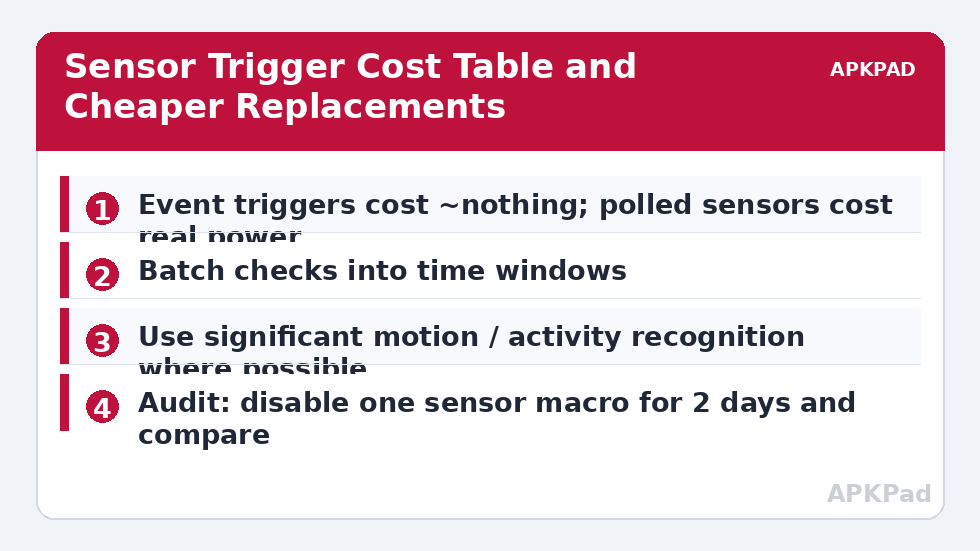
When you use a Screen On, Battery Level, or App Launched trigger, Android delivers the event to MacroDroid; between events the app sleeps. A light-sensor, proximity, or “sensor” trigger is different: to know the ambient light crossed your threshold, something must sample the sensor repeatedly. Modern Android batches sensor delivery through a sensor hub on many devices, which softens the cost, but a trigger configured with a tight update interval still forces wake-ups. The cost is not the sensor — it is the CPU waking to evaluate your condition every few seconds, forever, including all night.
Which Triggers Are Expensive
| Trigger Type | Relative Cost | Cheaper Alternative |
|---|---|---|
| Light sensor (continuous, short interval) | High | Time-of-day schedule, or light check gated by screen-on event |
| Proximity sensor held active | Medium-High | Proximity only during calls (system already manages this) |
| Shake / motion detection | Medium — uses accelerometer via sensor hub on most phones | Keep, but raise sensitivity threshold so it filters on the hub |
| Orientation / face up-down | Low-Medium — usually derived from batched sensors | Acceptable for most users |
| Location (GPS periodic) | High | Cell-tower triggers or geofence API — see the location comparison |
| Any “check every X seconds” loop macro | Scales with frequency | Convert to event triggers or lengthen the interval aggressively |
How to read this: the estimate adds a small always-on idle cost for MacroDroid itself (about 0.4% of battery per day) to a per-class daily cost for each trigger type you use, scaled slightly by how many macros you run. These are planning estimates from that transparent model — not measurements from your phone. Use them to compare setups before you build, then confirm against the real numbers under Android Settings → Battery.
Restructuring Patterns That Work
Gate the sensor behind an event. Instead of “light sensor below 10 lux → enable reading mode” running all day, use “Screen Unlocked → check light sensor once → act”. The sensor samples once per unlock — dozens of times a day instead of thousands — and the user experience is nearly identical, because the automation only matters when you are looking at the phone anyway.
Lengthen intervals without mercy. A macro that checks a condition every 30 seconds almost never needs to. Every 5 minutes is 10x cheaper; every 15 minutes covers most home-automation purposes. Ask what decision actually changes on a 30-second timescale. Usually none.
Use day/night windows. A light-based macro that only makes sense after dark gets a time constraint (18:00–07:00), instantly cutting a third of its polling life. Combine constraints — time window plus charging state plus screen state — and most sensor macros shrink to a fraction of their former cost. These patterns complement the polling discussion in our cell tower versus GPS comparison, which is the same problem wearing a location costume, and they belong in any setup from the battery hacks collection.
Proving It On Your Own Phone
Do not take this article’s word for the cost — measure it. Note two days of normal use with your sensor macros enabled (same rough usage, overnight drain noted). Then disable the sensor-based macros for two days and compare, particularly MacroDroid’s own entry in Settings → Battery. If MacroDroid’s share does not move, your sensors were being batched efficiently by the sensor hub and you can stop worrying — hardware varies, and the honest answer on some phones is “this costs almost nothing”. If it drops visibly, restructure using the patterns above, starting with whichever macro polls most often.
A Field Guide to Reading Your Own Logs
The audit in the main text tells you to bisect; this section tells you what you are looking at while you do. MacroDroid’s system log shows trigger evaluations and action outcomes with timestamps — export a night’s worth and search for repeats. Healthy setups show sparse, meaningful entries: a charger connected, a screen unlocked, a level crossed. Sick setups show texture: the same macro name recurring at metronomic intervals, sensor conditions evaluating true/false/true across a threshold (a light trigger fluttering at dusk can fire hundreds of times in an hour), and actions failing silently at each pass. Threshold flutter deserves its own fix beyond polling rates: add hysteresis — separate on/off thresholds with a gap (lights below 20 lux arm the action; above 40 lux disarm it) — or a “minimum time in state” condition, so a value hovering at the boundary costs two evaluations, not four hundred. Most “mystery drain” reports in automation forums are flutter plus frequency, and both surrender to the same log.
Where Sensor Triggers Are Worth Their Cost
Honesty cuts both ways: some sensor automations earn their polling budget. A fall-detection or shake-for-help macro for an elderly user, a proximity-based call recorder guard, a light-triggered reading mode that fires a handful of times an evening — these deliver value per wake-up that dwarfs their cost, and the correct response is to keep them and economise elsewhere (the wake-lock audit lists where elsewhere usually hides). The discipline is accounting, not abstinence: every continuously evaluated condition should be able to answer the question “what do you buy with your wake-ups?” If the honest answer is “a minor convenience I barely notice”, gate it behind an event or a schedule; if it is “safety” or “the feature I built this setup for”, pay the cost with a clear conscience and measure it once so you know the price.
The Sensor Hub: Why Your Phone Might Already Be Efficient
A word of hardware fairness before you restructure everything: most phones from the last several years route low-rate sensor work through a dedicated sensor hub or DSP — a tiny, frugal processor that batches accelerometer, and sometimes light and proximity, readings without waking the main CPU. On such hardware, a shake trigger or a batched light condition may cost an order of magnitude less than this article’s worst cases, and your two-day A/B test may show nothing at all. That is not the article being wrong; it is the article’s method working — the measurement arbitrates between the general warning and your specific silicon. The phones that suffer are predictable: older devices, budget models with cost-cut hubs or none, and any setup whose triggers request rates the hub cannot batch (very short intervals force main-processor involvement regardless of hub quality). Know which phone you have, measure rather than assume, and spend your restructuring effort where the log proves a cost exists.
One last calibration note: after restructuring, give the new design the same two-day comparison you used to convict the old one. If MacroDroid’s share falls and the automation still feels instant where it matters, the restructure is proven rather than merely plausible — and you have a before/after pair of numbers worth writing down, because the next sensor macro you dream up should be judged against them at birth.
Frequently Asked Questions
Which MacroDroid trigger uses the most battery?
Periodic GPS location checks are usually the worst, followed by fast-interval light/proximity polling and any hand-built “repeat every few seconds” loop. Single event-based triggers (screen, battery level, notifications) are effectively free.
Does the shake-to-flashlight trigger drain battery?
Modestly. Accelerometer-based shake detection is normally offloaded to the low-power sensor hub, so the cost is small on modern phones — but it is not zero, and on older devices without a hub it can be noticeable. Test by disabling it for two days.
How do I check how often a sensor trigger is firing?
MacroDroid’s system log and user log record trigger firings. If a sensor macro’s log fills with entries every minute all night, you have found your drain. The log also shows actions that failed silently.
Is there a global “poll less often” setting in MacroDroid?
There is no single master switch; polling behaviour is per-trigger and per-macro design. Some sensor triggers expose an update-rate or sensitivity option — set the slowest rate that still serves the purpose, and prefer event-gated checks.
Will reducing polling make my automations feel slower?
Only where the automation genuinely depends on instant detection. A light-based reading mode gated on unlock feels identical; a security-style motion alert is the rare case where responsiveness is the point — keep that one fast and economise elsewhere.