Android’s own scheduled dark theme is buried three menus deep, tied to a fixed clock time on some phones and missing entirely on others. Learning to automate dark mode sunset without root puts that schedule under your control: lights dim outside, your screen follows, and the switch happens at real local sunset rather than at 7 p.m. in both June and December. This guide uses MacroDroid’s built-in sunset trigger and dark mode action, then deals honestly with the one permission step that some brands demand.
This guide sits in the Macro Triggers collection. It pairs naturally with automating a screen brightness boost for camera and gallery, because brightness and theme work best when they are planned together, and with time based Do Not Disturb routines for a complete evening wind-down.
How to automate dark mode sunset without root, in outline
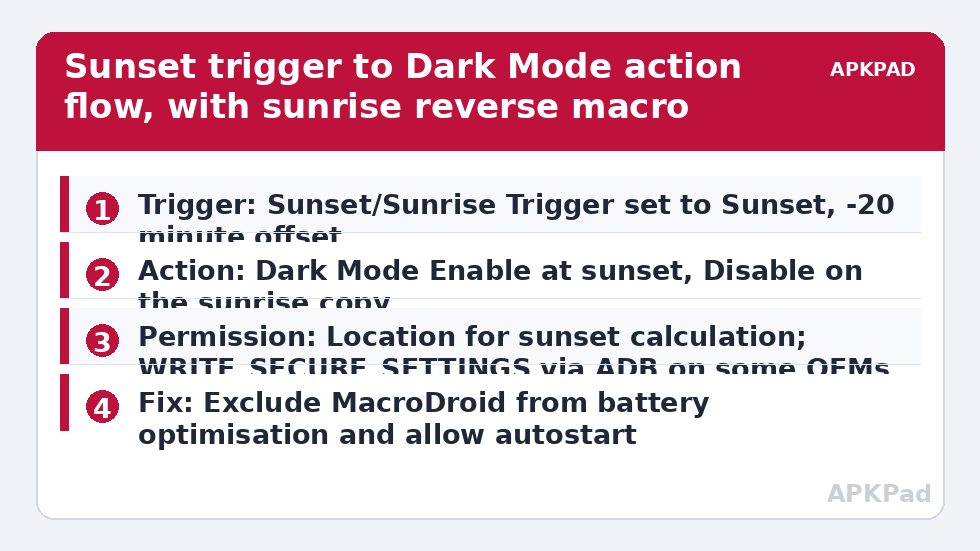
The mechanism is simpler than most people expect. MacroDroid calculates sunset for your location each day using its Sunset/Sunrise Trigger, so the trigger time drifts correctly through the year with no calendar maintenance from you. When that trigger fires, the Dark Mode action tells Android to switch the system UI mode to dark. A matching sunrise macro does the reverse in the morning. No root is involved at any point. The only wrinkle is permission: toggling the UI mode is a secure system setting on some phones, and Android protects secure settings behind a one-time ADB grant rather than ordinary runtime permissions. That grant is a single computer step, explained below at the exact point you need it, and it is not root, does not unlock the bootloader, and does not void anything.
Macro breakdown: trigger, actions and constraints
| Trigger | Sunset/Sunrise Trigger set to Sunset. Optional offset inside the trigger, e.g. fire 20 minutes before sunset for an earlier switch in winter. |
| Actions | Dark Mode action set to Enable (for the sunset macro) and Disable (for the sunrise copy). Alternative on stubborn OEM skins: Set System Setting / UI mode via the System Setting action, which is where the ADB grant is needed. |
| Constraints | Day of Week constraint if you want manual control at weekends, Location / Geofence constraint if you only want it at home, Battery Saver State constraint to avoid fighting battery saver, which forces its own theme behaviour on some phones. |
Two macros, one per direction, is the maintainable structure. A single macro that toggles sounds elegant until it fires while you have manually changed the theme, at which point toggle logic puts you in the wrong state for the whole evening. Explicit Enable at sunset and Disable at sunrise are self-correcting: whatever state the phone is in beforehand, it lands in the right one afterwards. That self-correcting property is worth more than saving one macro slot.
Building the sunset macro
-
Create a new macro and add the Sunset/Sunrise Trigger. MacroDroid needs a location to compute sunset, so grant Location permission when asked and pick whether the trigger uses your current location or a fixed place. For most people the current location option is right, because sunset at home and sunset on holiday are different times worth respecting.
-
Set an offset if you want one. Many users prefer the switch slightly before true sunset, when indoor light has already dropped. Minus twenty minutes is a good starting point. Do this inside the trigger rather than with a separate clock trigger, so the offset moves with the seasons automatically.
-
Add the Dark Mode action and set it to Enable. Test the action immediately using MacroDroid’s test action option. If the theme flips, you are done with permissions. If you get a permission error mentioning secure settings, follow the ADB step in the next section before continuing.
-
Add constraints sparingly. A Day of Week constraint is the only one most people need. Skip location constraints unless you genuinely behave differently away from home, because every constraint is a future reason the macro silently does nothing.
-
Save the macro, then clone it, change the trigger to Sunrise, change Dark Mode to Disable, and adjust the offset to your morning preference, often plus fifteen minutes after sunrise rather than at first light.
How to read this: the estimate adds a small always-on idle cost for MacroDroid itself (about 0.4% of battery per day) to a per-class daily cost for each trigger type you use, scaled slightly by how many macros you run. These are planning estimates from that transparent model — not measurements from your phone. Use them to compare setups before you build, then confirm against the real numbers under Android Settings → Battery.
The ADB grant, at the exact step that needs it
If the test in step three failed, do this once. On the phone, enable Developer Options and USB Debugging. Connect to a computer with the Android platform tools, and grant MacroDroid permission to write secure settings with the ADB command your MacroDroid permission screen shows you, which targets WRITE_SECURE_SETTINGS for the MacroDroid package. MacroDroid displays the exact command in its permissions help, so copy it from there rather than from a random forum post, because package names differ between the free and helper components. Disconnect, retest the Dark Mode action, and the theme should flip. State this clearly for yourself: this step needs a computer and ADB, it does not need root, and it does not need the MacroDroid Helper app for the standard Dark Mode action on most phones. The Helper becomes relevant for some system-setting writes on certain Android versions and OEM skins, and MacroDroid will prompt for it specifically if your device requires it. Follow that prompt if it appears, ignore it if it does not.
Permissions and the usual failure
Beyond the possible ADB grant, this macro needs Location permission for sunset calculation and MacroDroid’s normal background-running allowance. It does not need Notification Access, accessibility, or device admin. The number one reason it fails is OEM battery management killing MacroDroid in the background. A sunset trigger is a scheduled future event, and if Xiaomi, Samsung, Oppo, Vivo, or another OEM has frozen MacroDroid by late afternoon, the alarm that should fire at sunset never wakes the app. The fix is to exclude MacroDroid from battery optimisation in Android settings and to also allow autostart and unrestricted battery use in the OEM’s own battery menu, since many phones enforce both layers. Then test honestly: set an offset so the trigger fires ten minutes from now, lock the phone, leave it alone, and watch whether the theme changes without you touching anything. Testing by tapping Run Macro proves the action works but tells you nothing about the trigger surviving the afternoon.
Skin quirks worth knowing
OEM skins handle dark mode with varying enthusiasm. On near-stock Android the Dark Mode action flips the system and well-behaved apps follow instantly. On some Samsung One UI and MIUI builds, a handful of the manufacturer’s own apps ignore the system flag until relaunched, which looks like a partial failure but is really those apps caching their theme. Judge success by the notification shade, Settings, and your main apps, not by one stubborn pre-installed tool. Also note that battery saver on several skins forces dark theme independently. If your phone enters battery saver at twenty percent, the theme may change at 4 p.m. for reasons that have nothing to do with this macro, and your sunrise macro may appear not to reverse it until the charger is connected. That is expected behaviour, and the Battery Saver State constraint in the table exists for people who want to make the interaction explicit.
Finally, remember apps with their own internal theme setting set to Light will never follow any system macro. Switch the apps you care about to their Follow System option once, and after that this pair of macros genuinely runs your whole evening transition.
Frequently Asked Questions
Do I really not need root to change dark mode automatically?
Correct, you do not need root. The Dark Mode action works through Android’s UI mode system. Some phones ask for a one-time ADB grant of WRITE_SECURE_SETTINGS before the setting can be written, which is a permission grant from a computer, not root access, and it leaves your bootloader and warranty position untouched.
Why did my theme change at the wrong time while travelling?
The Sunset/Sunrise Trigger calculates from location. If the trigger uses a fixed location you set at home, it will keep firing at home sunset while you travel. Change the trigger to use your current location, and make sure MacroDroid still holds Location permission, especially after Android’s periodic permission resets.
Why does nothing happen even though the macro is enabled?
The most common cause is OEM battery management freezing MacroDroid so the sunset alarm never wakes it. Exclude MacroDroid from battery optimisation, allow autostart in the OEM battery menu, and test with the phone locked and untouched. Also check that a Day of Week or battery saver constraint is not silently blocking the run.
Can I make dark mode turn on before sunset?
Yes. Open the Sunset/Sunrise Trigger and set a negative offset, such as twenty or thirty minutes before sunset. The offset moves with the real sunset time through the year, so your early switch stays proportional in winter and summer without you editing the macro.
Will this affect apps that have their own dark theme setting?
Only apps set to follow the system theme will respond. Apps locked to their own Light or Dark setting ignore the system flag completely. Open the appearance settings in the apps you use most, choose Follow System once, and the macro will then control them along with the Android interface.