Most app automation focuses on what opens, but learning to trigger macro app closed macrodroid routines unlocks the other half: restore brightness when the video player closes, bring volume back up when the reading app shuts, clear a focus mode when the game ends, or log how long a study app stayed open. The close event is where tidy-up automations live, and MacroDroid’s Application Launched/Closed trigger handles it directly.
Understand the shape before you build. A close-triggered macro should be short, fast and forgiving. Short, because the user has already left the app and is doing something else. Fast, because a delayed restore surprises people mid-task in the next app. Forgiving, because switching briefly out of an app to check a message is not the same as finishing with it, and your macro should not punish quick switches with constant setting changes.
When to trigger macro app closed macrodroid clean-up actions
The strongest use cases undo something an open-triggered macro did. If opening a video app forced landscape and boosted brightness, closing it should restore portrait and normal brightness. If opening a work app enabled a focus profile, closing the last work app should release it. Paired open and close macros keep your phone’s resting state predictable, which is the quiet goal behind most of the builds in the Macro Triggers category.
| App closes | Sensible close action |
|---|---|
| Video player | Restore normal brightness and return rotation to system auto-rotate |
| Reading or study app | Restore media volume to your normal level and release focus mode |
| Navigation | Return to your standard sound profile and optionally log the trip end time |
Avoid destructive close actions entirely. Never delete files, clear app data or send messages just because an app closed. Close events can fire during updates, crashes and system memory pressure, not only when a person deliberately finishes, so anything irreversible attached to this trigger will eventually fire at the worst moment.
How to read this: the estimate adds a small always-on idle cost for MacroDroid itself (about 0.4% of battery per day) to a per-class daily cost for each trigger type you use, scaled slightly by how many macros you run. These are planning estimates from that transparent model — not measurements from your phone. Use them to compare setups before you build, then confirm against the real numbers under Android Settings → Battery.
Build a restore-on-close macro step by step
- First confirm the matching open macro exists and works. Note exactly what it changes: a brightness value, a volume level, a rotation mode. Your close macro must reverse those specific changes and nothing else.
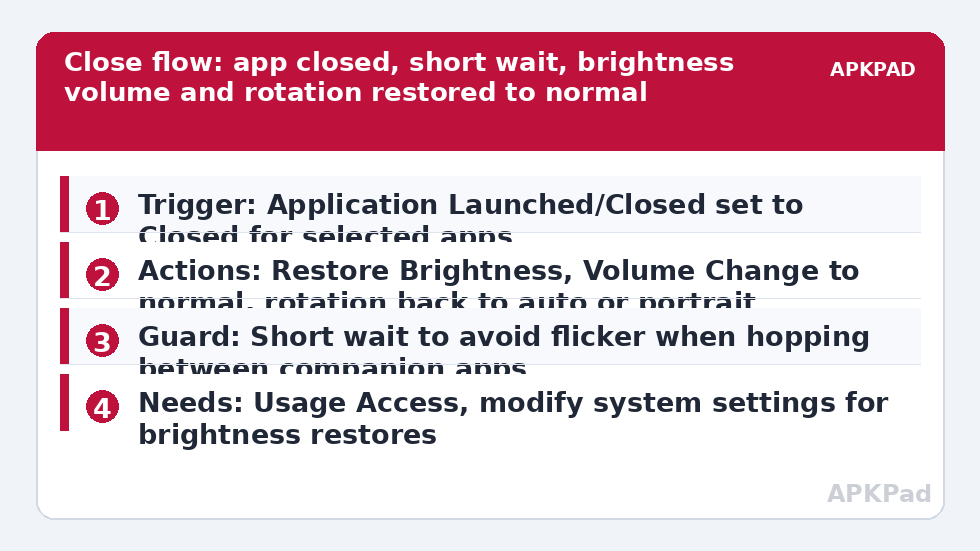
- Create a new macro and add the trigger Application Launched/Closed. Select the Closed event and pick exactly the same app or apps your open macro targets.
- Add the restore actions in reverse spirit: Brightness back to your normal level or adaptive mode, Volume Change for the same stream back to your normal level, or Force Screen Rotation back to portrait or auto-rotate, matching what the app needed.
- Add a short Wait of a few seconds before restoring if you switch between this app and a companion app often, such as between camera and gallery. A brief delay stops restore-and-boost flicker when you hop across to check one photo mid-shoot.
- Save with a paired name, such as Video Player Restore on Close, and test by opening the app, using it briefly, closing it fully, and checking every setting returned to normal.
The pairing pattern is exactly what powers the brightness restore in automating a screen brightness boost for camera and gallery and the rotation restore in automating screen orientation changes for video apps. If you have built either of those, you have already built a close macro; this guide simply names the pattern so you can reuse it anywhere.
Handling app hopping, recents and crashes
Real usage is messy. People swipe an app away, let Android close it in the background hours later, or jump out through a notification and never return. Expect close events to arrive at odd times occasionally, and design so that a late restore is harmless: returning brightness and volume to normal at a random moment is a shrug, whereas sending a text or changing a security setting at a random moment is a problem. That test, what happens if this fires at 3 a.m., should be applied to every close macro you keep.
Split-screen deserves its own note. When two apps share the screen, closing one may not mean you have finished with its settings, especially for rotation. If a close macro fights your split-screen use, exclude that app from the close list and restore its settings manually, or add constraints that reflect how you actually multitask. Simple and predictable beats clever and surprising, every time.
Permissions this trigger needs
- Usage Access: MacroDroid needs it to know which app is in the foreground and when it leaves, and Android gates that information behind this permission. Grant it in the settings screen MacroDroid opens when you build the trigger.
- Modify system settings: needed only for restore actions such as brightness. Some devices also prompt for the MacroDroid Helper app or an ADB grant for rotation changes.
- Notification Access and Accessibility are not required for a basic app-closed macro. Do not grant broad permissions for a simple restore build.
Android version differences show up here more than in many triggers. Newer versions report foreground changes promptly but restrict background activity harder, while some OEM skins delay app-closed detection when their memory cleaner intervenes. If close events seem slow on your handset, test with the screen on and the app closed deliberately before blaming the macro design.
Chaining close events into bigger routines
Once paired restores feel solid, close events can end sessions gracefully: closing your last work app can release the focus profile described in using timer triggers for Pomodoro focus sessions, and closing navigation can be one signal among several in the commute routine in building a commute mode that auto-texts your ETA. Keep each chain one level deep. A close macro that triggers another macro that triggers a third becomes impossible to debug on the evening it misbehaves, which it eventually will. Find more single-purpose patterns via the APKPad homepage.
Why the close macro sometimes never fires
The familiar answer comes first: OEM battery management killing MacroDroid in the background. An app-closed event is exactly the kind of background signal a sleeping MacroDroid misses, so the open macro fires while you are actively using the phone, MacroDroid later gets put to sleep, and the restore never runs. Your brightness stays boosted, your volume stays low, and the design gets blamed for a battery-manager decision.
Set MacroDroid battery use to Unrestricted in Android Settings, Apps, MacroDroid, Battery. Then clear the OEM layer: remove MacroDroid from Sleeping apps and Deep sleeping apps on Samsung, set No restrictions and enable Autostart on Xiaomi, or allow background launch in your manufacturer’s manager. Also confirm Usage Access has not been silently revoked by an update, which produces the same symptom. Restart, use the target app normally for a day, and check the MacroDroid log for both the open and close events appearing as a pair.
Frequently Asked Questions
Is Application Closed the same as the app being force-stopped?
No. The Application Launched/Closed trigger follows foreground use: the app leaving the foreground or being closed from your normal flow. A force stop, an update or the system reclaiming memory may not produce the same tidy event, which is why close macros should only perform harmless restore actions.
Why does my restore run when I only switched apps for ten seconds?
Because leaving the foreground is what the trigger detects, even for a quick check of another app. Add a short Wait before the restore actions and re-check whether the app is still closed if your setup allows, or keep the app lists narrow so brief switches between two treated apps do not trigger a restore at all.
Can I run a macro when any app closes, not a specific one?
Technically you can cast the net wide, but it is rarely wise. A restore that fires for every app close will run constantly, clutter the log and occasionally undo a setting another app still needs. Scope close macros to the specific apps whose open macros changed something.
Does the app-closed trigger need Accessibility or root?
No. It needs Usage Access so MacroDroid can observe foreground app changes. Root is not required, and Accessibility is not a substitute for Usage Access here. Grant only what MacroDroid prompts for when you build the trigger.
What should I check if open works but close never runs?
Check OEM battery management first, then Usage Access. Set MacroDroid battery use to Unrestricted, review your manufacturer’s sleeping apps or autostart list, confirm Usage Access is still granted, and look for the close event in the MacroDroid log after a deliberate, screen-on test.