Screen timeout is a compromise setting pretending to be a preference. One fixed number must serve the reader (who wants minutes), the meeting attendee (who wants the face-down phone dark in seconds), and the navigator (who wants the screen simply on). Smart screen timeout routines orientation macros in MacroDroid split the compromise by posture: the phone infers the situation from how it is held and sets the timeout to match. It is a convenience feature with a battery side-effect — the screen is the largest single consumer in most phones, so every minute shaved off unintended screen-on time is real money.
Why Orientation Is a Good Proxy
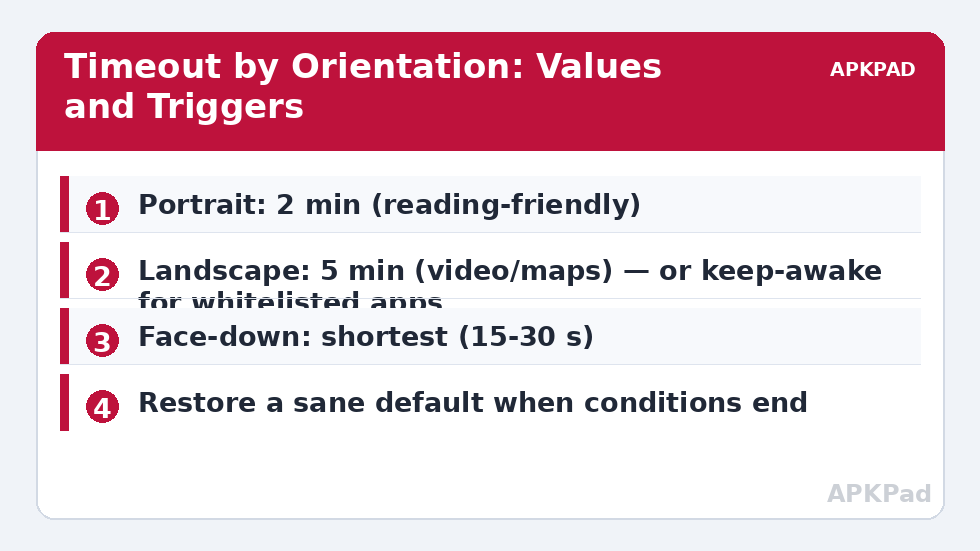
Portrait, one-handed, screen being read: standard behaviour, moderate timeout. Landscape usually means video, gaming, maps or a camera — activities where a mid-action timeout is infuriating and where the user is actively engaged, so a long timeout (or keep-awake scoped to specific apps) costs little because the session would hold the screen on anyway. Face-down or in-pocket means “not being used at all”: every second of timeout is pure donation. Orientation is not a perfect proxy — landscape reading and portrait video exist — but it is right far more often than the single factory number is, and the misses are survivable in a way a 15-second global timeout is not.
The Routine Set: Smart Screen Timeout Values by Posture
| Posture | Trigger | Timeout Set |
|---|---|---|
| Portrait | Orientation: Portrait (or Device Facing Up + portrait) | 2 minutes (default state) |
| Landscape | Orientation: Landscape | 5 minutes |
| Face down | Device Facing Down | 15–30 seconds (shortest available) |
| In pocket / proximity covered | Proximity sensor near (gated by screen-on event) | 15 seconds |
Setting the timeout value itself uses MacroDroid’s system-settings action for screen timeout; on most builds this needs WRITE_SECURE_SETTINGS via ADB or the Helper — the recurring toll of this category, as in the refresh-rate macro. Test the action once: set 15 seconds manually through the macro, wait, and confirm the screen sleeps on schedule. If your build shrugs, an alternative with no permission at all: the face-down case can be handled by a macro that simply locks the screen (Lock Screen action) a few seconds after face-down is detected — arguably better than a short timeout for that posture.
How to read this: the estimate adds a small always-on idle cost for MacroDroid itself (about 0.4% of battery per day) to a per-class daily cost for each trigger type you use, scaled slightly by how many macros you run. These are planning estimates from that transparent model — not measurements from your phone. Use them to compare setups before you build, then confirm against the real numbers under Android Settings → Battery.
Avoiding the Flapping Problem
Orientation changes constantly in the hand — reading in bed rolls the phone through every axis. A routine that rewrites the timeout on every orientation event will spend the evening oscillating. Mitigations: require the orientation to be stable — add a short wait and re-check before applying (the same verify-at-execution discipline as the Bluetooth delay pattern); scope the landscape rule with an app constraint (only when a video/maps/game app is in the foreground) so landscape-in-bed keeps the sane portrait value; and never set the landscape timeout below the portrait one — asymmetry in that direction feels broken instantly. Face-down is exempt from subtlety: it is never a reading posture, apply it fast.
Battery Expectations, Calibrated
The saving here is real but situational. If your current timeout is 2 minutes and you set the phone down unlocked twenty times a day, a face-down/in-pocket cut to 15 seconds saves roughly 35 minutes of screen-on time daily — at typical display draw, that is a few percent of a charge, every day, for free. If you are already disciplined about locking the phone manually, the routine saves nearly nothing and earns its keep purely as convenience. As always in the battery hacks collection: measure your own pattern before and after with a week of each, and keep the version that your battery history, not your hopes, prefers.
Posture Is Not the Only Signal: Apps and Places
Orientation is the headline signal, but two refinements out-perform it where they apply. Per-app posture: a reading app held any way at all deserves the long timeout, and a banking app deserves the short one however it is held — app-in-foreground constraints layered over the orientation rules convert posture from a guess into a near-certainty. In practice many users end up with a hybrid where the landscape rule only fires when a media or navigation app is foregrounded (exactly the anti-flapping constraint from the main text), and the portrait rule yields to a shortlist of reader apps with their own generous values. Place: at a desk with the phone on a stand, timeout length barely matters because the phone is glanceable all day; in bed, the rules of the house are the dark-room disciplines. A location or charger constraint selecting between “desk behaviour” and “bed behaviour” profiles is an evening’s tinkering that pays in a setup which stops needing adjustment — the true finish line of any automation project.
When to Stop Tuning
Timeout systems have a visible failure mode of success: the user fiddling forever. The stopping rule is behavioural — when a week passes in which the screen never sleeps mid-read, never glows pointlessly in a meeting, and never needs a manual lock you resented, the system is done, and further tuning is a hobby, not an optimisation. Say so, freeze the macros (export a backup of the whole MacroDroid configuration while you are at it — your future self, phone replaced at short notice, sends thanks), and let the setup recede into the invisible infrastructure it was meant to become. That recession is the real deliverable of the battery hacks approach: not a phone you manage, but a phone that has quietly stopped wasting your attention along with its charge.
Accessibility: When Long Timeouts Are Not a Luxury
One constituency must read this article in reverse: users for whom a short timeout is not an annoyance but a barrier. Motor impairments that make re-waking and re-unlocking costly, low-vision reading at a slower pace, cognitive conditions where a sleeping screen breaks a task’s thread — for these users the correct timeout system is generous everywhere, with battery cost accepted as the price of access, and where savings are needed they should be harvested from the other categories (radios, sync, idle discipline) rather than from the screen’s patience. MacroDroid is genuinely good here: per-app generous timeouts, a face-up “reading posture” that keeps the screen while held, and a single home-screen widget that pins the screen on for a session are accessibility features wearing automation clothes. If you are building a setup for a family member, ask about their hands and eyes before their battery — the hierarchy of this entire guide inverts, correctly, when access is at stake.
Frequently Asked Questions
Can MacroDroid keep the screen on indefinitely for one app?
It can set a very long timeout or use a keep-awake style action while a whitelisted app is in the foreground, restoring a normal timeout when the app closes. That is usually better than touching orientation at all for navigation and reading apps.
Why does the timeout setting not change on my phone?
Writing the system screen-timeout setting generally needs WRITE_SECURE_SETTINGS (ADB) or the Helper app, and some OEM skins override external changes. Test the single action; if it is refused, the lock-screen-on-face-down fallback in this guide needs no such permission.
Does checking orientation drain battery?
Orientation is derived from sensors the system already fuses for rotation, and MacroDroid’s orientation triggers are comparatively cheap — but they are not free like pure events. The stable-orientation delay in this guide also reduces evaluation churn. If MacroDroid’s battery share grows after adding posture triggers, this is the first place to look.
My timeout keeps changing while I read in bed. How do I calm it down?
Add the stability re-check (wait, confirm the orientation persists), and constrain the landscape rule to media/navigation apps in the foreground. Reading apps stay on the portrait value regardless of how the phone is propped against a pillow.
What timeout values do you recommend as defaults?
Portrait 2 minutes suits most readers; 15–30 seconds for face-down; 5 minutes for landscape media. If you often show people things on your phone, portrait 3 minutes avoids mid-conversation sleep. Tune from your annoyance, not from theory.