Phones that stay up for months get sluggish, and a weekly restart clears stale processes in a way no cleaner app matches. Wanting to trigger device reboot automatically scheduled for 3 a.m. every Sunday is a sensible wish. Here is the plain truth before any steps: on most modern Android devices, a true reboot from MacroDroid needs ROOT. Without root, MacroDroid cannot restart your phone with a single action, no matter what a screenshot on a forum suggests. This guide explains why, then covers the routes that genuinely work unrooted, so you can choose an honest option instead of a macro that silently does nothing every Sunday.
Why the restriction exists: Android’s sandbox gives each app its own compartment, and restarting the operating system requires the system-level REBOOT permission, which Android reserves for privileged system apps signed with the platform key. Regular apps, MacroDroid included, cannot hold that permission. The power menu and the reboot inside it belong to the system itself. MacroDroid’s Reboot action therefore calls a mechanism that only functions when the phone is rooted and MacroDroid can act with superuser rights. On an unrooted phone the action fails, and depending on the version it may fail quietly, which is worse than failing loudly because you can believe for weeks that Sunday restarts are happening when none are.
Other scheduled automations in the Macro Triggers series do work fully unrooted, including time based Do Not Disturb routines and automating dark mode at sunset without root. The reboot is the exception, and it is better to know that up front.
Your real options to trigger device reboot automatically scheduled
Option one, rooted phones: use MacroDroid’s Reboot action directly, as in the table below. This is simple, reliable, and the only true one-macro reboot. Option two, unrooted with computer help: on some devices, the MacroDroid Helper app combined with ADB-granted permissions extends what MacroDroid can do with system settings and certain shell-style operations, and MacroDroid will tell you during setup if a given operation is supported on your model through that route. Treat this as device-dependent, test it manually first, and do not assume it grants a reboot the sandbox forbids; where the Helper route cannot reboot, it will not, whatever you schedule. Option three, and for most unrooted owners the best one: check whether your OEM already offers scheduled power off and on in Settings, often under Battery, Additional Settings, or Accessibility-style scheduled power menus on Samsung, Xiaomi, Oppo, and other skins. That feature is the system scheduling itself, so it works completely, at 3 a.m. on Sunday exactly as you wanted, just configured in Settings rather than in MacroDroid. Option four, the honest fallback: schedule MacroDroid to restart the things that cause most sluggishness without restarting the OS, such as relaunching your launcher, killing specified background apps where permitted, clearing caches for named apps where the OS allows it, and then opening your home screen. That is not a reboot and this guide will not call it one, but it recovers a surprising amount of the benefit.
Macro breakdown: trigger, actions and constraints
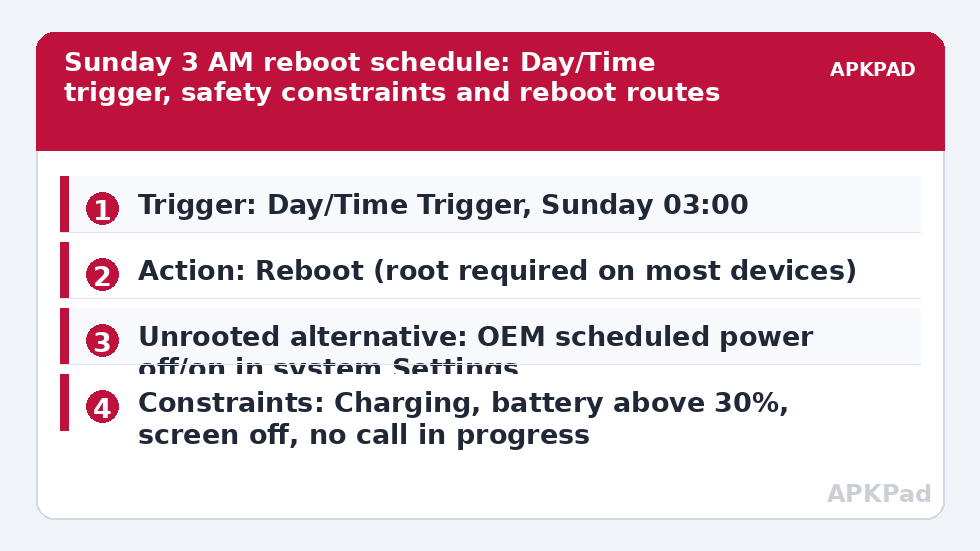
| Trigger | Day/Time Trigger set to Sunday, 03:00. This trigger itself needs no special permission and fires reliably if MacroDroid is kept awake, as described below. |
| Actions | Reboot action (ROOT REQUIRED on most devices). Unrooted alternatives: use the OEM scheduled power off/on feature in system Settings instead, or MacroDroid actions to relaunch the launcher and restart selected apps as a partial substitute. Some devices expose additional capability via the MacroDroid Helper file / ADB-granted permissions, only where MacroDroid confirms support. |
| Constraints | Charging State constraint set to Charging, so the phone is never mid-restart on a low battery, Battery Level constraint above 30%, Screen State constraint of Screen Off, and Call State constraint of No Call in Progress. |
The constraints matter more here than in most macros because a restart is disruptive in a way a spoken alert is not. A phone that reboots during a call, an alarm-critical morning, or a download you needed is a phone whose owner deletes the macro and distrusts automation generally. Charging, screen off, and not in a call are the three conditions that together make 3 a.m. on Sunday genuinely safe rather than merely statistically likely to be safe.
Setting up the rooted route, and testing the unrooted routes
-
First, establish which world you are in. If your phone is rooted and MacroDroid holds root access, add the Day/Time Trigger for Sunday at 03:00, add the Reboot action, add the three constraints from the table, save, and then test the action manually once from MacroDroid’s test option while watching the phone, because a successful test proves root is really being granted. Do not schedule first and discover the truth a week later.
-
If you are unrooted, do not add the Reboot action and hope. Instead, search your Settings app for scheduled power, auto on/off, or restart schedule. Wording varies by OEM. If you find it, set power off for Sunday 03:00 and power on a few minutes later if the feature separates the two, charge the phone that night, and verify the next morning by checking the device uptime in Settings, About Phone, Status, which should show minutes or hours, not weeks.
-
If your OEM offers nothing, consider the Helper and ADB route with clear eyes. Install the MacroDroid Helper only from MacroDroid’s own prompt or official source, grant only what it asks for, and test whether the specific operation you want is offered and succeeds manually. This route needs the Helper app and, for some operations, an ADB grant such as WRITE_SECURE_SETTINGS from a computer. It does not need device admin for this macro, and you should not grant device admin to chase a reboot. If the manual test does not reboot the phone, the scheduled version will not either, so move to the fallback.
-
For the fallback build, keep the same Day/Time Trigger and constraints, and replace the action with a small sequence: kill or restart the specific apps that misbehave on your phone where Android permits it, relaunch your launcher, and optionally play a soft sound or write a log entry so you can confirm the routine ran. Label the macro honestly, for example Sunday Refresh, Not A Reboot, so future you remembers what it does.
How to read this: the estimate adds a small always-on idle cost for MacroDroid itself (about 0.4% of battery per day) to a per-class daily cost for each trigger type you use, scaled slightly by how many macros you run. These are planning estimates from that transparent model — not measurements from your phone. Use them to compare setups before you build, then confirm against the real numbers under Android Settings → Battery.
What actually happens on an unrooted phone at 3 a.m.
Walk through the failure once, concretely. Sunday 03:00 arrives. The Day/Time Trigger fires correctly, because triggers are just alarms. The constraints pass. The Reboot action requests a restart through the only channels open to a normal app, and Android refuses, because the app lacks the privileged permission and has no superuser path. The macro ends, sometimes with only an entry in MacroDroid’s system log to show for it, which is worth checking on Sunday morning. Nothing about this is a MacroDroid bug: every automation app faces the identical wall, because the wall is Android’s security model working as designed. Any guide promising a one-tap non-root reboot without naming the OEM scheduled power feature or a device-specific Helper capability is skipping this paragraph.
The background survival requirement
Even the trigger half of this macro has a condition: the number one reason scheduled macros fail is OEM battery management killing MacroDroid in the background. A 3 a.m. trigger after the phone has sat idle since midnight is exactly the scenario aggressive battery savers are built to freeze. The fix is to exclude MacroDroid from battery optimisation in Android settings, and to also allow autostart and unrestricted battery use inside your OEM’s own battery menu, because Samsung, Xiaomi, Oppo, Vivo, and others layer proprietary controls over the stock ones. For the OEM scheduled power route this does not apply, since the system schedules itself, which is another quiet advantage of that route. For any MacroDroid route, also set the Day/Time Trigger and then verify over one real week rather than assuming; uptime in Settings and MacroDroid’s own log together tell you the truth.
One last honest note: on current Android versions the benefit of a weekly reboot is smaller than folklore suggests, because modern memory management recovers well. A restart mainly helps when a specific app has wedged itself, which the fallback refresh targets directly. Automate observed problems, not rituals.
Frequently Asked Questions
Can MacroDroid reboot an unrooted phone at all?
On most modern devices, no, not a true operating system reboot. Android reserves rebooting for privileged system apps, and MacroDroid’s Reboot action needs root to gain that ability. The working unrooted routes are your OEM’s built-in scheduled power off and on feature, device-specific Helper capabilities where MacroDroid confirms support, or a partial refresh of apps and the launcher.
Why does the macro run but the phone never restarts?
Because the trigger and constraints succeed while the Reboot action is refused by Android’s sandbox for lack of the system reboot permission. The macro completes without the phone restarting, sometimes with only a log entry to show for it. Check MacroDroid’s system log on Sunday morning, and check uptime in Settings, About Phone to confirm whether any restart really happened.
Does the MacroDroid Helper app give me a non-root reboot?
Only on some devices, and only for operations MacroDroid itself confirms are supported through the Helper and its ADB-granted permissions. The Helper extends MacroDroid’s reach for certain settings and actions, but it cannot override Android’s privileged reboot permission in general. Always test the action manually once: if a manual test does not reboot the phone, scheduling it will not change the result.
My phone has a scheduled power feature. Should I use that instead?
Yes, for most unrooted owners that is the best option. The OEM scheduled power off and on feature is the system scheduling its own restart, so it works fully at 3 a.m. on Sunday, survives battery management that would freeze an app, and needs no root, no Helper, and no ADB. Set it in Settings, charge the phone that night, and verify with the uptime figure the next morning.
Will a Sunday 3 a.m. reboot break my Monday alarms?
A Sunday restart finishes long before Monday, so weekday alarms are unaffected, but check Sunday morning alarms specifically. After any reboot, some phones require the first unlock before certain apps fully start, so if you depend on a Sunday alarm, use the stock Clock app, keep the phone charging, and test one full cycle before relying on it.