Using pomodoro timer triggers macrodroid routines turns a simple kitchen-timer idea into a full focus system: start a twenty-five minute work sprint with one tap, let MacroDroid silence distractions for exactly that sprint, get a clear signal when the break begins, and have your normal sounds return automatically when the break ends. No subscription focus app, no wearable, just timed triggers and honest constraints.
MacroDroid is not counting your productivity and this guide will not pretend otherwise. It runs timers, changes modes and announces transitions. The benefit is behavioural: the phone that usually interrupts you becomes the thing protecting a short, defined block of attention, and the end of the block is never a surprise you have to watch a clock for.
Building pomodoro timer triggers macrodroid sessions that end cleanly
The design rule that saves every Pomodoro build is symmetry. Whatever the start macro changes, an end macro must change back. Focus sessions fail socially when Do Not Disturb stays on through lunch or media stays muted all afternoon because a timer chain broke halfway. Build the start and the reset together, test the full cycle twice, and only then lengthen sessions or add cycles.
| Phase | MacroDroid setting |
|---|---|
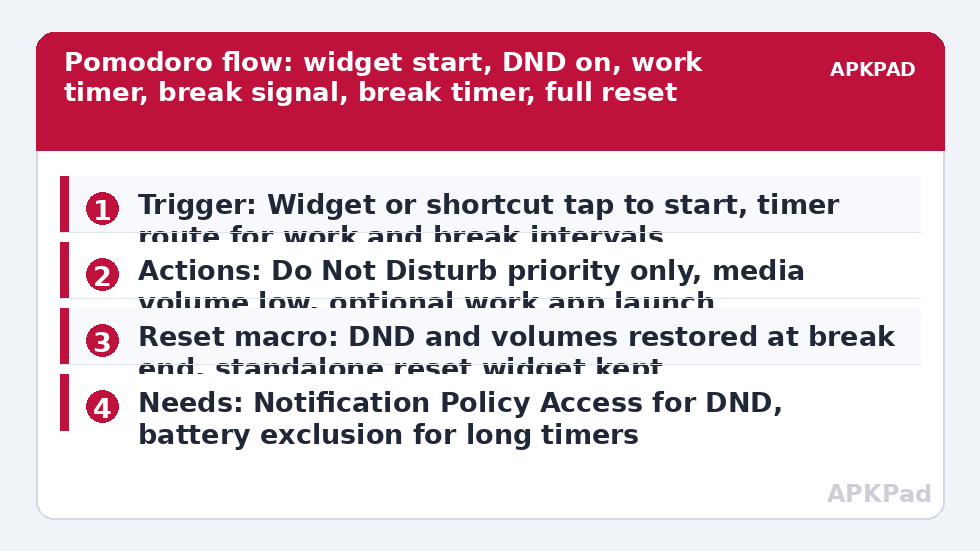
| Start | Widget or shortcut tap starts the session, enables Do Not Disturb priority only, lowers media volume |
| Work interval | A timer or wait chain holds the session length, then signals the break with sound or speech |
| Break and reset | Break timer ends with a different signal, DND released, normal volumes restored |
MacroDroid offers more than one timing route depending on version and device: a Stopwatch or timer-style trigger, an interval trigger, or a macro that uses Wait actions in sequence. Pick one route and stay with it for the whole build. Mixing two timing systems in one session is how sessions end twice or never.
How to read this: the estimate adds a small always-on idle cost for MacroDroid itself (about 0.4% of battery per day) to a per-class daily cost for each trigger type you use, scaled slightly by how many macros you run. These are planning estimates from that transparent model — not measurements from your phone. Use them to compare setups before you build, then confirm against the real numbers under Android Settings → Battery.
Build a single focus session step by step
- Create a start macro triggered by a MacroDroid widget or home-screen shortcut, so beginning a session is one deliberate tap. Name it Focus Start.
- Add actions: set Do Not Disturb to priority only, set Media volume low or muted, and optionally launch the single app you work in, such as your notes or reading app.
- Start your chosen timer for twenty-five minutes within the same macro flow, or enable the companion timer macro, following the timing route your MacroDroid version presents. Keep the session length visible in the macro name.
- Create the transition macro that fires when the work timer completes: play a distinct, pleasant sound or Speak Text saying the sprint is over, release or loosen DND according to your break preference, and start the five-minute break timer.
- Create the reset macro for the break ending: a different, shorter signal, DND returned to your normal everyday setting, and media volume restored to your normal level. This macro is not optional decoration; it is half the system.
- Test one complete cycle with shortened test timers of two minutes and one minute before using real session lengths. Watch every transition happen, in order, with the phone locked part of the time.
Once one cycle is reliable, add repetition carefully. A variable can count completed sprints and suggest a longer break after four, but add that flourish only after the basic loop survives a week. The quiet-volume behaviour in automating media volume lowering for quiet apps pairs naturally with the start macro, and the DND stages follow the same permission pattern as time-based Do Not Disturb routines, which is worth reading before your first real session.
Signals, breaks and not annoying other people
Choose transition signals you can identify without looking: a soft chime for break time, speech for the final reset, or vibration patterns if you work in a shared quiet space. Through headphones, slightly louder signals are fine; through a speaker in a library, they are a public announcement. A headset constraint can route the session signals privately, the same thinking used in pausing media automatically when headphones disconnect, later in this set.
Protect the break as firmly as the sprint. A Pomodoro system that makes breaks feel like cheating collapses within days. During the break, let priority notifications through, restore enough volume to hear the reset signal from another room, and resist adding just one more work action to the break macro. The timer’s job is to make both halves trustworthy.
Permissions and session safety
- Do Not Disturb access: grant Notification Policy Access so MacroDroid can enable and release DND during sessions.
- Notification permission: needed if your session shows a countdown or status notification you rely on.
- Usage Access: only needed if you add app-launch or app-closed elements to the session, such as ending a session when a work app closes.
- No SMS, location or contacts permissions are needed for a plain timer build. Do not grant them for this macro.
Keep an emergency path open. Priority-only DND should still let your priority contacts and repeat callers through under Android’s own DND settings, configured in Android settings rather than in MacroDroid. A focus system that blocks a genuine family emergency call for twenty-five minutes is badly configured, however peaceful the sprint felt. Review more session patterns in the Macro Triggers category, linked from the APKPad homepage.
Why sessions drift, double-fire or never end
Long timers expose background limits that short tests hide. The number one cause is OEM battery management killing or freezing MacroDroid in the background, so a twenty-five minute timer completes late, fires during the next task, or never completes at all. Samsung, Xiaomi, Oppo, Vivo and similar skins all do versions of this, and a two-minute test will not reveal it because the app was recently active.
Set MacroDroid battery use to Unrestricted in Android Settings, Apps, MacroDroid, Battery, then clear the manufacturer layer: remove MacroDroid from Sleeping apps on Samsung, choose No restrictions and enable Autostart on Xiaomi, or allow background launch in your brand’s manager. Restart, then test one full-length session with the phone locked and untouched. Also avoid stacking multiple enabled timer macros during testing; disable experiments, because two similar session macros double-firing their signals imitate a timing bug very convincingly.
Frequently Asked Questions
Can MacroDroid repeat the work and break cycle automatically all day?
It can chain cycles using variables and timer restarts, but start with a single deliberate cycle per tap. All-day chaining amplifies any timing or reset mistake across your whole schedule. Add repetition only after the single cycle, including the full reset to normal sounds and DND, has run reliably for several days.
What happens to my focus session if the phone reboots?
Expect the session to be interrupted. Timers and waiting macros do not reliably resume their exact position after a reboot. Build the reset macro as a standalone widget too, so one tap restores normal DND and volumes whenever a session is abandoned for any reason, not only a reboot.
Why did my break signal play but DND never turned off?
The signal and the DND release are separate actions, and the release usually fails because Notification Policy Access was revoked or never granted, or because the reset macro was blocked. Check that permission, then read the MacroDroid log to see whether the reset macro ran at all.
Can I use different session lengths for different tasks?
Yes. Clone the start macro with a different widget and session length in its name, such as twenty-five minutes for writing and fifty for coding, while sharing the same transition and reset macros if the signals suit both. Keep names explicit so the log shows which session ran.
What is the first fix if long timers finish late?
OEM battery management. Set MacroDroid battery use to Unrestricted, check your manufacturer’s sleeping apps or autostart list, restart the phone, and test one full-length locked-phone session. Short tests pass even on affected phones, so only a real-length test proves the fix.